

2022 HP Reverb G2 Virtual Reality Headset V2 Version
$549.95
Related Products


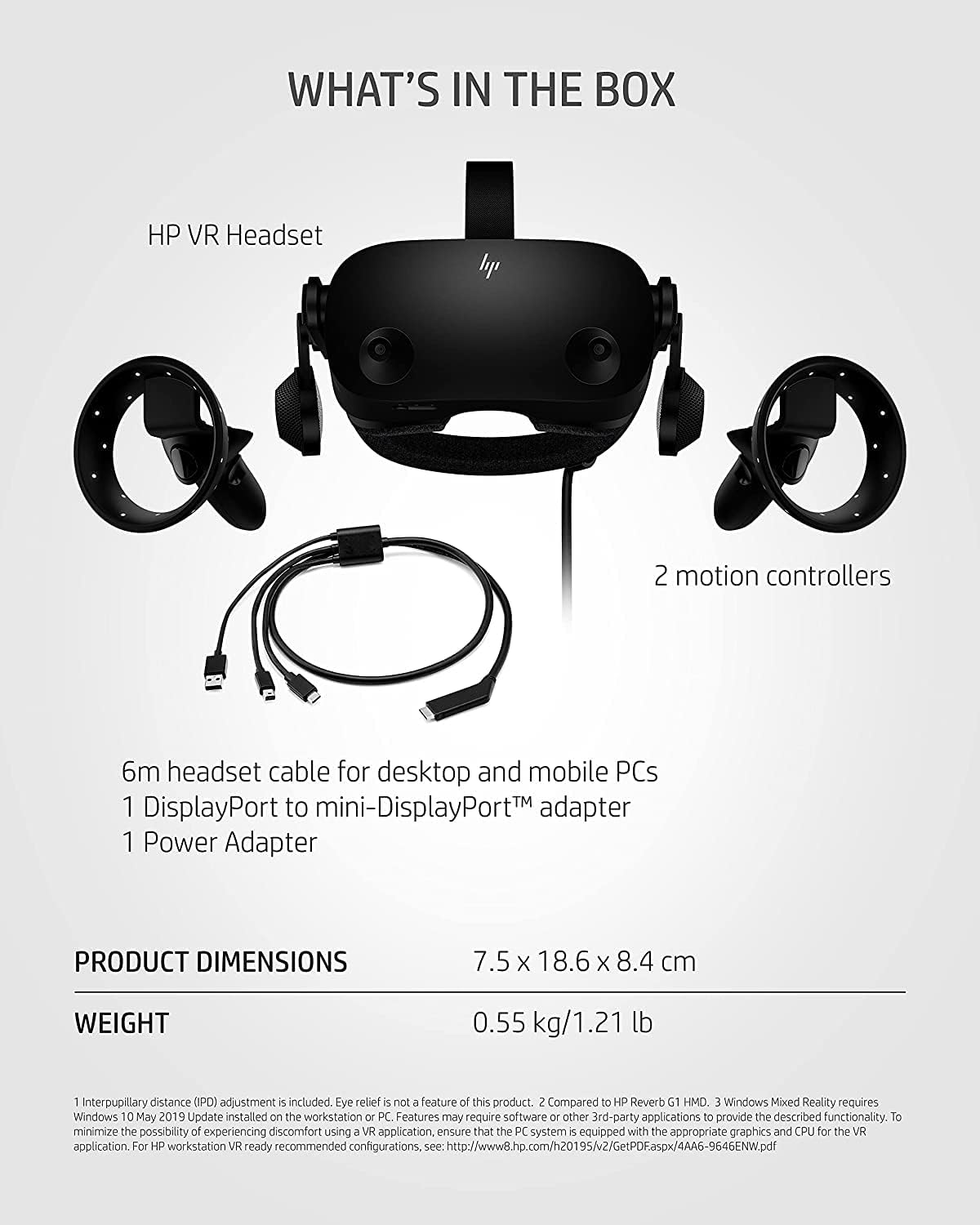

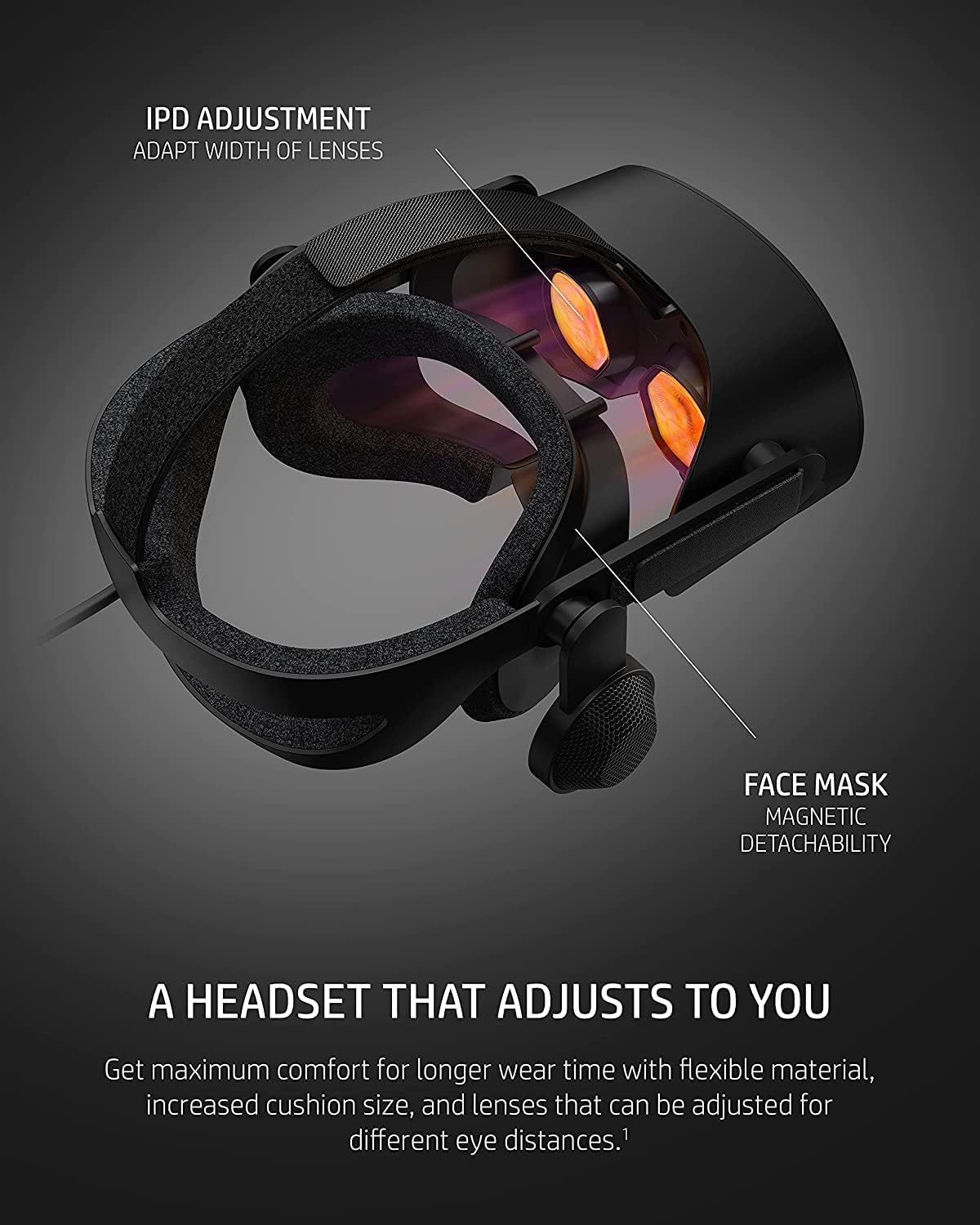


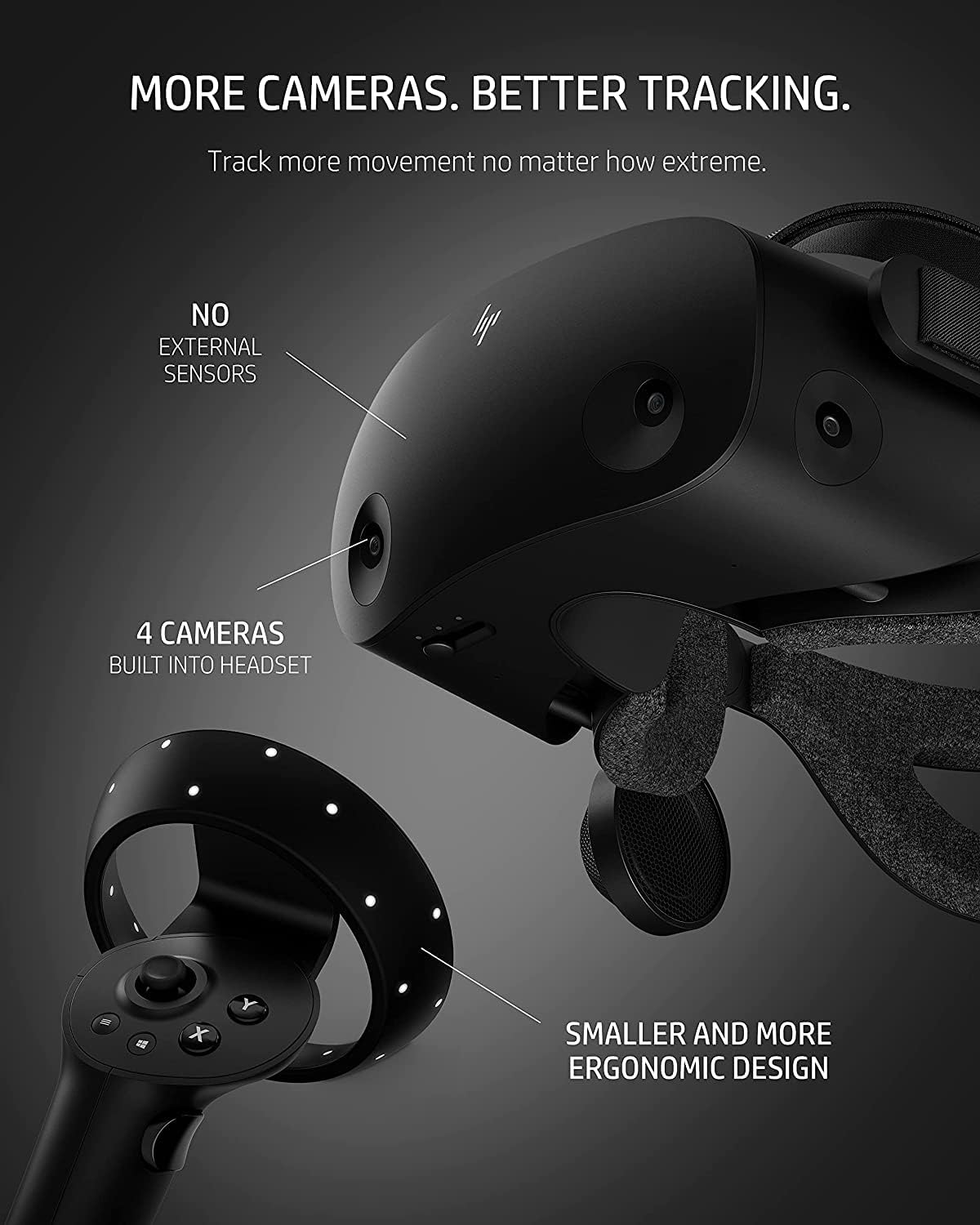
Explore your virtual world with the HP Reverb G2 VR Headset. Stellar visuals, audio from Valve, and high-performance join to create a more immersive experience* than ever before. Your package not only contains your headset, but it also includes a 6m headset cable for desktop and mobile PCs, two motion controllers, one DisplayPort to mini-DisplayPort adapter, one Power Adapter, and easy set up instructions. Seeing and hearing is believing with mura-free 2160 x 2160 LCD panels per eye and incredible spatial audio. The VR headset adjusts to your needs thanks to its flexible material, increased cushion size and lenses that accommodate various eye distances. Plus, tracking more movement with the gaming VR headset is made easy and comfortable with 4 built in cameras and ergonomically designed controls. The HP VR Headset with controller is compatible with both Steam VR and Windows Mixed Reality.** Game with peace of mind knowing that your investment is protected with HP’s 1-Year Limited Warranty including parts and labor. *Compared to HP Reverb G1 HMD **Windows Mixed Reality requires Windows 10 May 2019 Update installed on the workstation or PC. Features may require software or other 3rd-party applications to provide the described functionality. To minimize the possibility of experiencing discomfort using a VR application, ensure that the PC system is equipped with the appropriate graphics and CPU for the VR application. For HP workstation VR ready recommended configurations, see: http://www8.hp.com/h20195/v2/GetPDF.aspx/4AA6-9646ENW.pdf
THE NO COMPROMISE VR HEADSET – Realistic visuals, soundscapes, and superb performance come together to form a more immersive experience
IT’S ALL INSIDE – Packaging includes HP VR Headset, 6m headset cable for desktop and mobile PCs, 2 motion controllers, 1 DisplayPort to mini-DisplayPort adapter, 1 Power Adapter, and easy set up instructions
EXCEPTIONAL VISUALS AND SOUND – Seeing and hearing is believing with high-quality resolution and fully immersive spatial audio with mura-free 2160 x 2160 LCD panels per eye
A HEADSET THAT ADJUSTS TO YOU – Flexible material, increased cushion size, and lenses that adjust to suit different eye distances, allow you to bask in your virtual world comfortably
MORE CAMERAS. BETTER TRACKING – With 4 built in cameras, and ergonomically designed controls, tracking more movement with the VR headset just got a whole lot easier

Dunkan –
Very good value and attributes
Being my first VR headset, I have nothing to compare it with. It is also worth pointing out that I am writing this after about 1 month of ownership.-The headset itself. The screens have a very good resolution and give a very clear image in the center of your FOV. If you have very low frame rates you will notice the edges of the FOV rendering as you move your head, I understand that some people can find it distracting but it hasn’t been the case for me. The image will also “lag” and this could cause VR sickness for some, 2 of my friends have reported feeling slightly unwell because of it but I haven’t. It really depends on the person wearing it.The IPD adjustment is wide enough IMO and I fall right in the middle of the range available to me. The lenses used are Fresnel lenses and thus have some degree of godrays and blurriness towards the edge of your field of view. I would say it is not a real issue in most cases but I can imagine why some people would have problems with it. Speaking of the FOV, it is somewhat narrow but I can work with it. What you lose in FOV compared to other rival headsets, you gain in resolution.The last thing to mention is that the lenses will fog up more or less and more or less quickly depending on a variety of factors such as environmental conditions and your own skin. This stops being an issue once everything has gotten warmed up but it can be annoying for the first 5 minutes. This is an issue of sealed VR headsets and not a G2-specific issue so I would not count that against it, you do have very good sealing with the face gasket and it prevents outside light from leaking in so I would say it’s worth dealing with.-The installation and setup. It is not complicated to plug and install the required software for this product. The one thing I would say to watch out for is for people plugging the USB cable into an older motherboard. Mine is a Z170 board (2016) and the Mixed Reality Portal initially threw a caution message saying that my USB connectivity was adequate but that some features might be disabled. I have no idea what features it was referring to as everything seems to work just fine. This is just in case you come across the same error, it might be a false alarm.The cables are long enough for full-room games such as beat saber and the like, but are naturally a bit of a bother for people who will use it mainly sitting down at their desk since they’re 6m long. Be aware that the power plug itself is a strange one and I had to use an adapter to plug it into my wall outlet. It should also be noted that after a power cut, the headset will turn itself on when the power comes back. If you live in a area where they are frequent, I would advise unplugging the power (either from the small box or the wall) to avoid unnecessary wear should this happen when it is left unattended.-Tracking. You have to keep in mind that it uses optical (inside-out) tracking and the lighting and your environment will cause your mileage to vary. Avoid overly bright conditions, windows with daylight pouring in cause the camera tracking feed to be washed out and overexposed, making it less accurate. Very sterile and uniform rooms with little to no landmarks will also negatively affect tracking accuracy. I have heard from some users that putting up dark coloured post-its helps the tracking “anchor” itself but I have not had to use this method.-The controllers. They’re fine overall, they feel more flimsy than I would like but the price point is also to be considered. They overall work great for me, they also use optical tracking and therefore need to be visible by your headset’s cameras to be used. I have not yet encountered a situation where the tracking let me down and the accuracy is also higher than some material online would lead you to believe (again, this is just my personal experience).-The speakers. They are surprisingly good, I did not expect them to sound as good as they do. The range of adjustment (swivel and height) might be a tad on the small side but it works for my head. I will say that after a month of ownership, the right side speaker started to sound weak and the volume was noticeably lower than on the left side. This initially caused me to worry but I quickly found a reddit post mentioning it and one comment advised to unmount and remount the speaker. It is held on by one single easily accessible Phillips screw and the speaker itself uses to little pins that socket into the headband. I took it off, wiped it slightly and blew on both the pins and sockets then remounted it. The issue has been resolved.-Overall. I am satisfied with this product, as my first foray into the world of VR/MR I can say that it has breathed new life in games I only experienced on a flat screen. The specs are very good for the particular price point and the build quality is decent. As for the seller themselves, they dispatched my package in a reasonable timeframe and my experience with them has been good.
John Pellmann –
DO NOT BUY USB FAIL
I exclusively play VR racing simulators with this headset. I am sitting stationary while playing. The cable assembly failed exactly 1 month after purchase. I am using the supplied USB A to C adapter. It failed when I plugged another USB device into my computer. I think the failure is in the black box that is inline with the cable.After 30 min with customer support I have a free replacement cable assembly in the way. Once this is out of warranty I’ll be looking for a new headset.USBTreeView Output Below:=========================== USB Port7 ===========================Connection Status : 0x09 (Device is enumerating)Port Chain : 1-7Properties : 0x03IsUserConnectable : yesPortIsDebugCapable : yesPortHasMultiCompanions : noPortConnectorIsTypeC : noConnectionIndex : 0x07 (Port 7)CompanionIndex : 0CompanionHubSymLnk : USB#ROOT_HUB30#5&2045765f&1&0#{f18a0e88-c30c-11d0-8815-00a0c906bed8}CompanionPortNumber : 0x03 (Port 3)-> CompanionPortChain : 1-3Used Endpoints : 0======================== USB Device ========================DriverKeyName : ERROR_INVALID_PARAMETER—————- Connection Information —————Connection Index : 0x00 (Port 0)Connection Status : 0x09 (DeviceEnumerating)Current Config Value : 0x00 (Configuration 0)Device Address : 0x00 (0)Is Hub : 0x00 (no)Device Bus Speed : 0x00 (Low-Speed)Number Of Open Pipes : 0x00 (0 pipes to data endpoints)Data (HexDump) : 00 00 00 00 00 00 00 00 00 00 00 00 00 00 00 00 …………….00 00 00 00 00 00 00 00 00 00 00 00 00 00 00 09 …………….00 00 00 …————— Connection Information V2 ————-Connection Index : 0x07 (7)Length : 0x10 (16 bytes)SupportedUsbProtocols : 0x04Usb110 : 0 (no, port not supports USB 1.1) -> but Companion Port 1-3 doesUsb200 : 0 (no, port not supports USB 2.0) -> but Companion Port 1-3 doesUsb300 : 1 (yes, port supports USB 3.0)ReservedMBZ : 0x00Flags : 0x00DevIsOpAtSsOrHigher : 0 (Device is not operating at SuperSpeed or higher)DevIsSsCapOrHigher : 0 (Device is not SuperSpeed capable or higher)DevIsOpAtSsPlusOrHigher : 0 (Device is not operating at SuperSpeedPlus or higher)DevIsSsPlusCapOrHigher : 0 (Device is not SuperSpeedPlus capable or higher)ReservedMBZ : 0x00Data (HexDump) : 07 00 00 00 10 00 00 00 04 00 00 00 00 00 00 00 …………….———————- Device Descriptor ———————-bLength : 0x00 (0 bytes)——————– String Descriptors ——————-none
Guy –
An amazing VR headset for the price
I just upgraded from my very old HP Windows mixed reality.I am not the most VR enthusiast, i play VR once every two weeks.Things i noticed from my upgrade:- The visuals are great, finally i don’t have to see everything through a “binocular”.- The image quality is much sharper.Pros:- Easy setup, Windows automatically recognizes the headset upon connecting. room layout is easy to set.- Great image quality for the price. i can barely see any pixels even when i look for them.- controllers don’t need to be paired separately like my old VR, once you activate them they’re automatically recognized.- The audio quality of the builtin headphones are great!- The audio in the headphones are hear-able only for who puts on the headset. the first time i put a VR game and played it, i expected the audio to come from another source, only to hear it faintly coming from somewhere. eventually i discovered that when you twist the headphones closer to your ear, you hear the audio.which means the headphones are built so the outside can’t hear what you’re playing!Cons:- The headset comes with a spacer between the headset and the eyes.for most people, they should remove the spacer to get closer to the image for greater immersion.the problem is that without the spacer, the foam part falls off easily when you don’t wear the headset to press it in.- The cable connections between to the computer needs to be connected by removing the spacer i mentioned before.it’s not a big deal, but i prefer if it was just located in a more convenient location.
John Penner –
The product was received in good order, but not without issue. The seller needs to stay on top of their communications if customers are experiencing problems with shipments. They could also benefit from some quality control improvments so their customers are not unnessesarily tracking another customers parcel. Everything worked out in the end and the item was as advertised. Thank you.
Antonio Karam –
La mejor opción para Simracing … fácil, sencillo …
Jean Pelletier –
Retour