

Adesso Tru-Form 150 3-Color Illuminated USB Ergonomic Keyboard AKB-150EB
Original price was: $59.99.$6.99Current price is: $6.99.
Related Products


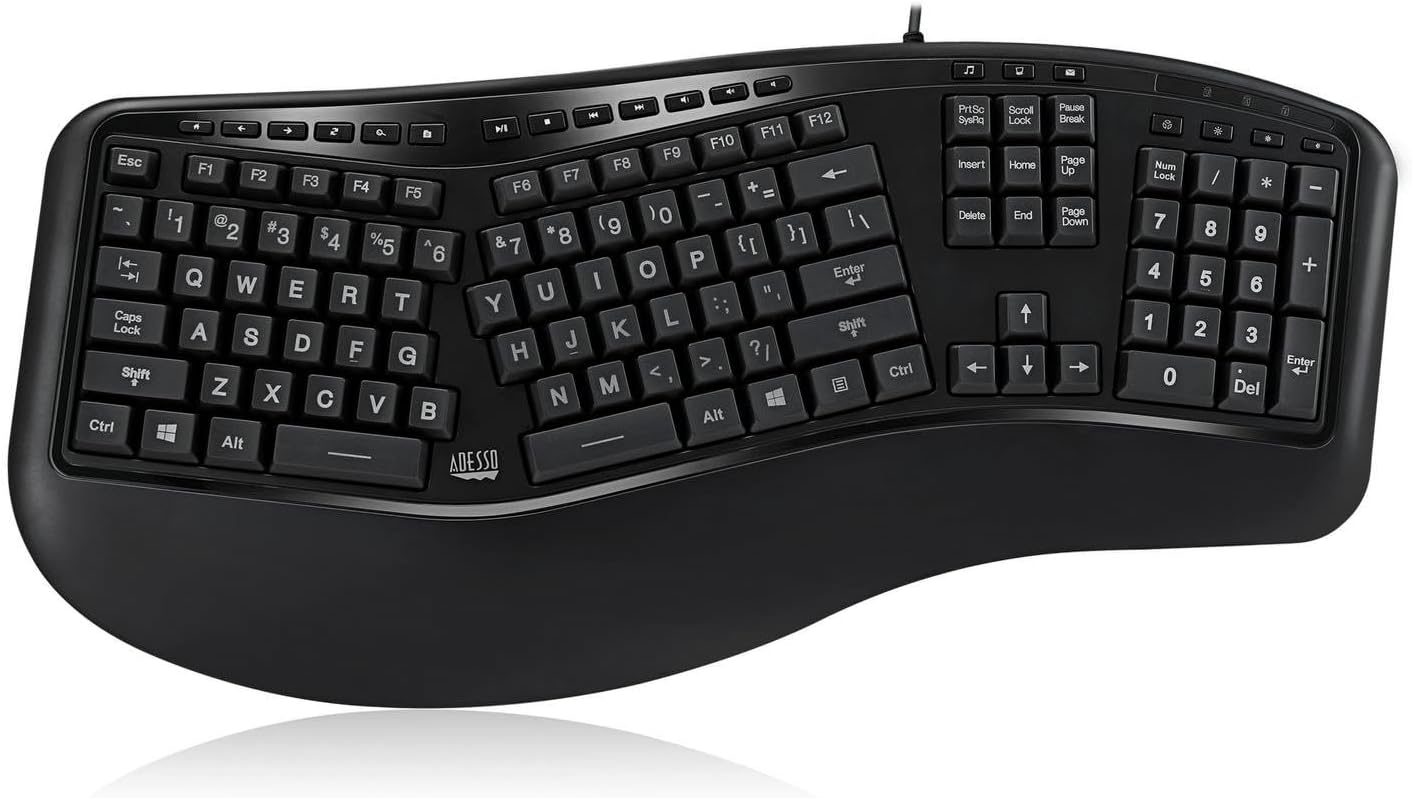


The Adesso Tru-Form 150 – 3-Color Illuminated Ergonomic keyboard is designed with ergonomic split key zones and a gentle slope for the natural positioning of hands, wrists, and forearms, increasing maximum comfort and extended use. With its eye-soothing backlit keys made for increased productivity in dim or dark environments, you can easily switch between green, blue or red lights with one touch of a key! The multi-functional hotkeys allow quick access to your media controls, email, internet browser and other common applications. The Adesso Tru-Form 150 is also designed with membrane key switches that provide a quieter, faster response and stands up to long term usage. Sleek and modern, Adesso Tru-Form 150 brings the best in comfort, efficiency, and style.
Specifications:
Keyboard Layout: 105-Key US Layout
Connection: USB Cable
Key Type: Membrane
Power Source: PC Powered via USB
LED Indicators: Num Lock, Caps Lock and Scroll Lock
LED Hotkeys: 4 Hotkeys (Brightness Up, Brightness Down, Color Switch, On/Off)
Internet Hotkeys: 7 Hotkeys (Home, Back, Fwd, Refresh, Search, Favorite, Email)
Windows Hotkeys: 9 Hotkeys (Play/Pause, Stop, Previous, Next, Vol. Up, Vol. Down, Mute,Player, My Computer )
Color: Black
Dimensions:20.5” x 9.3” x 1.5” (520 x 235 x 38mm)
Net Weight: 1.95 lbs. (885 g)
Requirements:
Operating System: Windows 10, 8, 7, Vista, XP
Connectivity Interface: An Available USB Port
3 Color (Red, Green, Blue) Illuminated Backlit Keyboard – The 3-color Illuminated Backlit keyboard lets you choose your backlit color to green, blue, or red in one keystroke! The gently-lit keys allow you to work day and night without straining your eyes. No more mistyping! You can work from dusk till dawn at your desk or bedroom without disturbing others!
Ergonomic Design – The design of this keyboard with splitted key zones and gently sloped shape encourages natural position of hands, wrists, and forearm in maximum comfort for long use.
Large Print Keys – Makes the keys easier to see and easy on the eyes.
Split Key Design – Encourages natural position of hands, wrists and forearms for maximum comfort.
Integrated Palm Rest – Keeps your wrists in the most comfortable position.
Internet & Multimedia Keys – You can get instant access to your commonly used Internet and multimedia tools with the 20 built-in hotkeys this keyboard has to offer.
Membrane Switch – 5 Million keystroke lifecycle for a quiet and fast typing experience.
8 reviews for Adesso Tru-Form 150 3-Color Illuminated USB Ergonomic Keyboard AKB-150EB
Add a review

Original price was: $59.99.$6.99Current price is: $6.99.
Everett Flores –
Simple keyboard with nice features.
Why did you pick this product vs others?:I want to first give praise for the good parts of this keyboard. It seems there are no other options of keyboards which feature both ergonomic design and backlit letter keys. I also really like the size of the board and the spacing of the keys. The number of keys is practically perfect for all the things I like to have easily at my disposal. The split spacebar is a nice touch to make this board even more unique. And quick color change with a single press of a button also does well for me.This product is not perfect, however. I notice some of the keys don’t strike so well and I have to press slightly more to ensure the press registers. But all together I like this board. And the reason I give it 5 stars instead of four is to encourage more boards to be made like this, but I would like to see a bit more quality and encourage healthy competition to imitate this style.
A.K. –
Not yet love, but getting close.
I write this review typing with this keyboard and I like it!Below is a wall of text, skip to the end for overall impression. But read on if you are a professional who uses a keyboard for many hours a day, every day, 300+ days a year.I’ll start with a short story – I was searching for stock corded + illuminated + ergonomic (curved) keyboard for many, many years. I even wrote to Microsoft and Logitech at some point desperately asking for one even a prototype that won’t go into production. Nada.I started my career with Microsoft Natural and used one for a long time.Between 2009 and 2011 I was using the Microsoft 8000 set. it was quite good despite the $300 price tag and slow wireless connection. On one bad morning keyboard stopped pairing to Bluetooth and became an expensive paper weight. I’d have purchased another as I really got used to it and the mouse from 8000 set is the best mouse I’ve ever owned (and still use!!!), but the set wasn’t in production anymore, I didn’t want to get used off ebay for hygiene reasons and power consumption of this cordless illuminated keyboard was driving me crazy. On a lot of occasions batteries were dying right when I needed them most facing deadlines.I’ve tried several expensive keyboards like DSS Kineses, but didn’t like the feel. Next came the Microsoft 4000. Corded, curved but without illumination. 4000 proved to be the best keyboard on the market in my opinion and I’ve replaced two of them over the last couple years because of weak spot where cord is attached to the keyboard and gets teared with heavy usage. Up until this week I was using the custom made aftermarket Microsoft 4000 with illumination, laser etched letters and reinforced cord that was purchased for almost $500. I basically earn my bread with a help of a keyboard, often work until 2-3am, so it’s my work tool, thus the investment was perfectly justified. You can find a couple of youtube video from seller who modifies Microsoft 4000’s and posts them on ebay from time to time.Now, Adesso has put this keyboard on the market that has almost everything I’d ever wanted from a keyboard, and at unbelievably low price. Below is a short review after 2 days of intensive use (several multi page documents, a lot of browsing for black friday deals. etc).Pros:1. Curved!2. Illuminated!3. Corded!4. Large well visible letters! They are far far better than those on my custom 4000. I love it5. Green light is probably the best to use – doesn’t stress the eyes and looks great in the dark. Blue and read are just OK.6. Tactile feel is quite close to 4000. If you used one – this Adesso will be quite easy to switch. While I can’t type completely blindly, thus a need in illumination, my fingers still ‘remember’ where the letters are and find the needed button with ease.Cons:1. Several buttons get stuck… On my keyboard. I don’t know if they would on other units, though. Left Space bar, Left Alt, Right arrow key. These are the keys that I use a LOT. Buttons stuck somewhere in the middle. This means – that you won’t get a hundred of spaces in your document if your space bar gets stuck, as you still have to press further down to have a ‘click’. The button just doesn’t return all the way up and you need to help with your fingers to ‘un-stuck’. This is really annoying as you don’t get the tactile feedback, but at least this doesn’t ruin the document. I’ll see if this cures itself with further usage.2. Lack of soft leather pad as on Microsoft 4000. I didn’t think it was important until I realized there’s none on Adesso and it’s somewhat uncomfortable to have palms resting on solid surface for several hours. I’d probably fit and glue a soft pad from my old broken 4000.3. Cord… It’s of exactly the same thickness as on Microsoft 4000 and without any sort of rubber dampers. Meaning – that the keyboard will likely die in 12 months when wiring in the weak spot gets damaged and tears. Time will tellOverall, this keyboard is a step in the right direction and I’m glad Adesso pioneered with this model.I hope someone from Adesso management reads this: “You’ve created a great entry level keyboard. Now, please, create a $100-150 version, a little larger overall (like Microsoft 4000) with significantly larger Ctrl, Alt, and Space bar buttons, more expensive and durable button membranes/springs that won’t get stuck under any conditions, add leather pad for wrists and put a thick indestructible cord. Also add an on-board USB (or two) ports and mic/headphone jacks. I’ll be your free beta tester and first customer.For now I’ll use this keyboard instead of my custom 4000 because the illumination is great, I see all letters a lot better, and I can live with semi-stuck buttons as long as it won’t affect writing. Will post updates later to keep this topic alive.
Desron 449 –
Ubuntu / Kubuntu / KDE people look here!
I will not repeat the other reviewers observations about how good it looks, etc.The product arrive clean and on time.It is not a gaming keyboard for me it is a “cool” work computer keyboard that would look good with my wall mounted out of case computer mod an lighted mouse and mousepad.But also be a replacement for the MS(tm) keyboard.I need the ergonomic keyboard so much that when I saw that MS(tm) had dropped it that I scouted out two of the old white wired versions for “just in case” and I completely wore out the silver wireless keyboard and associated mouse.This keyboard fits me perfectly in terms of replacing the MS(tm) keyboard.But, to speak to “Linux, Ubuntu, Kubntu, KDE users….the other thing to me is in terms of functionality of the buttons.For a Kubuntu and KDE Neon OS all of the buttons like media etc work except for the e-mail button which is mapped to find MS Outlook(tm), but that is to be expected.I imagine that I could change a script somewhere it is the media buttons and file buttons are the important ones for me particularly.A NOTE ON THE KEYPAD for the above users! :)The keypad may not work but it is not because of the hardware. Before heading to the terminal …. it is probable that your distro has preselected the keypad to move the mouse.After all …..us “Linuxy people” tend to use a lot of keystrokes etc.. lolIt is a simple fix, go to your particular distro’s settings/hardware/MOUSE – and UNtick whatever your distro offers as “move the pointer with the keyboard (uses numpad). This enables the keypad immediately.if that doesn’t work then there are a variety of checks on the web that can be done in terminal.Anyway….this is a great keyboard and I’m going to purchase a backup! 🙂
Anony Mouse –
Pros:- Backlighting, colour change and brightness setting works- Sufficiently long cable- Personally find keyboard comfortable sizeCons:- Keys are ‘mushy’. Even for a membrane keyboard, this feels pretty bad to type on and I have to press significantly harder for the keys to register when compared to my previous keyboard (also membrane).- Backlighting is not centered properly, can be difficult to determine what the key is supposed to be. Would benefit having the transparent bits being more frosted,- No kickstand. This is the first keyboard I’ve bought which didn’t have a kickstand at the back.Overall:Does everything it advertises, but doesn’t do it well.As an ergonomic keyboard, the fact that I have to use fairly significant force for the keys to register is a big downside.The backlighting works, but it is still difficult to determine which key is which as the lights are not centered and the overly transparent parts of the key just shows the LED rather than light up the symbol on the key.The backlighting also doesn’t remember the settings after shutdown.It is disappointing as this is the only ergonomic keyboard I have found which has backlighting and could have been perfect for me, but the fact that it performs it’s primary task poorly (the mushy keys) means I can not rate this more than 3/5 stars.
Izik –
Amazing keyboard! The best one I’ve ever had and I’ve had loads! Beautifully lit keys and adjustable brightness Also can switch between three colours: red, blue and green!If you’re looking for a quality keyboard at a great price, pick this gem up!
WhatsSaidAndDunn –
I really wanted this keyboard to be THE ONE. I tried to make it work, but I decided I had to return it.I’ve been in the market for a good ergonomic keyboard ever since 2017 when I (finally) upgraded to Windows 10 and found that my beloved Microsoft Natural Keyboard Pro which I had toted from machine to machine since 1999 was just no longer supported. I’ve tried several ergonomic keyboards in the years since. None have been great. In the past 6 months (perhaps as my aged eyes have deteriorated), I’ve found myself wanting a backlit external keyboard. I like how keyboards built into laptops have backlit keys. I wanted an external ergonomic keyboard with the same feature. Oddly, these are very hard to find.So I was very excited when I came across the Adesso Tru-Form 150 on Amazon last summer. I added this to my wish list. The kids decided to get this for me for Christmas. So even though it was purchased in November, I didn’t get to try it until late December.The biggest problem is that many keystrokes get ignored as you type. The keys aren’t broken. If you stop and just press each key slowly, the characters appear. But once you type at a normal typing speed, keypresses get ignored. I type at a fairly average speed (50-60 words per minute) and I’m pretty heavy handed when typing, so I think most people would have the same problem.There were a few smaller problems too. I noticed letters were transposed far more frequently than would occur when I typed on other keyboards. Also, there is no gap between the Ins/Home/PgUp keys and the PrtScn/ScrLk/Pause keys. I’m used to reaching for the Home key by finding it on the top middle of that array. I tried to teach myself to find the middle key in a 3-by-3 array, but I kept hitting Scroll Lock instead. Next, the wide gap between the two space bars was not good for me. I kept hitting the gap in between. Finally, one last gripe had to do with the backlighting. The keyboard supports three colours of backlighting. There is a special key to use to cycle from green to blue to red. When I first got the keyboard, I decided I liked the blue. But every time you restart the computer, the keyboard goes back to green. Again, not a big deal, I ended up just leaving it on green. But why even offer a choice if it always resets?After noticing the problem with the ignored keypresses, I went back to the Amazon product page. I noticed several new reviews had been posted since I had added the product to my wish list. Other users complained of the same problem, so I knew this wasn’t unique to me. I tried for several days to get used to it. But I was wasting so much time correcting typing mistakes due to the keyboard. I had to send it back.I got lucky. I was looking through Amazon to see if there were any other backlit ergonomic keyboards available. I found the Perixx PERIBOARD-312 Ergonomic Backlit Keyboard in stock. I had seen this listed before, but it is usually listed as unavailable. This keyboard seems widely available on the Amazon USA site, but it comes and goes in terms of availability on Amazon UK. I received the Perixx recently, and so far it seems to be working fine. I will post a full review of that keyboard on the relevant product page on Amazon UK. But I can see it is once again currently listed as unavailable.Please take a second to click “Helpful” if this indeed helped you. Thanks!
Prev-I –
Acquistata per rimpiazzare la mia veneranda tastiera comfort di microsoft, ormai fuori produzione, Il prodotto ha una dimensione importante rispetto ad una tastiera classica (altezza, larghezza e spessore).Comoda la retro illuminazione, che come riportato non è pilotabile via software, ed i tasti con la mappatura inglese (niente lettere accentate). La qualità dei tasti invece lascia molto a desiderare…Essendo un programmatore sono abituato a scrivere velocemente al computer e con questa tastiera capita spesso che i tasti premuti non vengano rilevati e che alcuni (come l’invio e la barra spaziatrice) emettano dei fastidiosi cigolii durante l’uso…Un esperienza d’uso davvero negativa, per un prodotto dal prezzo abbastanza alto, forse conviene puntare ad altri lidi per una tastiera di qualità.
Produkte-Tester –
Ich glaubte endlich einmal die richtige Tastatur gefunden zu haben. Sie entsprach voll meinen Vorstellungen. Sie sollte beleuchtet und ergonomisch geformt sein. Beides traf zu. Erst beim Auspacken bemerkte ich, dass alle Umlaute fehlen, was sie für mich unbrauchbar macht. Schade, nun muss ich so lange weitersuchen, bis ich irgendwann einmal fündig werde.