

Ergonomic Wireless Keyboard and Mouse Combo, Rechargeable 4000mAh Backlit Keyboard with a Soft, Faux Lambskin Palm Rest, Wave Keys for Natural Typing, Compatible with Windows/Mac/Chromes OS—SABLUTE
Original price was: $79.99.$6.99Current price is: $6.99.
Related Products


From the brand



30% OFF — Ergonomic Collection
Premium Comfort & Craftsmanship – Experience the luxury of a silky-smooth faux lambskin leather palm rest paired with a refined matte finish. Unlike fabric, this synthetic leather is durable, sweat-proof, and easy to maintain. Every detail reflects thoughtful craftsmanship.
4000mAh Ultra-Long Battery – Work longer without interruption. With 2× the capacity of standard backlit keyboards and intelligent auto-sleep, this keyboard lasts weeks on a single charge.
10M Keystroke Durability – Built to handle 10 million keystrokes—twice the life of standard keyboards (5M). A smarter long-term investment that saves on replacements. (Peace of mind: 30-day return + 1-year replacement.)
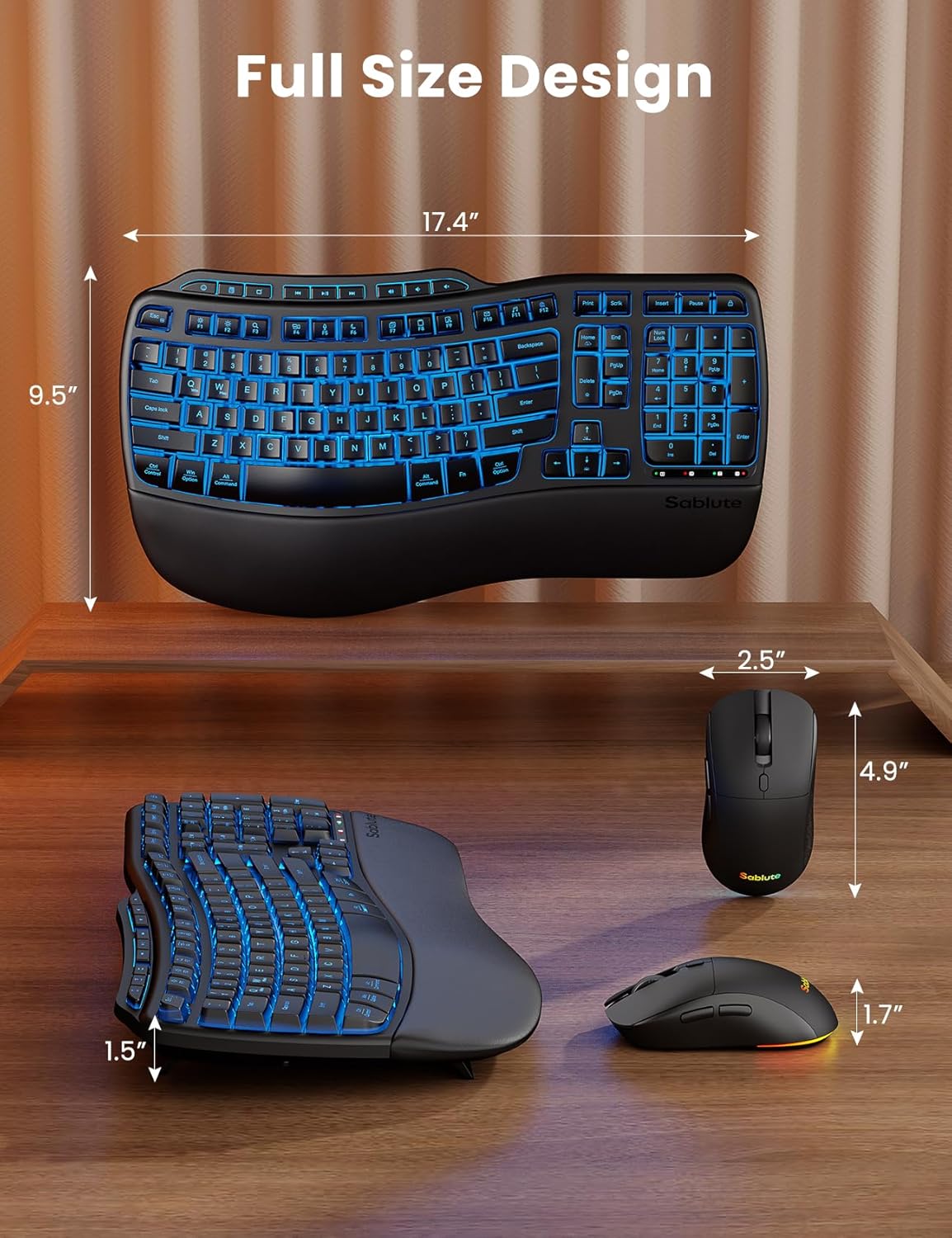
Ergonomics Designed – Sit or stand—new adjustable front/back stands support healthy wrist posture. Wave keys deliver smoother, more comfortable typing, so you can type for 8 hours without fatigue. Perfect for pros, home offices, and daily work
Backlit Style – Sleek, refined lines and backlighting bring both style and focus to your workspace. Choose soft tones (blue, cyan, white) for calm productivity or bold colors (red, green, purple, yellow) to match your mood—one for every day of the week.
RGB Mouse – 700mAh battery, auto sleep mode, 6 buttons, and 3 DPI levels (800/1200/1600). Tired of mice with only cycling lights? This one lets you choose 6 fixed colors or 5 cycle modes. Plus, the keyboard has 9 shortcut keys to boost productivity.
Universal Compatibility – One 2.4GHz USB receiver (33ft) connects keyboard and mouse. USB-A & C combo works with 99% of devices—PC, laptops, tablets, desktops, Macs. plug and play.
13 reviews for Ergonomic Wireless Keyboard and Mouse Combo, Rechargeable 4000mAh Backlit Keyboard with a Soft, Faux Lambskin Palm Rest, Wave Keys for Natural Typing, Compatible with Windows/Mac/Chromes OS—SABLUTE
Add a review

Original price was: $79.99.$6.99Current price is: $6.99.
AMH –
Perfect for Work
I absolutely love this ergonomic wireless keyboard and mouse combo. I use it every day for work, and it has honestly made a huge difference in how comfortable I am while typing.
Joseph Baker –
ABSOLUTELY LOVE THIS!!
I am a weird cookie. I have obsessively used the Logitech Wave K350 keyboard for YEARS. We’re talking like 15 years. I bought it as an emergency need for a new keyboard at a PC parts store named TigerDirect at a location that was somewhere in Crystal Lake, IL. For those whom don’t know, that company closed all brick and mortar locations in 2015 – it really has been THAT long. Since then, Logitech supported this keyboard up until around 2022 where it was discontinued from production and could only be bought at second-hand sellers for exorbitant prices. I tried to move on and purchased a fancy gaming mechanical clickboard, but frankly it *annoyed* the crap out of me swapping away from the ergonomic wave and Logitech’s new Wavekeys design gave me the big Ick. …In comes THIS badboy, from an up and coming company I’d never heard of, and I figure “This keyboard is giving me Deja Vu” and buy it off a black friday sale…I was NOT disappointed! This keyboard was MADE for me. Made for those that loved Logitech’s original based design, how comfortably it sits in the hands, how easy it is to type and know exactly where your fingers fall at any given time based on how the keys feel. I wrote this whole review on the new keyboard, and made maybe 3 typos I could quickly correct without issue. It feels like everything I remember, and has so many new features I love. Look close, Logitech, because this is what you SHOULD have done with the WaveKeys! Don’t fix what isn’t broken, instead give it premium features like a proper hand rest and backlighting, and thank god for the keys being etched instead of painted on. My old keyboard was so worn half the keys were unreadable. Literally only I could still use it in my house since I had the keyboard memorized.10/10, I’m a new fan of yours Sablute. I hope like hell you continue supporting or upgrading this design until the day I die!
lmhy8 –
Great keyboard
So far, so good. The keyboard is quiet, and the keys type easily. I love that I can change the light color, and it turns off automatically if not used for a certain amount of time.
Aurora –
Comfortable. quiet. and super easy to use
Been using this keyboard and mouse for a few days and I really like it. The wave keys feel natural, the palm rest is soft, and the backlight looks great at night. Battery lasts a long time and setup was instant just plug and play. Overall, a solid and comfortable combo for daily work。
John –
Space Key double-strikes
UPDATE (12/1/25) The saga goes on. I have been communicating with the company for a week now. I have tried three different keyboards on two different computers and still have the same problem. But no one else seems to be reporting this? I have done everything they have suggested. The double-strikes are so random. Sometimes I can for 3-4 minutes and everything is fine, then it happens two times in the next minute. So the COMPANY is being very proactive and want to help me – I want to make that clear. What I would like to see is that if you decide to try out this keyboard (because it really is NICE) just pay attention and see if you get random times where it puts in two spaces instead of one, and if so, let them know…(let me know too.) I can’t imagine it is just ME, yet I see no one else with this problem. *sigh*UPDATE (11/28/25): While the problem has not gone away, I do want to say the company is working very hard with me to try and resolve this. I am now on keyboard #3… double-strikes still seems to be a problem, but I am going to try this keyboard on another computer and see if that fixes it. I would think that if this was a real problem, EVERYONE would be reporting it. I wish I had another computer here so I could test it today. Stay tuned…I so loved this keyboard. It looked great, it felt great, but both the original one I bought and the replacement I got were defective: The space key double strikes.If the company fixes the problem and sends me a new one, I would be glad to change my review, but for now I have to clearly state these are DEFECTIVE.
Lailah –
Good size keyboard. Cool lights.
Nice keyboard. Fit my hand well and the light was pretty cool. Nice upgrade to current set.
Andrea C. Avalon –
Loud Keyboard
Keyboard is loud with each stroke of the keyboard keys. Not only is out loud, the keys are spaced so far apart, that it makes mistakes easy to happen. I have long fingers and can type rather quickly, but had to return this. Not happy with it. I did however like the light up feature.
Minh V Loc –
Comfy, quiet, and wrist-friendly for all-day office use
These Sabute keyboard and mouse are so comfy—plus, they’re dead quiet! I use ’em for work, and my wrists don’t ache anymore after long days at the desk. Typing’s super easy, and they don’t make a peep (perfect for the office). Obsessed, 10/10 recommend!
christian bourassa –
Nice keyboard but the lights doesn’t workUpdate Dec 4: Got contacted by the seller and they were kind enough to send me a working replacement. I greatly appreciate the gesture. It’s nice to see companies who stand behind the quality of their product.Thank you.
CalgaryBen –
I’ve been using this Sablute wireless keyboard and mouse combo daily for the last week, and really like it! I started things off on a full charge, and there’s no signs of things needing to be recharged yet. I’m eager to see if we can go a month with daily use on a charge! The layout and feel of the keyboard is comfortable, and the soft palmrest makes using it really enjoyable. What I really like is that both the keyboard and mouse are ready to go when you are, even after a prolonged period of non-use, such as first thing in the morning (there’s no lag or sense of either device sleeping — as soon as you touch it, it’s awake and functional!).I initially thought the backlighting for the keyboard was just a bell/whistle I wouldn’t appreciate, but I actually found the gentle glow through the characters/symbols useful for finding keys in a dark environment, especially given that this is a slightly different/new layout that I haven’t completely gotten used to yet. The backlighting on my keyboard seems to have a slight defect, where the left side has a slightly more blue hue, but it doesn’t bother me, but instead gives it an interesting gradient look.While I haven’t had to re-charge either the keyboard or mouse yet, it’s nice that both can be used while they’re charging, so if one of them suddenly stops working due to the battery being depleted, you’re not frozen in your tracks because you can just plug in the USB-C cable and continue working. I tested using the keyboard and mouse as wired devices (with the provided cable plugged into either device and the other end into my computer), but it does not work that way (not detected as a device); it’s completely reliant on the wireless USB-A dongle (and by the way, Sablute included a USB-C adapter in case you have a newer computer with no USB-A ports).Pros● Single USB-A dongle (replaces 2 USB-A connections if you were using wired keyboard/mouse before)● Very much a plug and play dongle (worked immediately on Windows 11, no driver installation required)● No lag or delay; mouse is active and good to go as soon as you touch it, as is keyboard.● Backlight aids in finding keys in a dark environment● Rechargeable (USB-C) and lasts a long time on a full charge!● Very comfortable layout and soft palmrestCons:● Uses up a USB-A port or USB-C port (with adapter), of which there might be fiew on some laptops; Bluetooth combo might be better in this case● Is completely dependent on the USB wireless dongle; if you lose it, the keyboard and mouse become useless● There is no battery charge indicator; having one either via an app in the OS, or from the device, would be helpfulI’ll be sure to update my review when I have a better sense of how long it lasts on a charge, etc.
Jason –
I’m a huge computer buff, so I jump at any chance to try out new peripherals and hardware whenever I can, to see how they stack up against everything else I’ve tried; so I can say with some certainty that this is a very *decent* keyboard/mouse combo for the price; they are both fully-featured, replete with RGB; and everything feels well-made.The RGB options on the keyboard seem somewhat limited unfortunately, lacking any of the more dynamic lighting features that most other modern keyboards have at this price range (things like ‘pulse mode’, ‘rainbow’, etc. are completely nonexistent here – but the various ‘solid color’ options it has are numerous and well-saturated, and they look really nice.The lighting options on the mouse, however, are a bit different – there is some dynamic lighting there – though there seems to be no sync of the lights with the keyboard (which is fine and quite common among mid-tier combos – but still worth knowing).One other caveat is that there is no Bluetooth support; and though none is mentioned on the listing it’s a bit of a surprise considering the large majority of even budget keyboards these days support it – but the included 2.4ghz dongle works great and it all connects just as fast as expected.The manual is good, easy to read and informative, as is the included quick-sheet – and setting it up is as easy as removing the dongle from the device, plugging it into your computer, and flipping the switch on both keyboard and mouse to ‘on’ (which is one benefit of using 2.4Ghz over Bluetooth, as the latter has a far greater tendency to be finicky with new connects).Overall I don’t think you can go wrong here. As long as you don’t mind a few missing RGB options (tbh, half the time I leave my other keyboards on solid colors anyhow – and only switch when I want them to look fancy), a lack of Bluetooth support and some slightly ‘squishy’ keys (I’m used to high-end mechanical switches – and while this doesn’t live up to that, it’s still not unpleasant to type with by any means), I think it’s an excellent bargain for the price.
Anna –
A few days ago, I got this SABLUTE Keyboard and mouse set and let me tell you it absolutely honestly changed the way I work at my desk every day. The keyboard feels so solid the moment I picked it up out of the box and it has this smooth, comfortable finish that makes typing feel effortlessly. What I really appreciate is that the back has pulled out clips on all four corners, so that I can elevate the keyboard to the exact angle, I like. It makes a whirl of difference during long typing sessions.The keys have a soft, cushioned tap that doesn’t get tiring, and the spacing feels very natural, so I don’t make as many typing mistakes. The built-in wrist rest gives my hands a gentle place to relax, it’s so soft uncomfortable, which really helps me when moving between emails, documents and browsing for many hours. The back light is another of my favourite feature. I appreciate and love, it makes the keys easy to see when I’m working early in the morning or late at night without needing to brighten the whole room, this is a very convenient and functional feature.The mouse glides smoothly with no skipping or lagging, and both pieces connect instantly once I plugged in the tiny receiver. There is no complication, pairing or software needed, it literally was effortlessly plugged and go. The keyboard also has extra functions shortcuts for a volume, media and quick commands, which makes it faster to switch between tasks without lifting my hands away.I really like the size of the keyboard. It is just right for me not too small not too large. What I noticed most is how much this set up improves my workflow. Typing feels easier, navigating the screen smoother, and my desk looks cleaner because there are no wires running everywhere. It just makes the whole workday feel lighter and more comfortable. For a home office set up, this SABULTE combo has been a real upgrade for me working from home every day. I feel that this keyboard is design with premium material and functionality that is going to last for a long time. If you are like me and you are looking for keyboard and mouse combo rechargeable 4000mAh backlit wireless keyboard with many unique features that is functional and well design to help improve your day-to-day workflow or just browsing then this combo might be for you as well. I absolutely recommend it.
FuzzyBee –
Got this SABLUTE combo to replace an aging keyboard, and the upgrade has been noticeable in all the right ways. The wave key layout felt natural after a short adjustment period, and paired with the soft faux lambskin palm rest, it made for a very comfortable typing experience even during longer sessions. The keys themselves are quiet with a soft feel, and the backlight is genuinely useful rather than just a gimmick, letting the legends stay visible in dim rooms and offering different colours if you like a bit of personality on the desk. Battery life has been solid so far; with the built in rechargeable pack and auto sleep, it just quietly keeps going between charges, and setup was basically plug and play using the included wireless dongle, working fine across both Windows and Mac in my case.The mouse does its job with smooth tracking and quiet, crisp clicks, plus the RGB is a fun touch, but it does not feel quite as “ergonomic” as the keyboard and is more of a good, basic companion than a standout on its own. The combo does mean both devices share a single dongle, which keeps things simple and frees up USB ports, but also means there is no Bluetooth fallback if you misplace it. For everyday office and home use, though, this set has certainly met my expectations, if not surpassed it. The keyboard is clearly the star here, thanks to the comfortable wrist rest, natural wave layout, and strong battery life, while the mouse is perfectly serviceable. As a bundle at this price, it feels like very good value if you want a quiet, comfortable wireless setup that works for both Windows and Mac computers.