

j5create ScreenCast 4K Wireless Adapter Screen Cast from Mobile Phone, Tablet, or Laptop Support for AirPlay, Miracast & Chromecast Mirror Extend for Windows & macOS Wireless Screen Display (JVAW76)
Original price was: $69.99.$63.99Current price is: $63.99.
Related Products




From the brand


We develop. We innovate. We create. j5create is a team that has come together from a diverse set of backgrounds to make technologies more meaningful and inclusive. We design, build, sell and support innovative technology, and we find creative ways to apply new technologies to provide computing solutions.

Made in Taiwan
All our products are manufactured in Taiwan, which has been a global force in the electronics industry since the 1990s.
j5create USB-HDMI Adapters
j5create Docking Stations
j5create USB-C Hubs
j5create Webcams
j5create Screencast Adapters
j5create Video Capture Cards
j5create Laptop Stands
j5create Monitor Mounts
Wirelessly display content from a phone, tablet, or laptop onto a bigger screen with the ScreenCast 4K Wireless Display Adapter. Note: Please use this wireless display adapter in the same room to prevent signal obstruction by walls. Wireless transmission distance of up to 50 ft./15m in an open environment
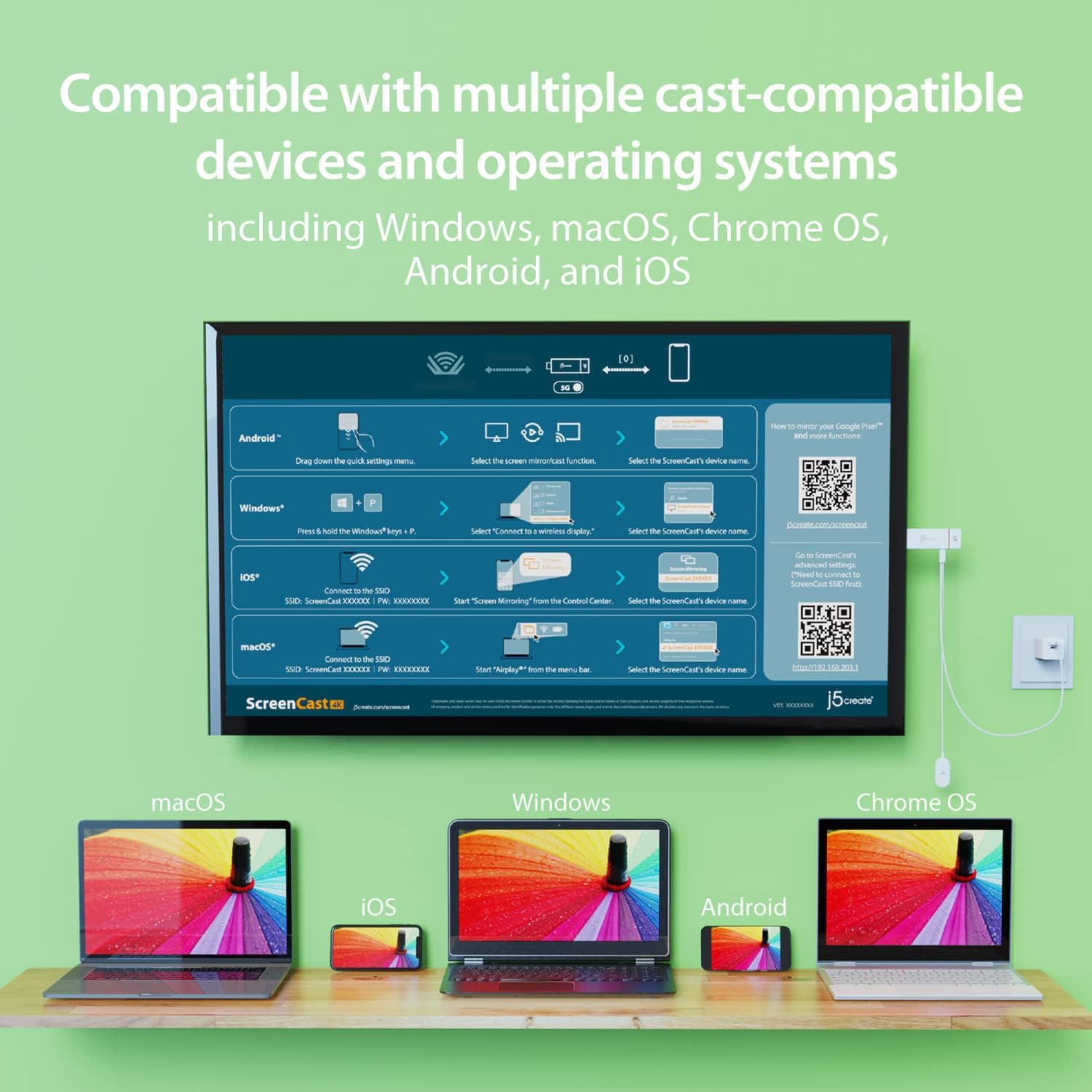
With its support of multiple wireless display standards (Miracast, AirPlay, and Chromecast), this wireless display adapter is compatible with devices and TVs you already own, including Windows, macOS, iOS, Android and other cast compatible laptops, tablets, and mobile phones.
Featuring customizable background and PIN code functions, this allows you to establish your visual style that leaves a lasting impression and ensures a secure presentation experience. Please note that the PIN code function is exclusive to Miracast. If these two functions are not visible in the Settings Menu, please upgrade to the latest firmware.
In addition to its compact design, the ScreenCast 4K Wireless Display Adapter features an external antenna for enhanced signal coverage, making it perfect for home, office, and travel.
Just plug in the adapter, power, and connect to the ScreenCast 4K to start Miracast casting. AirPlay and Google Cast (Chromecast) require Wi-Fi configuration. Please follow the setup instructions in the manual.
13 reviews for j5create ScreenCast 4K Wireless Adapter Screen Cast from Mobile Phone, Tablet, or Laptop Support for AirPlay, Miracast & Chromecast Mirror Extend for Windows & macOS Wireless Screen Display (JVAW76)
Add a review

Original price was: $69.99.$63.99Current price is: $63.99.
DonP –
Really happy with this
This is a great device. I have a somewhat older, lower cost TV with limited features. It was easy to setup and wirelessly connect my laptop to the TV. This allows me to display my photoshop work live and see it at the final size. Well worth the cost.
MASteiny –
Best wireless display adapter!
We needed to find an alternative for the Microsoft wireless display adapter, and we ended up finding an upgrade! We have multiple conference rooms with tvs at my work and some of the Window laptops would not connect to the Microsoft WDA. When Microsoft discontinued them, we found these and LOVE that you can cast Apple devices to it. And every Windows laptop has been able to cast effortlessly. Devices do not need to be connected to WiFi, which is an added bonus. All that needs to be done is connect to the TV and cast! We’re in the process of replacing all of our Microsoft devices with these.
John W. –
Easy setup
Have not used it a lot just yet, but it was easy to setup and connect to with laptop and iphone.
rig-alert –
Cant believe they try to sell these.
Cant believe they try to sell these. The device has issues connecting with every device I tried (windows, android, and IOS). If and when you get it to connect there is nothing good. Image quality is very bad, there is a constant left to right “wave” that occurs as a sort of buffering along with image artifacts ranging from slightly noticeable to the entire screen flashing in random colored blocks. I bad image quality and glitches weren’t enough the device also drops connection after a few minutes constantly. There was a firmware update but if anything, the update made the device worse.
Jjjerm –
Pricey but effective
This was a little more than I wanted to pay at the time, but it works flawlessly. Great way to hook any (essentially) device to a tv/monitor very quickly without running cables.
Toby T –
Great for Windows/Android but Unacceptable for macOS/iOS
I am an IT professional. I purchased this item as a possible solution to cast a to a TV so that you could easily mirror a desktop computer to a TV without having to run cables between them. It is pretty fantastic if your environment only has Windows and Android devices. You can easily add it to your wifi network and configure it from your computer. My favorite part was that it displayed the connection instructions on the TV so end users can easily be reminded what (very simple) steps need to be followed to mirror to the TVUnfortunately, the macOS and iOS options are unacceptable. In order to connect such a device, you have to disconnect form your current network and connect to the ad hoc network being broadcast by the j5create ScreenCast. Then you can use Airplay to mirror. So, unless you have a wired connection, you lose your connection to the internet.Additionally, the thought of having hundreds of end users needing to be trained on how to accomplish the goose, grain, and fox puzzle of connecting to this network but remembering to disconnect to avoid internet connectivity issues is the stuff of nightmares for people in my line of work.If you are blessed to be in a Windows only environment, this is a rock solid solution. But, I’m looking for an OS-agnostic single solution to deploy enterprise wide, so I must keep looking.
Nick C –
I can now use my computer with my TV.
The instructions were a little to be desired. The instructions said, “The Admin gateway will disconnect when the ScreenCast is connected to your wireless internet,” but this one would not. I was unable to get my computer to connect with this unit, until my secretary showed me how to “cast” it to the unit (Windows & K). Now that I know how to cast it, it is working fine. The unit has an on & off switch on it so I can turn it off when I am not using it, but I have to remember to turn it back on when I want to use it. Overall, I like this unit.
IT Department –
Unacceptable for 4K
At 4k resolution there is tremendous delay, screen tearing, bad resolution, awkward to set up, but it does technically remotely connect: not a good replacement for the Microsoft dongles.
peter d. –
Disappointing, had great hope for this , after trying to follow some differcult instructions and going back and forth with no luck, 1 hr of trying to set up , I gave up! And was quite expensive,
The product is good value for money –
Works great
Fossaert Ludovic –
Très bien
Dominik Turk –
Great product for its price
01001010@Work –
We bought this to replace WIDI adapters. It was easy to connect, worked well. The most attractive part is when it isn’t connected and receiving a signal it displays a info page. Easy to follow instructions for our team members to follow to get connected without the need to contact IT. They can have meetings and we can do other things. Really neat idea! We have ordered 3 more for other office displays.