

Lemorele Wireless USB-C Transmitter and HDMI Receiver Kit, Plug&Play USB-C to HDMI Wireless Extender, 2.4/5G 164ft Range 1080P Full HD, for Streaming Video&Audio to HD TV/Monitor from Phone/Laptop
$95.99
Related Products



From the brand


Lemorele’s Wireless HDMI Transmitter and Receiver kit is the product you need for wireless picture transmission for life, work, business and education.
As a company with a complete product development system, Lemorele understands how to improve people’s lives through innovation. Our team consistently delivers high quality products and ensures that our customers receive the best possible service.
Lemorele Wireless HDMI Kit
Lemorele Wireless HDMI Kit
Lemorele Wireless HDMI Kit
Lemorele Wireless HDMI Kit


【Plug and Play & Portable Design】: The Lemorele wireless USB-C transmitter and HDMI receiver kit is plug-and-play, requiring no software installation, network connection, or cables. This keeps your desktop tidy. Its compact and lightweight design makes it ideal for both office use and travel
【164FT Range & 5G Wireless Transmission】: The wireless USB-C transmitter and HDMI receiver can transmit up to 164FT in open environments using a 5G transmission protocol. Please note that transmission distance and speed may be affected by walls or obstacles; for best results, use it in as open a space as possible
【1080P HD Quality】: It supports up to 1080P@60Hz Ultra HD output, making it perfect for family gatherings, business meetings, movie nights, and educational presentations. Connect the transmitter to a suitable power source (5V/2A) to ensure optimal performance and prevent interruptions due to insufficient power
【Rich Usage Scenarios】: The USB-C wireless transmitters and HDMI wireless receivers can project content from laptops, cameras, cable set-top boxes, and other devices onto HDTVs, projectors, LED displays, and other large screens. One HDMI receiver supports up to 8 transmitters (HDMI or USB-C). If you need additional transmitters, they must be purchased separately (HDMI Transmitter ASIN: B0DJTBRG6Y, USB-C Transmitter ASIN: B0DJV7JKG6)
【Wide Compatibility & Peace of Mind】: Lemorele’s USB-C transmitter supports smartphones, tablets, and laptops equipped with USB-C ports, while the HDMI receiver is compatible with most display devices featuring HDMI inputs, including HDTVs, projectors, LED monitors, and various media players such as Blu-ray players. It is compatible with Windows, macOS, Android, and iOS. Please note: USB-C ports must support displayPort. We also offer a one-year product warranty and 24/7 customer service for your peace of mind
5 reviews for Lemorele Wireless USB-C Transmitter and HDMI Receiver Kit, Plug&Play USB-C to HDMI Wireless Extender, 2.4/5G 164ft Range 1080P Full HD, for Streaming Video&Audio to HD TV/Monitor from Phone/Laptop
Add a review

$95.99
JGSinLA –
Multi Purpose Media Transmitter
This was a tool that worked so much better than I hoped. We do presentations and never sure what projection device we’ll be using for the presentation. Plugging a USB C into a laptop and the HDMI into the monitor, and we had a decent connection between the two. No software to install or fancy connections to try and maneuver, it just worked. We never suffered from distance as it connected across the room. It was a straight shot, no walls or interference, but it worked. At home, I connected it from my phone to the tv and showed travel pictures and videos to the family. it worked great.I’m sure there will be plenty of other uses I have yet to discover, especially while travelling. Using my phone and an HDMI port, there’s no limit. For work and pleasure, this little device, taking up literally no room in a travel case comes in handy for any purpose you might have. Great Wireless Transmitter and Receiver. It just works!
D-Vine –
Perfect for work travel/conference rooms
I recently travelled to my corporate office, which is now a ghost town because everyone works remotely, but anyway, I travelled there to meet with my boss and fellow coworkers to do some planning. While there, we realized that it has been some time since the video conference solution had worked there and seemingly nothing would work. Then I remembered I had this device in my laptop bag so that I could connect wireless in my hotel room, but this seemed like an opportune time to use. I hooked it up, and we were good to go a few minutes later. What a handy tool to have in your laptop bag. I love that it has usb-c connectivity because we didn’t need to hunt for an hdmi port on the laptop since almost every newish laptop has a usb-c port nowadays. With that said, this is a staple that is staying in my laptop bag for future trips as it’s worth every penny!
Kordless –
Pretty Handy
I’ve used this a couple times at work and a few times at home as well and have found this device to be pretty handy. I’ve mostly been using it with a laptop and an iPad Pro so those are the ones I can speak to. I tried it with my PS5 just out of curiosity but the C ports must not be display ports so it didn’t pick the device up at all.With both the laptop and the iPad, response is very quick and there’s no visible lag. I even tried playing a couple of games on my laptop and the response was fast enough that I couldn’t tell any major difference between my laptop screen and the TV I had this device plugged into. For the iPad, I used it to run a couple photo montages at the inlaw’s house. The don’t have any TVs that are networked but they have HDMI ports so that’s what we needed. The main TV we used didn’t have a USB port for power, but I solved that by using a little phone recharger I keep and it ran the receiver long enough that I had no issues with it.If I wanted anything to improve this, it would be making the transmitter cooler, because it gets HOT. My primary laptop is a gaming laptop anyway, so it gets pretty toasty, but having the transmitter plugged into it as well just radiated heat. I wound up using a thunderbolt hub and plugged the transmitter into that to get it away from my laptop. I was surprised it worked but the hub I have comes with two Displayport compatible ports.The other thing is having to supply power to the receiver is a pain. I get that HDMI ports on TVs aren’t really setup for powering a device like this. But as big as the stick is already, why not put in a rechargeable battery or something to power it rather than having to try to run cords from the receiver to a USB port (at least one of our TVs the HDMI ports are on one side of the back and the single USB port is on the opposite side on the bottom so I had to dig to find a cable for it). Those are minor issues if you plan on using it on the same TV all the time, but it became a problem more than once at work where I was using it to screenshare on a 85″ tv and had to buy a five foot cord to reach across the back of the TV for power.Other than those two things, it does what it says it does and does it well.
Amazon Customer –
Glitches
Worked for a few months then started glitching. Connection doesn’t last for more than a few minutes before shutting off. Sound and picture quality were great. Set up was easy and I was truly enjoying the product before it started glitching.
Shawn –
Good HDMI Dongle. A sleep mode would be better.
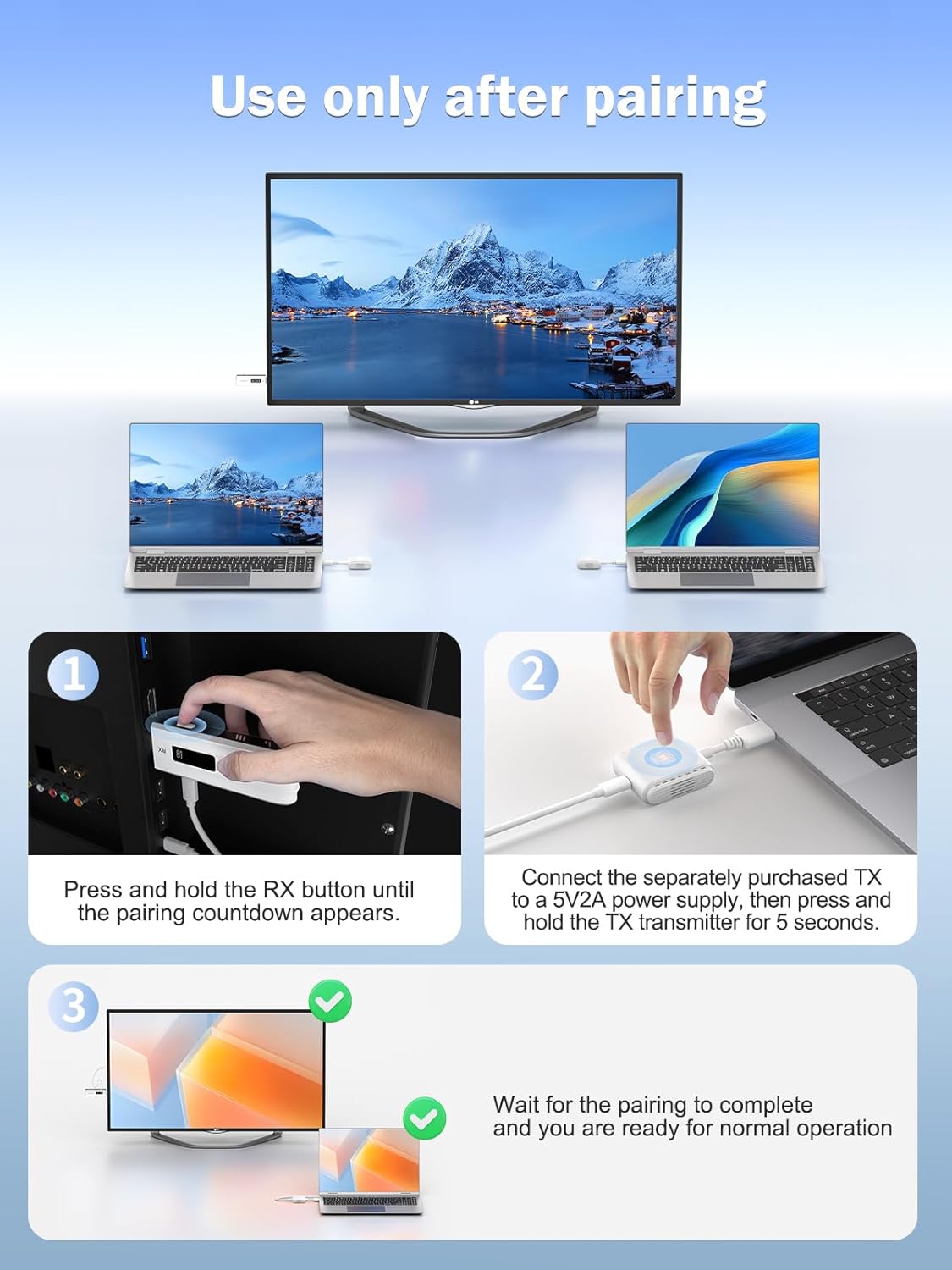
Occasionally I need to stream videos from my laptop to my TV, mainly for continuing education videos, but also other things. Until now, I’ve just been using a long HDMI cable, but this is so much better.- No cords to trip over.- The HDMI ports on the laptop and the TV get far less strain from “tugging” on the cable.- Pressing the button on the TX dongle can be used to re-pair the connection (I haven’t had to do this), but it is more useful for a quick on/off of the TX stream.I’ve watch hours of videos with these over the past few months, and I can say that use and functionality is rather plug-and-play”, and stable. The video and sound are clear.There is a way to connect to the RX dongle by connecting to its WiFi network and using a browser to connect to its IP address. This allows you to configure the video settings, upgrade the software, and also add/repair connection to the TX dongle(s).USB power for the RX dongle is always required for operation. USB power for the TX dongle is optional, but helpful if you have a weak HDMI port, or need a little extra boost for range. Also, an external USB power will PD power my (PD capable) laptop, but only as a “slow charger”. (Without the dongle, the 100W PD charger “fast charges” the laptop). Even so, this still allows me to USBc-PD power my laptop while using this.The only gripe I have with these in when the TX dongle is powered off, the RX dongle continues to broadcast the default Lemorele home screen. I think that the RX dongle should “go to sleep” after a bit with no TX connection. Since it doesn’t, my TV doesn’t auto shutoff either, because it’s always receiving a transmission from the RX dongle.