

4K Wireless HDMI Display Adapter,TV Adapter for The APP YouTube,for i-Phone, i-Pad, Android, Tablet, Laptop,Windows to HDTV/Monitor/Projector, Compatible Miracast, AirPlay, DLNA
Original price was: $49.99.$3.99Current price is: $3.99.
Related Products


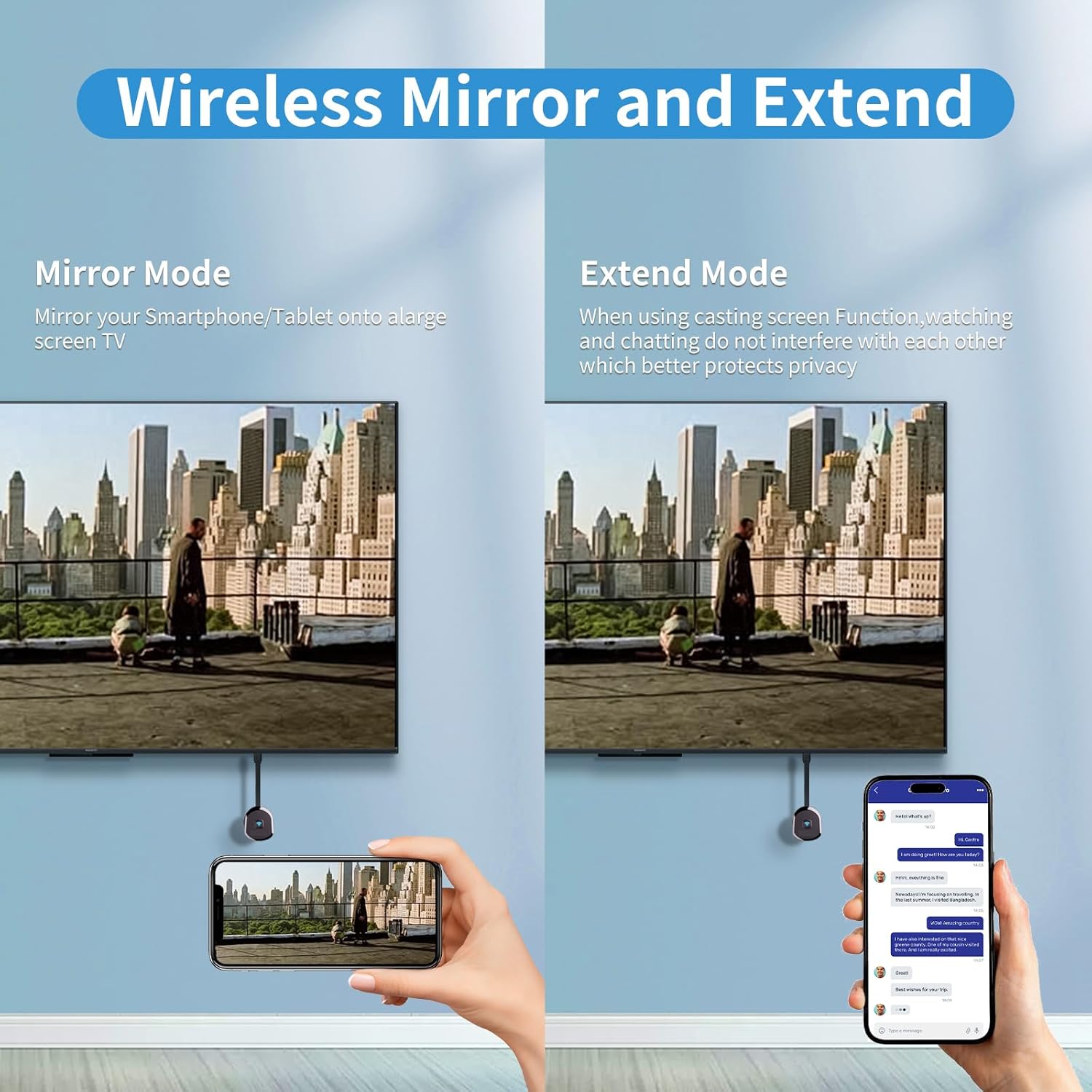


Product description


Physical Setup:
1.Connect the dongle to the TV’s HDMI port.
2.Connect the dongle’s USB cable to the TV’s USB port or a USB power block.
3.Turn on the TV and set the input to the dongle’s HDMI port.
4.Make sure the device’s black main screen appears on the TV.
Android System Mirroring
1.Confirm that the device’s black main screen appears on the TV.
2.In the “Cast ” function, select the ‘HRpart-5G-XXXXX’ device, wait for a few seconds, and the phone screen will automatically appear on the TV after a successful connection.
iOS System Mirroring
1.Go to Settings > Wi-Fi > OTHER NETWORKS > select “HRpart-5G-XXXXX” and enter the password “1234”
2.Tap “Screen Mirroring” > choose “HRpart-5G-XXXXX”
Note: Android systems can use the mirroring function while connected to home Wi-Fi, but Apple devices need to have phone data enabled to use the mirroring function.
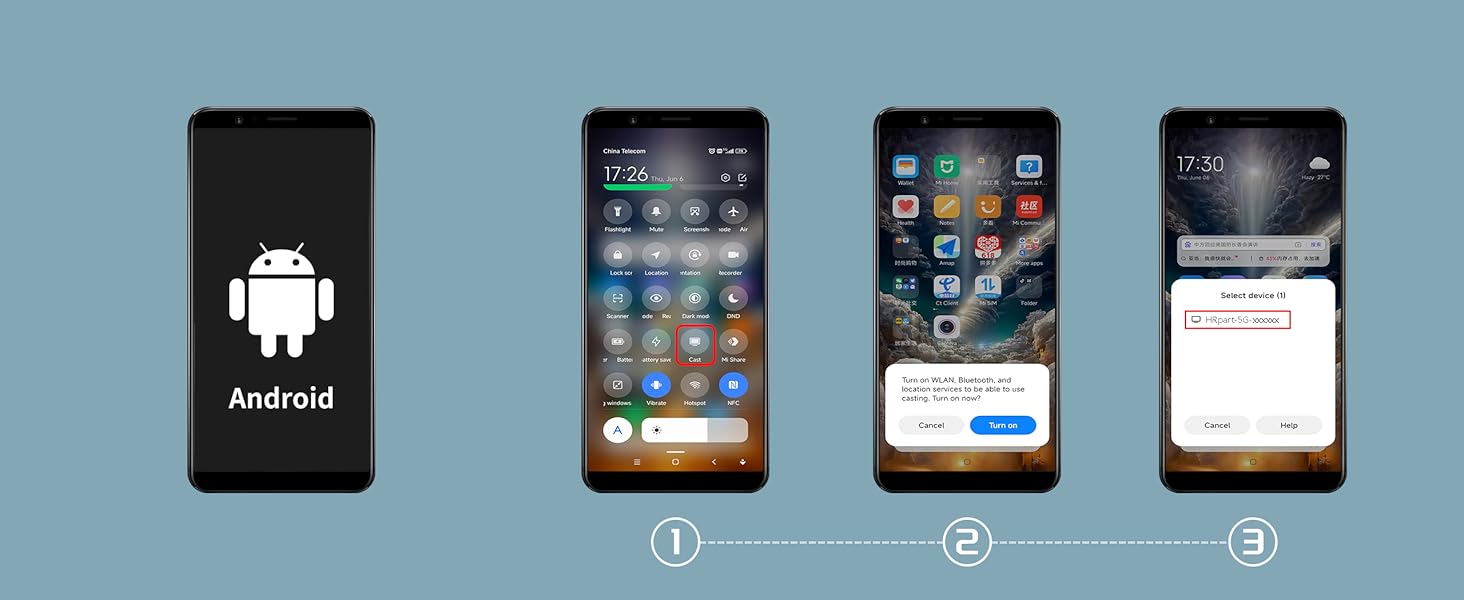
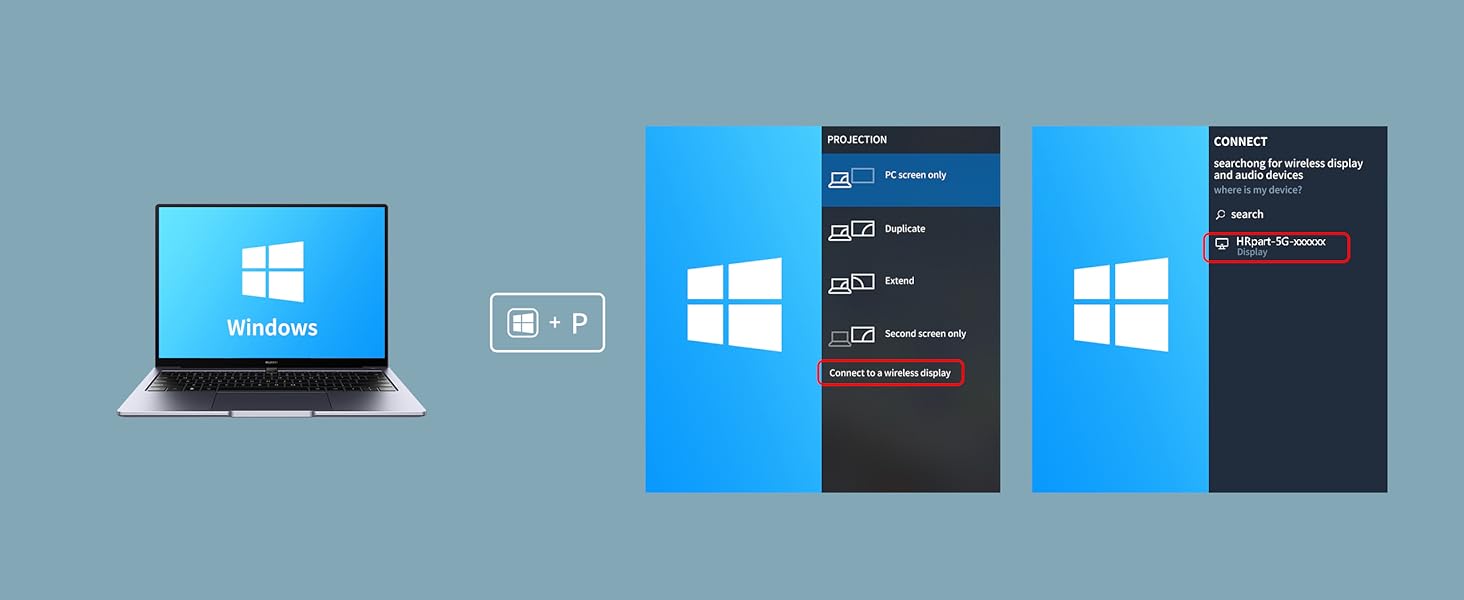
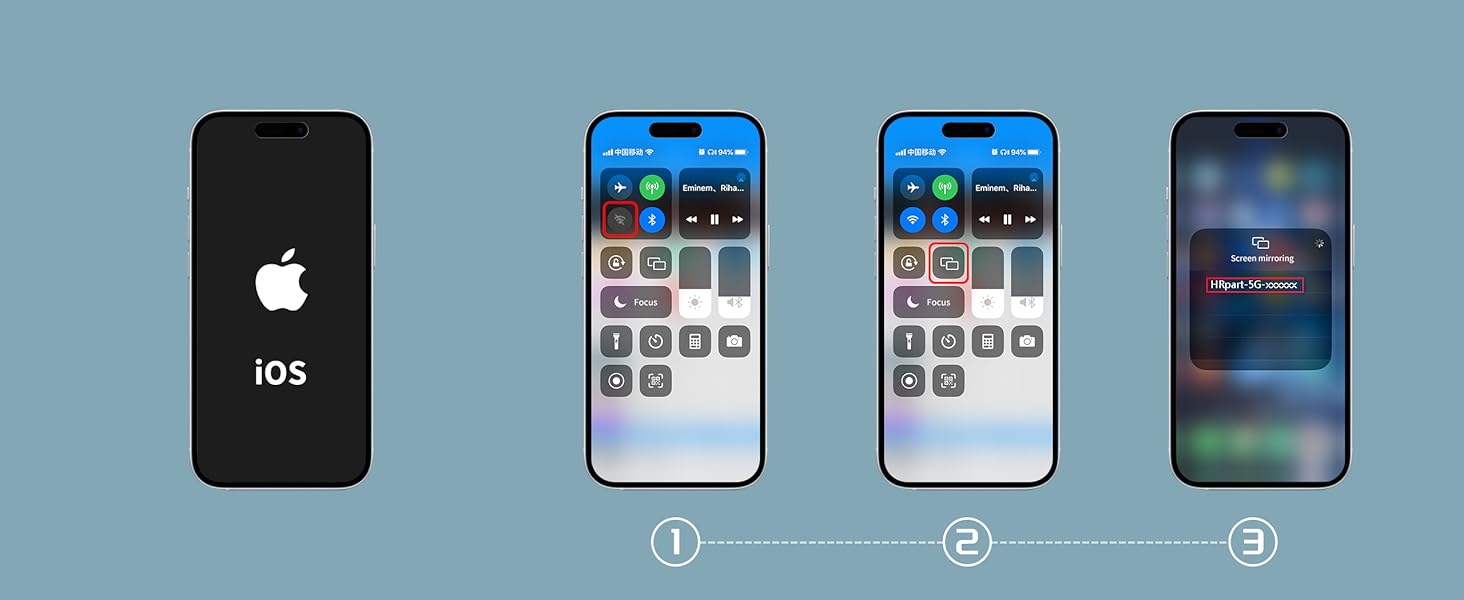
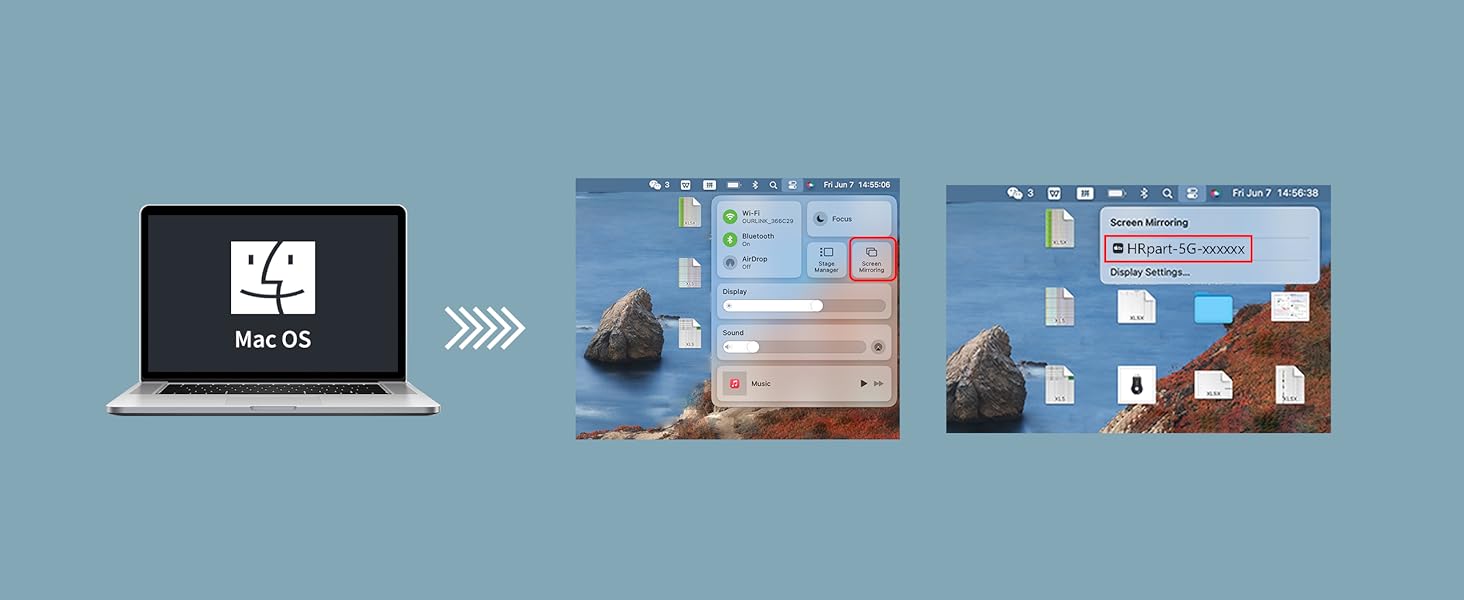
1 Android Connect
2 Windows Connect
3 i-OS Connect
4 M-AC OS Connect
To set up DLNA, you first need to establish a network connection between the device and the router. For specific steps, please refer to Section B.5 (5.1 to 5.2) of the instruction manual.
Question:
How to use DLNA functionality on Android and iOS phones
Answer:
Open the audio and video app on your phone, select the program source you want to play, and after it starts playing, tap the DLNA/Airplay screen casting button in the top right corner of the video. Search for “HRpart-5G-XXXXX” and tap on it to start using DLNA/Airplay playback.
Note:
1.In DLNA mode, all you need to do is set up the network for the first time. After that, it will automatically connect to the WiFi you initially connected to whenever you turn it on.
2.If you have already established a network connection between the device and the router but cannot find “HRpart-5G-XXXXX” on your mobile device, you need to check if your router’s name contains special characters such as spaces.
Why choose the HRpart wireless display adapter/receiver?It will allow you to view audio, video, office documents and more from a small to a large screen without the need for long and messy cables. Share your file content, photos, videos on any TV, monitor, projector with HDMI port, perfect for presentations, meetings, exhibitions, etc.
Two Casting Modes:Direct and DLNA mode,versatility with two casting options. The Direct Mirror mode is ideal for users on iOS and Mac OS, providing seamless streaming. For a more reliable and prolonged streaming experience, utilize the DLNA mode with your router network.
Wireless and Easy to Connect: No need to download any apps or use Bluetooth; simply plug the wireless HDMI adapter into your TV and power it through the TV’s USB port (5V/2A). Your TV screen will display the operation details.
2.4G & 5G Dual Band Wi-Fi Compatible: Our HDMI wireless adapter is compatible with Wi-Fi and operates on both 2.4G and 5G frequencies, providing smoother and faster streaming. Whether you’re delivering an important presentation, enjoying your favorite movie, or participating in a video conference, the adapter ensures a stable, high-speed Wi-Fi connection, keeping you connected and boosting your productivity in any situation.
NOTE: Reconnect to power before each use. Only Sam-sung phones support video apps with HDCP copyright protection, such as Net-flix, Amazon Prime Video, Hulu, Comcast TV, and BT Sport; other phones are incompatible with these apps.This product supports 4K transmission natively but cannot upscale non-4K signals to 4K. To achieve 4K output, both your display and the signal source (e.g., videos or movies) must support 4K.
8 reviews for 4K Wireless HDMI Display Adapter,TV Adapter for The APP YouTube,for i-Phone, i-Pad, Android, Tablet, Laptop,Windows to HDTV/Monitor/Projector, Compatible Miracast, AirPlay, DLNA
Add a review

Original price was: $49.99.$3.99Current price is: $3.99.
adrian gonzalez –
Gets the job done
Works really well. Haven’t had any issues
john passas –
Doesn’t work as claimed
Can’t get it to work. Audio comes thru but no mirroring. Going to send back.
Jesse Smith –
Perfect!
I can’t remember the last time I had an electronics accessory connect this easily. It might have taken all of 2 minutes to connect this adapter and have my iPhone mirroring to my TV. There are two pieces, the dongle itself with an HDMI cord, and the Wifi antenna which plugs into the dongle and also a USB port (see photo). Luckily I had an HDMI and USB port open side-by-side on the back of the TV. Plugged everything in, clicked the prompt on the phone, typed in the 4-digit code and it connected instantly. Picture is sharp, no lag at all. So glad I chose this unit out of all of them offered on Amazon.
ryan claerhout –
Work great with samsung phone
I have a samsung phone and it pairs perfectly with smart view. Picture is a little grainy but to be expected with this set up.
S. –
Can be better. Easy set up.
Useful when needing to project without cords or wires. Usually it’s not showing and I have to make some technical adjustments. It was easy to set up, but using it in finding some difficulty.
Keith Lopez –
3/5 stars
Not like a google chrome. Only does screen mirror
adan ramos –
great device to watch movies with on a tv
awesome product, i am loving it in my office, it glitches from time to time but my internet at work is weak, so i know is going to stop at times, but overall, it is a great device.
LCM –
No video
Easy to set up but only mirrors audio, no video. Supplier does not respond to my questions. Will return for refund