

Logitech Wave Keys for Business, Wireless Ergonomic Keyboard with Cushioned Palm Rest, Secure Logi Bolt Technology, Bluetooth, Compatible with Windows/Mac/Chrome/Linux – Graphite
$69.95
Related Products


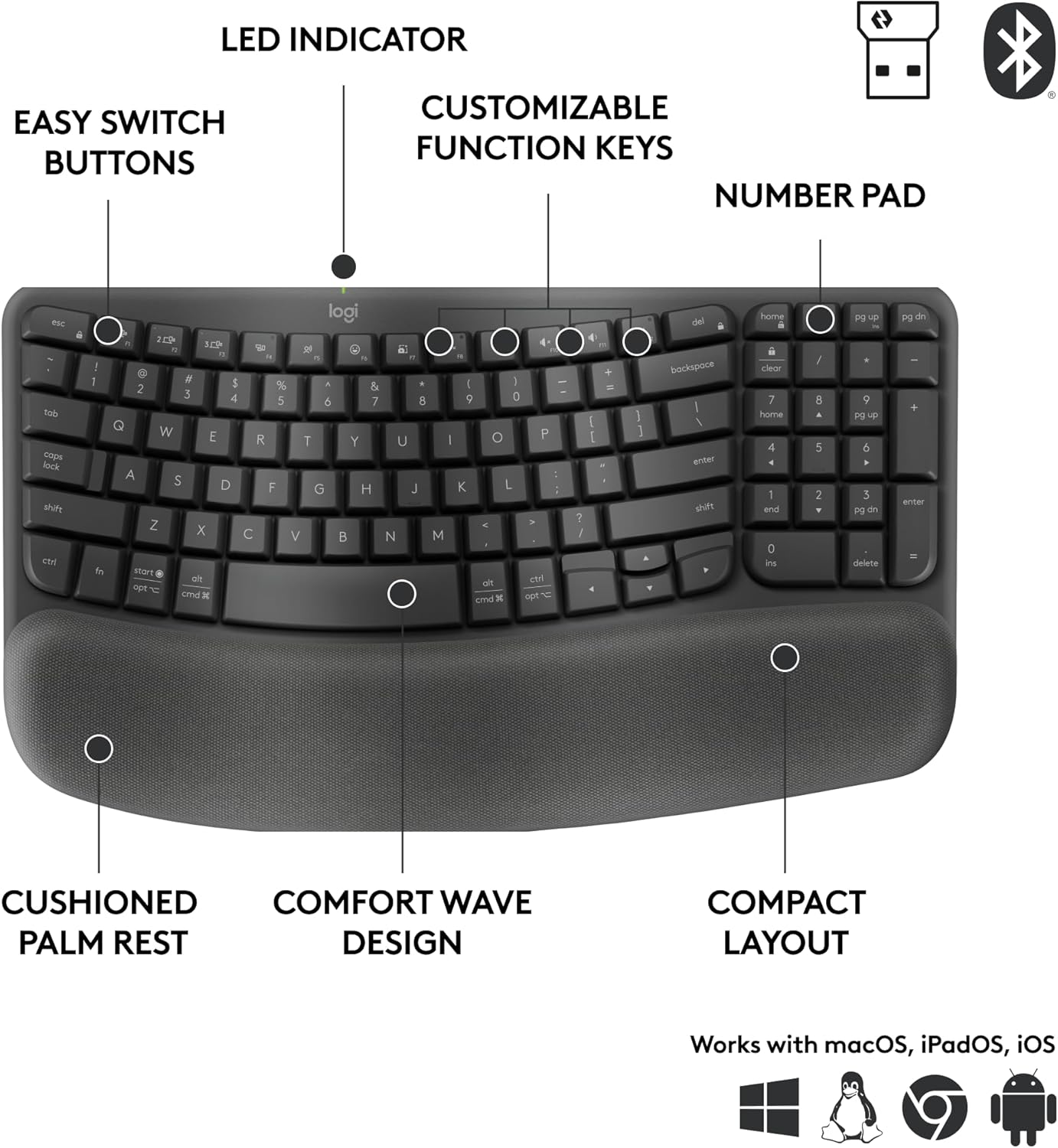


Catch the next wave of employee wellbeing. With an easy-to-use ergonomic wireless keyboard, employees can work in all-day comfort. Wave Keys for Business features an ergonomic wave design and cushioned palm rest, promoting 57% better wrist support (1). Large, curved keycaps and shorter key travel make typing fluid and easy. This ergonomic keyboard is made with 61% of recycled plastic (3), was developed and tested in the Logi Ergo Lab and is certified ergonomic by United States Ergonomics. The Wave Keys enterprise-grade keyboard provides a reliable and secure wireless connection in busy wireless environments, whether at home or in the office. The Wave Keys for Business wireless keyboard is easy to deploy and checks all of the boxes for IT.
Ready for Business: This enterprise-grade wireless keyboard offers secure wireless connections and ease of deployment; improve employee comfort without compromising work efficiency
Enterprise Secure: Logi Bolt wireless technology addresses enterprise security with a fully encrypted Secure Connections Only mode
User Tested, Ergonomist Approved: Wireless ergonomic keyboard improves employee comfort at work; developed in collaboration with Logi Ergo Lab and certified ergonomic by United States Ergonomics
Easy to Deploy: Multi-OS layout simplifies deployment to employees with Windows, macOS or ChromeOS systems; IT admins can remotely monitor devices with Logitech Sync
Wave Comfort Design: Shaped for all-day comfort and ease of use, this compact keyboard with number pad provides a typing experience similar to a straight keyboard
More Wrist Support, Less Pressure: The integrated cushioned keyboard palm rest contains a memory foam layer that reduces pressure and provides 57% more wrist support (1)
Uncompromised Productivity: Enjoy up to 3 years of battery life and a minimal learning curve; don’t compromise productivity for ergonomics (2)
A Choice You Can Feel Good About: Wave Keys for Business is certified carbon neutral and includes 61% certified post-consumer recycled plastic (3)
In case of wireless keyboard or combo (keyboard and mouse), the USB receiver is usually provided either inside the mouse (under the battery cover) or attached within the product packaging
8 reviews for Logitech Wave Keys for Business, Wireless Ergonomic Keyboard with Cushioned Palm Rest, Secure Logi Bolt Technology, Bluetooth, Compatible with Windows/Mac/Chrome/Linux – Graphite
Add a review

$69.95
Angela –
Compact but very nice
This keyboard is relatively small and compact as others have mentioned. It causes me to occasionally hit one of the function buttons unintentionally. That said, I think once I adjust to the keyboard, it will be great considering it saves space! I was concerned that the handrest was fabric and would get dirty very quickly, but it is NOT. It feels more like foam inside with a material that I think is probably waterproof (or at least resistant) on the outside, so it should actually be easy to clean. The key action is great and makes typing super easy. Way better than my gaming keyboard or my business laptop. It’s also a nice upgrade, in my opinion, from the older bulky Wave keyboard that my husband still has on his desk. It’s comfortable to type on and connected easily to my computer. Overall, it’s a fantastic little keyboard if for lots of typing.
Tammy o. –
Smaller than expected, but I love it
Smaller than I expected for some reason, but pleasantly surprised. I love how petite it is, doesn’t crowd my desk and the touch of the keys is quiet and nice. Happy with purchase.
Nathan G –
Easy to use
Great keyboard.
Mikeisgettinupset –
The old WAVE but BETTER!
I used to use the old WAVE keyboard froma bout 2010 to 2015 before i got into Mechanical keyboards. I’ve been impressed with what Logitech has been doing with their “for business” line and decided to give it a try again, and man do I love this thing. It’s quiet, its everything that was great about the old WAVE in a smaller, more practical package. Love it!!
JHenry –
Didn’t last a year
Keyboard frequently has connection issues. Finally am giving up on it after only nine months of use. It will no longer connect with my laptop.
Carol –
Too Small – Bring back the old Wave!
I’m sure for some this keyboard is really nice, but i have used the original Logitech Wave for a long time and I hate this mini keyboard. I cant use the updown right left arrows are at the heel of my hand instead of my fingers without stopping what i’m doing to find the right arrow. Where is the print screen button. I’m always hitting the top buttons. I’m always hitting the delete button instead of the backspace. I gave it time to see if I could get accustomed to it. But I can’t! Please bring back the old wave. I do love how the keys are on the new one, so smooth, so quiet, just make one like this that has the keys in the same place as the old wave. For now I’m going to have to buy a copy cat of the wave, because I can’t use this munchkin keyboard anymore. 😭
DORA –
Use this keyboard at work
I like that it is not too big or too small. Easy to carry around when I need to use it with my laptop. The only thing I found inconvenient was where the on/off switch is located. It’s not where you would typically find it at the top corners, on the sides or even on the back. I was working remote for 8 months and left it at the office. When I returned.I couldn’t remember where the switch was located. I remember having trouble with it when I first got it but couldn’t remember why.I started thinking maybe I had to press specific keys to turn it on. It took me over an hour to find. Seems silly now but at the time I was really irritated. FYI : It is on the top middle, right above the logi name and light.
Entirely Zen –
Love it!
I love this little keyboard it is ergonomic small and compact it doesn’t take up all the room a standard one does. I will never go back to a big keyboard! I love it