

ZigBee Smart Knob Switch Wireless Scene Button Rotatable Dimmer Switch,Need Zigbee Hub,Light Automation Scenario Remote Panel (1)
$19.88
Related Products


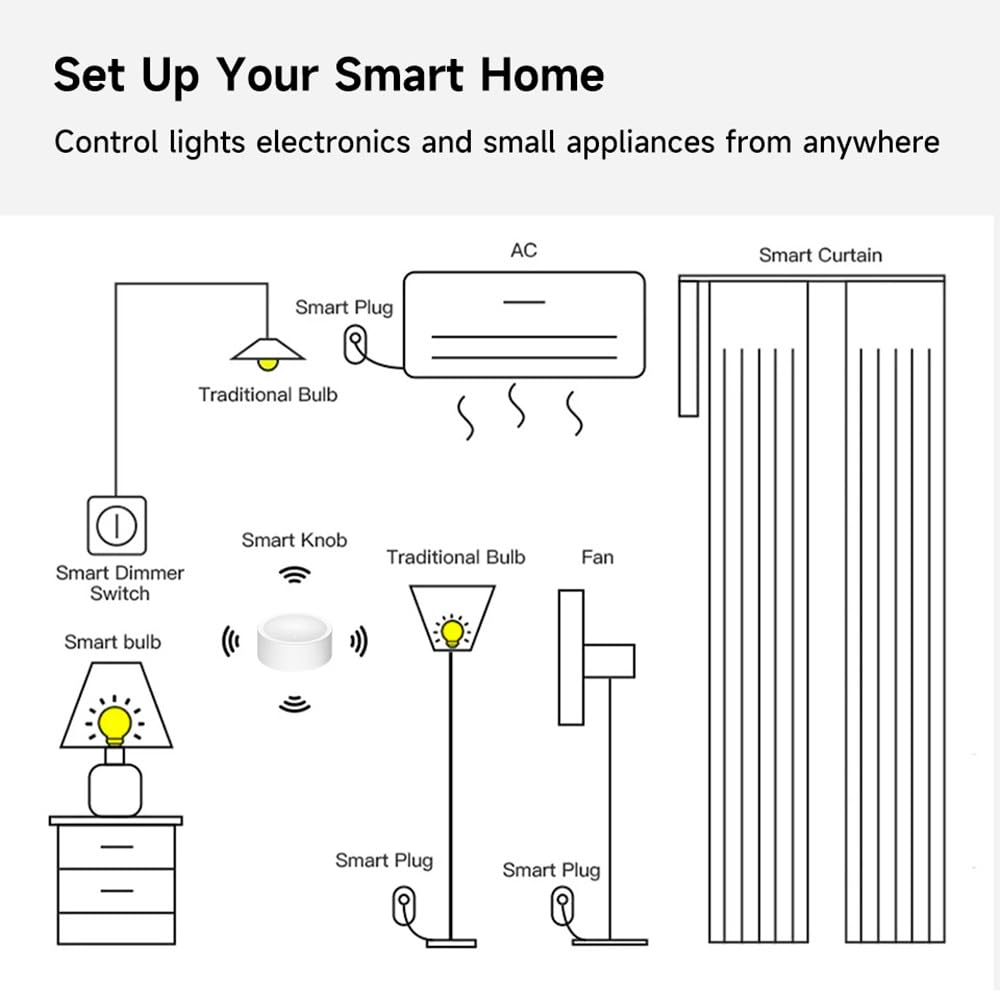
Product name:Smart Knob Dimmer Size: 50X50X24.5mm Built-in battery :CR2450 Operating voltage :DC 3V Working current: Standby current <8uA Wireless: zigbee(need zigbee gateway) Wireless transmission distance; Open,range ≥30 Operating environment: -5 °C to 55°C (23°F to 131°F) /≤95% (no condensation)
Product Dimensions : 2 x 2 x 1 inches
Item model number : zigbee smart knob
Batteries : 1 Lithium Ion batteries required. (included)
Date First Available : November 9, 2024
Manufacturer : IHSENO
ASIN : B0DMJYKGQG
Best Sellers Rank: #332,499 in Tools & Home Improvement (See Top 100 in Tools & Home Improvement) #652 in Dimmer Switches
Customer Reviews: 2.9 2.9 out of 5 stars (6) var dpAcrHasRegisteredArcLinkClickAction; P.when(‘A’, ‘ready’).execute(function(A) { if (dpAcrHasRegisteredArcLinkClickAction !== true) { dpAcrHasRegisteredArcLinkClickAction = true; A.declarative( ‘acrLink-click-metrics’, ‘click’, { “allowLinkDefault”: true }, function (event) { if (window.ue) { ue.count(“acrLinkClickCount”, (ue.count(“acrLinkClickCount”) || 0) + 1); } } ); } }); P.when(‘A’, ‘cf’).execute(function(A) { A.declarative(‘acrStarsLink-click-metrics’, ‘click’, { “allowLinkDefault” : true }, function(event){ if(window.ue) { ue.count(“acrStarsLinkWithPopoverClickCount”, (ue.count(“acrStarsLinkWithPopoverClickCount”) || 0) + 1); } }); });
【ZigBee Hub Required】-Work with Tuya Gateway,it Support Voice Control like Alexa,Google Home after connected to the controller.
【Two-in-one device for wireless scene】In the scene mode, the button respectively support single click, double click scene requirements. You don’t need to click the scene mode on your phone, just click the ZigBee smart remote control to open the smart scene.
【Wireless control of ZigBee dimming lamp in remote mode】Add an intelligent knob switch in tuya intelligent ZigBee gateway, and then add an intelligent ZigBee light bulb under the remote dimming interface in the App, so you can remotely control your lamp wirelessly. (Note: Only ZigBee lamp can be added for control)
【4 operations under remote mode to meet different demands】Single press to ON/OFF the bulb,rotate to normal dimmer,press and rotate to set the color temperature,and long press more than 3 seconds to set color,which clarifies the real-sense of value for money with this mini excellent device.
【Create multiple intelligent scenes for smart devices in App under scenario mode】To create any smart automation as you want on your smart phone app to start your another intelligent lifestyle, when you are tired from one-day work,such as home mode.
3 reviews for ZigBee Smart Knob Switch Wireless Scene Button Rotatable Dimmer Switch,Need Zigbee Hub,Light Automation Scenario Remote Panel (1)
Add a review

$19.88
Brian S. –
Short range, even shorter battery life, poor construction, and arrive with dead batteries.
Another update with more bad news:This knob doesn’t integrate correctly with Home Assistant, at least not today.It claims four functions in the description. Single push, double push, increase, and decrease.Home Assistant is only receiving three actions. Press, increase, and decrease. Double-press doesn’t fire an event.Also, press doesn’t work. The Zigbee configuration (“quirk”) for the device specifies events that it doesn’t fire, so the press event can’t be used in any automations without having to program your own custom “quirk” with the correct events.So, in Home Assistant, on top of the battery and signal reception issues, you can only use dimming and can’t turn a light on and off with these buttons. (Without serious work, requiring what I’d call moderate programming experience.)Update 1:These arrived March 28, at which point one said its battery was at 100% and the other said 33%.It’s now March 31, only three days later, and their battery levels are 80% and 5%. During that time I haven’t even used them, they’ve been waiting on a desk while I work on the lamp they’re going to control.That means these things are going to chug CR2450 button batteries like it’s a robot frat party. 20% battery drain in three days is two button cells per month. That’s 24 batteries each in a year.I’m seeing an average cost of $0.75 each for those batteries, so these two knobs are going to cost me about $40 a year just to keep fed, and I’m going to have to dedicate actual significant drawer space just for them.Absolutely unacceptable, I consider these completely unusable. I’m going to have to hack a USB power connection into their chassis.First impression review:They work.Arrived with batteries already connected, no tab keeping them from draining prior to sale. One is reporting 33% battery on receipt.Range is very short compared to my Sonos Zigbee switches. These are the first devices I’ve had to carry over to the room with the hub in it to pair. They would require a repeater to install where I intended, whereas the other switches I got work fine without one. At 20 feet from the receiving antenna, this dimmer reports -11dB worse signal than a Sonos button sitting right next to it.Twist action (the dimmer) is unnecessarily stiff, and the rubber foot pad isn’t very tacky. They don’t have enough friction to use the dimmer without being mounted to their plate, and the plate taped down. If placed on a clean table finished with glossy polyurethane (not at all slippery, actually a somewhat tacky surface), it’s not possible to reliably twist the dimmer action without pressing the button. It’s difficult, but can be done without pressing the button too often, holding the rubber base ring against one hand and twisting with the other. It can be twisted with one hand on a stable magnetic surface, like a magnetic white board, or with its plate wall mounted, but I like pulling the zigbee button for a room off of its wall mount to use on a desk while I’m in that room, and that isn’t viable with these.The plate has no hole to mount with a screw. It can only be mounted with adhesive, which is usually more damaging to the wall when removed.Requires undoing a tiny screw to access and change battery, which isn’t a captive screw and is easily lost in carpet. Not the worst except you’d better not lose that tiny screw, the back plate doesn’t snap in it’s only held by that screw. My other Zigbee switches open with a coin or other common object, and you only have to keep track of the backplate itself. On the plus side (debatably) the tiny screw is strongly attracted to the magnet, so if your grip on the screw falters before it’s fully in the hole, the screw is more likely to zip to the middle of the backplate than fall on the floor.Within the battery compartment the magnet is loose, not glued or snapped in to its socket. When I removed the rear plate the magnet slid out of the cover and was stuck to the battery instead. To reinstall the plate I had to guess where the magnet would line up with its mounting socket and leave it stuck to the battery while I put the plate back on top of it. I got the 2-pack, and both were like this. There’s no evidence of any attempt at adhesive where the magnet sits.Paired easily with Home Assistant, once I got out a laptop to pair them closer to the Zigbee antenna.
Eric S –
TERRIBLE. STAY AWAY.
Range from upstairs to first floor controller is just fine. Construction is ok. The sticky material under the button so they stay still on the table when twisting the knob, simply doesn’t work. The button events don’t work on home assistant, only the dimmer up and down events work — single and double click don’t register an event at all. Also, the batteries drain about 20% per day. You’ll need to replace batteries every week. These are Alibaba reseller junk. They are made from cheap components.
Confusing Shopper –
Excellent v
I see these up with Home assistant to control my outdoor speakers. Worked well, though I did need to get a range extender.