

ZigBee Wireless Remote Control Smart Switch Wall Panel Transmitter,Requires MoesGo zigbee Hub,Smart Life/Tuya APP Remote Control, Wireless Button for Smart Home Devices and Scenes White
$26.99
Related Products




Product description


MOES ZigBee 12 Scene Switch
Enjoy your Smart Life with Moes Products.
MOES Smart Home will use the ZiGBEE protocol to create a fully smart home. This scene switch is compatible with all Tuya products, allowing customers to experience one-click switching of scenes and custom setting of Tuya equipment.
Package List:
Wireless scene switch*1(CR2430 3V battery not included)Manual*1Sticker*2
Specification Input:CR2430 3V(battery not included) Dimension:86*86*13mm Battery life:730 days Working Temperature:-10℃~45℃ Standby Power:10uA

ZigBee is More Suitable For Smart Homes than WIFI
Zigbee Protocol will not be dropped and it is more stable and safer than WIFI .ZigBee power consumption is much lower than WIFI.


Compatible with Tuya devices Compatible with all Tuya smart devices in your home

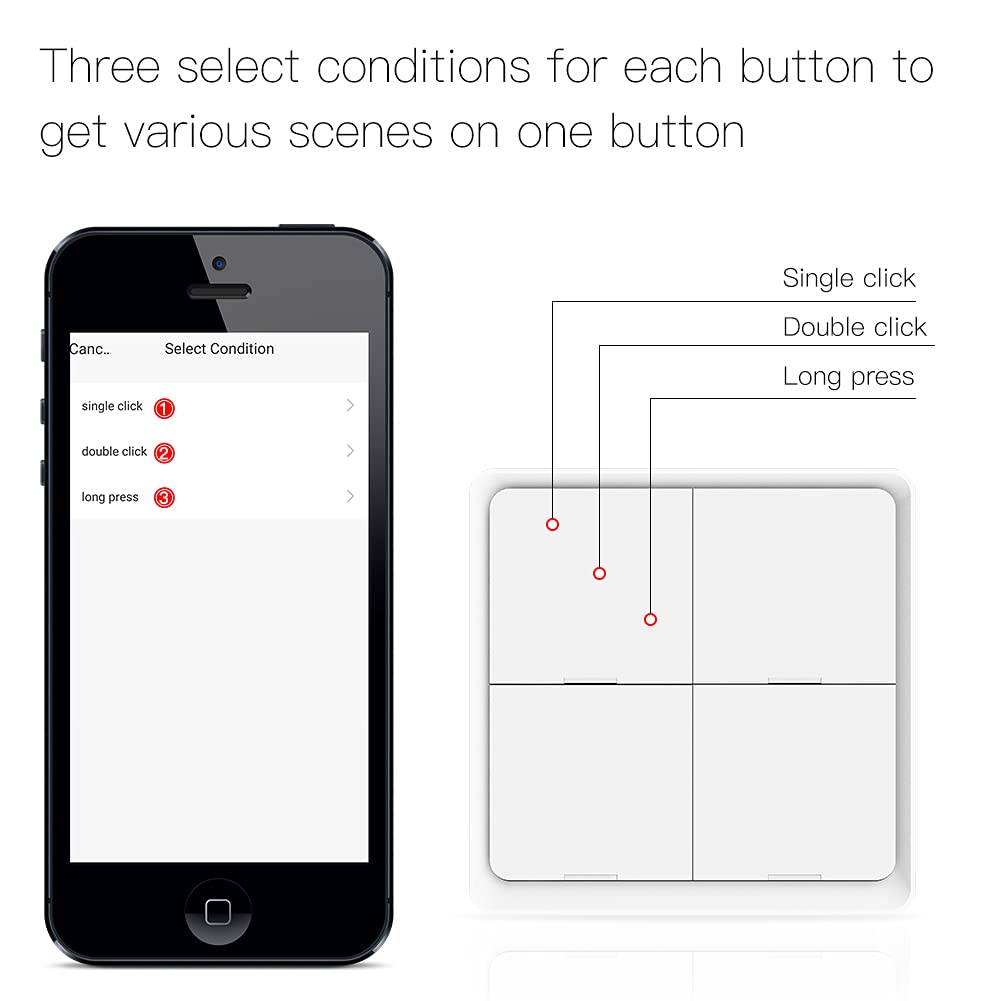
DIY Setting Scene It supports up to 16 scene applications, custom setting scenes, including: switch curtains, switch lights, turn on the sweeping robot, etc.

Note Only support ZigBee HubTuya Zigbee Hub is not included in the package.
Add to Cart
Customer Reviews
3.2 out of 5 stars 14
—
3.7 out of 5 stars 10
—
3.8 out of 5 stars 169
4.0 out of 5 stars 66
Price
— no data
— no data
— no data
— no data
$26.99$26.99
— no data
Color
White Black White White White White
APP Control
✓
✓
✓
✓
✓
✓
Wireless type
ZigBee 3.0 ZigBee 3.0 ZigBee 3.0 ZigBee 3.0 ZigBee 3.0 WiFi 2.4G
Requires MoesGo zigbee Hub
✓
✓
✓
✓
✓
no data
Package Dimensions : 3.98 x 3.94 x 0.87 inches; 3.21 ounces
Item model number : RT-W-EU
Batteries : 1 CR2430 batteries required.
Date First Available : July 15, 2021
Manufacturer : Hangzhou Tuya Information Technology Co.,Ltd
ASIN : B099KDS3W9
Best Sellers Rank: #108,125 in Tools & Home Improvement (See Top 100 in Tools & Home Improvement) #139 in Home Automation Hubs & Controllers
Customer Reviews: 3.8 3.8 out of 5 stars (169) var dpAcrHasRegisteredArcLinkClickAction; P.when(‘A’, ‘ready’).execute(function(A) { if (dpAcrHasRegisteredArcLinkClickAction !== true) { dpAcrHasRegisteredArcLinkClickAction = true; A.declarative( ‘acrLink-click-metrics’, ‘click’, { “allowLinkDefault”: true }, function (event) { if (window.ue) { ue.count(“acrLinkClickCount”, (ue.count(“acrLinkClickCount”) || 0) + 1); } } ); } }); P.when(‘A’, ‘cf’).execute(function(A) { A.declarative(‘acrStarsLink-click-metrics’, ‘click’, { “allowLinkDefault” : true }, function(event){ if(window.ue) { ue.count(“acrStarsLinkWithPopoverClickCount”, (ue.count(“acrStarsLinkWithPopoverClickCount”) || 0) + 1); } }); });
【NOTE】Required Tuya ZigBee Hub and sold separately.(ASIN:B0969ZHH83)/Intelligent linkage to tuya smart devices for normal use only,can not be used alone without tuya smart devices/Not included battery (CR2430 3V).
【Smart Automate scene】Smart automate the Tuya ZigBee wireless scene switch to any tuya smart devices in Smart Life App to set various scenes for your smart life.Tap-to-run to get another easier control for all tuya smart devices with one key on the switch
【Compact magnetic design】 it is a wireless wall switch when attached to the wall, remote control when unattached. It can be conveniently carried to the balcony, bedroom, kitchen, and more due to its compact size with only 0.5IN thickness.
【One button to enter smart mode】speed up smart device responding time, provide more fluid control, remove the dependence on a WiFi network only.
【Easy Installation】Fix it anywhere you like with double-side tape; no wiring needed for simple use,easily establish multiple control to realize fast and easy upgrades.
11 reviews for ZigBee Wireless Remote Control Smart Switch Wall Panel Transmitter,Requires MoesGo zigbee Hub,Smart Life/Tuya APP Remote Control, Wireless Button for Smart Home Devices and Scenes White
Add a review

$26.99
Jason Willadsen –
Great little button for Home Assistant/z2m integration!
Paired this via Home Assistant to open/close my garage doors. There’s a blueprint that can be installed to make the process easier for automations.Each button can have three separate triggers:Single pressDouble pressPress and hold (5 seconds)This can provide a total of 12 different triggers to build automations for, which is a great value. For example, to open my garage door, I require a double-press. To close it, a single press works. This prevents an accidental bump from opening the door.I’ll be monitoring battery life for this device to see how long it lasts as other reviews have plenty of complaints about that, but that appears to be due to some configuration issue. Will need to report back after a few months. No news will be good news.
LesF –
Well worth the money. Works with Home Assistant
This item is awesome for the price. They kept saying that smartlife or tuya was necessary. I was hoping that was incorrect. Because it is Zigbee, I should be able to use it with Home Assistant without tuya or smart life. I opened up the product, pulled out the battery tab and went to my Home Assistant and this was up and running in about 15 seconds. It works great. The only negative is that each of the 4 buttons were suppose to do single press, double press and long press. None of them do long press but, for my purposes, I didn’t care. This is an awesome set of Zigbee buttons and is compatible with Home Assistant, no tuya or smartlife needed. No Moes hub needed.
Austin Block –
Unreliable, Cheaply Made, and a Poor Value
The 4-button ZigBee Wireless Remote Control by MOES may just be the worst ZigBee product I have ever owned. In fact, I have (soon to be had) 2 MOES remote controls, and neither has ever met my expectations.Starting out with one, it appeared to work well, so I ordered a second. Everything only went down hill from there. Starting within a week or so, the remotes became unreliable. Triggering a button would take several presses–at least two, if not three attempts. In my experience, it appears to require one press to wake the device up, and another to send the button press. This is not required on any other ZigBee device I have, it is specific to this MOES product.After 2 months of use, both remotes are no longer usable. The first started flashing green LEDs and will no longer respond to any button presses–not even a reset command (holding the lower left button per MOES website). Measuring the battery voltage, I found the battery was low, but not ‘dead.’ Replacing the battery should not be necessary at only 60 days old given that MOES website states a battery life of 700+ days. However, 10 minutes after replacing the battery, the flashing green LEDs began again. Not just a few days later, the second remote stopped functioning completely with no hopes of working again.On the topic of batteries–this product does not include them. I have purchased many other ZWave and ZigBee products (many of them being cheaper) and they have all included batteries. For this simple reason, I would consider this product by MOES to be of poor value.Moreover, the build quality of this product is abysmal. After these remotes stopped functioning, I purchased a Philips Hue Tap Dial to replace one. That is when I realized just how cheap these MOES remote controls are. They are flimsy plastip, have cheap button switches (that even sound it), and do not include all require parts (batteries).I will never again buy a MOES product and do not recommend this to anyone. There are plenty of better products out there.
Another Consumer –
Decent button
Works as stated. Range was a little less than the Aqara single buttons. Wish it came with some labels or stickers.
TXBobcat –
Works Right out of the box
You will need a zigbee hub in order for this 4 button zigbee to work. I already have one at my house to automate the blinds in a few rooms. I used this 4 button zigbee in order to control the wifi relay lights in a movie room and the auto window blinds. I’m using the Smart Life app to control all of the qifi relays and this 4 button zigbee.
D. McEntire –
Worked out great with Home Assistant (zigbee2mqtt integration)
UPDATE 2023:When using with Home Assistant, I had several of these that exhibited the “blinking” then battery dead problem, and I was able to fix it all by moving them away from the zha integration and into the zigbee2mqtt setup. I am using a second zigbee interface, a Conbee for it, so I am running the two systems in parallel (zha for supported devices and the zigbee2mqtt for these MOES controllers).Using that method, via mosquitto as the broker, the moes units have been working perfectly for months now without any battery problems. For me, using them a handful of times each day, so far they are all still above 80% battery levels. The events fired for triggers is a little different, and sometimes requires you to edit the automation via the yaml interface, but it’s easy and you’ll figure it out pretty quickly.My next project is to try and laser engrave the buttons with a laser engraver I am getting sometime soon. If that works out I’ll post pictures of the results. Currently I am just using labels or stickers. Also I added a photo of one in a 3D printed desktop stand, which you can find at the usual sources.ORIGINAL POST BELOW….Wasn’t sure if this would work for me with HA, but they worked out great with the zha integration. I first tried them with deconz/conbee and ran into issues, so I removed it and went with the zha integration with my Nortek z-wave/zigbee interface and it ended up being the solution I needed. The controller just fires off zha_events which are easy to use for triggering automations.Two things to note that might be helpful to new users:1) Hold button #3 down for 10 seconds until all LEDs flash to get into pairing mode.2) Once it’s paired, be sure to then hold #2 and #4 until LED #3 blinks to get it out of the default on/off mode where #1 and #3 and on/off triggers for ALL lights. LED #3 will blink once to indicate it’s switched modes to individual buttons.In HA, you’ll be looking for a zha_event with this data:device_id: xxxxx (long string from the note below)endpoint_id: {1..4} (button #)command: remote_button_short_pressThe button options are:remote_button_short_pressremote_button_double_pressremote_button_long_pressTo get the device ID, go into Developer Tools, events, then listen for “zha_event”. Pressing buttons will fire events that will give you the data you need, including the device_id.Random notes – When I first tried to use this I realized that NONE of this is needed:1) MQTT/mosquitto broker2) Any zha quirks installed manually (it’s already built in)3) Custom blueprintsJust using it as an event controller with zha seems to do the trick for me.Hope this helps someone!
Giles Robinson –
Got a couple of these switches now, had to send this one back as it requires a neutral wire at the switch (my fault for not checking before ordering) so make sure you check which type you require before you order
Gaetano Mingari –
Nonostante la leggerezza e la “semplicità” sembra funzionante ed efficace, sia fisicamente maniera diretta che tramite wifi con l’ app, peccato abbia potuto provarlo solo brevemente altrove e non nella mia abitazione in quanto ho commesso l’ errore fatto da molti di non verificare prima se fosse necessario il cavo neutro, informazione tra l’ altro presente in bella vista nel titolo nel prodotto. Non posso Farne uso, peccato. Mi sento di consigliarvi ma: VERIFICATE PRIMA LA COMPOSIZIONE DEL VOSTRO IMPIANTO ELETTRICO. Comunque sia Moes si sta rivelando un ottimo marchio in generale come rapporto qualità-prezzo (avevo già altri prodotti del marchio).RETTIFICA: molto brevemente, dopo alcuni mesi non si collega più in nessuno dei modi che dovrebbero essere possibili
Donaldo –
Ich habe mir Alexa Smart Lichtschalter, MoesGo Smart Alexa Doppel-Lichtschalter, um Testen aus dem Vine Programm bestellt. Habt ihr schon viele Produkte der Firma im Gebrauch haben und auch nie enttäuscht worden sind.Aus dem Grund: Ich finde Smart Home, ist eine großartige Sache, aber bei derzeitig 36 Smart Home Geräten doch schonmal teilweise mein WLAN vielleicht an ihre Grenzen. Denn aber die Limitierung auf die wenigen Bluetooth bzw. die ohne Hub/Gateway funktionierenden WLAN-Geräte stößt man hier schon schnell an seine Grenzen. Deswegen haben wir vor kurzem fast alles auf ZigBee umgestellt und nur einige Geräte laufen noch im WLAN.Da dieser Schalter auch ZigBee ist, war es kein Problem in unser neues ZigBee zu integrieren. da dieser Schalter auch noch über weitere Funktionen wie zum Beispiel: Übereinen Timer verfügt den man sich in der Software oder App einstellen kann, ist der wesentlich besser als mein Alter Doppelschalter hier im Wohnzimmer. Der über solche Funktionen nicht verfügt.Er passt in eine normale Unterputzdose, schnell installiert. das Gleiche Geld für unser ZigBee System und Alexa Ansteuerung.Noch zu beachten dieser Schalter braucht keinen neutral, das ist besonders wichtig gerade im Altbau, wie bei uns da, dieser Neutralleiter nicht vorhanden ist.Nach einem längeren Test mit dem Lichtschalter, alles funktioniert tadellos ohne Problem. Die Verarbeitung und vor allen Dingen die einfachen Installationen finde ich hier mal wieder sehr gut. Und wir sind von der Firma wie üblich auch nicht enttäuscht worden. Wie bereits gesagt wir haben auch andere Lichtschalter von der Firma im Gebrauch schon seit über einem Jahr und auch ohne Probleme. Hier bekommt man für knapp 18 € wirklich eine gute Qualität. Der Schalter lässt sich auch gerne mal im Altbau verbauen lässt, wo man keinen Neutralleiter hat. Und was die Firma endlich mal geändert: Dass hier eine mehrsprachige Bedienungsanleitung auch in Deutsch dabei ist. Der Schalter ist hochwertig verarbeitet und hier stimmt auf jeden Fall, dass Preis Leistungsverhältnis. Das Ganze mit einer Installation, ohne Probleme, mit einer guten Alexa Ansteuerung.Hier vergeben wir gerne Sterne ⭐⭐⭐⭐für das Produkt und aber ein Weiterempfehlung🛒🛒🛒🛒. 👍
Casa Rei –
Es un excelente producto, algo complejo de configurar en Smart Life pero funciona a la perfección. Seguro compraré otros.
Vicente SP –
Usando un controlador hecho por la comunidad, no tuve ningún problema para que fuera detectado e integrado con la red mesh para un hub Hubitat Elevation. Lo uso para crear escenas para cada cuarto se puedan ir a dormir a diferente tiempo…. Y si. Me quedan muchas combinaciones libres.