

eufy Security Indoor Cam C120 | Plug-in Security Camera 3 MP | 2K with Wi-Fi | IP Camera | Voice Assistant Compatibility | Night Vision | Two-Way Audio | HomeBase 3 Compatible | Audio and Motion Alert
Original price was: $42.99.$34.99Current price is: $34.99.
Related Products




Product description


Know When You Are Needed
The built-in AI notifies you of excessive noise levels so you know when your little one needs some attention.

Instant Detection
As soon as motion is detected the camera will start recording and push a notification* in case you want to see what is happening.

Activity Zones
Only receive the alerts* which matter. Customize the area in which detection takes place to suit your home.

Sight at Night
Keep an eye on any room, even in low light settings.

Communicate From Your Camera
Speak in real-time to anyone who passes via the camera’s built-in two-way audio.

Instant Mobile Alerts*
Notifies* you in seconds when suspicious motions are detected.

Dual Storage** Options
Store your data and recordings: locally with an extra SD card (not included) or in the cloud.

Recordings on the Go
Get instant access to your video footage right from your smartphone.
Add to Cart
Add to Cart
Add to Cart
Add to Cart
Customer Reviews
4.2 out of 5 stars 12,569
4.3 out of 5 stars 23,558
4.4 out of 5 stars 1,843
4.1 out of 5 stars 497
4.2 out of 5 stars 1,055
4.5 out of 5 stars 1,668
Price
$34.99$34.99 $33.24$33.24 $139.99$139.99 $34.88$34.88 $25.99$25.99
— no data
Weather Resistance
Indoor use only Indoor use only Indoor use only Indoor use only Indoor use only Indoor use only
Resolution
2K 2K 4K UHD 2K 1080p 4K UHD
Night Vision
IR (32.8ft) IR (32.8ft) Recognize Faces at 30 ft IR (26.2ft) IR (26.2ft) IR (32.8ft), Color (16.4ft)
FOV
125° 125° 130° 100° 100° 125°
Storage
Local**, cloud, NAS (RTSP) Local**, cloud, NAS (RTSP) Local**, cloud, NAS (RTSP) Local**, cloud, NAS (RTSP) Local**, cloud, NAS (RTSP) Local**, cloud, NAS (RTSP)
Included microSD Card
Not included Not included Not included Not included Not included Not included
Recording Method
24/7 & Event 24/7 & Event 24/7 & Event 24/7 & Event 24/7 & Event 24/7 & Event
AI Detection
Human, Pet, Crying Human, Pet, Crying Human, Pet, Crying Human, Motion, Audio Detection Human, Motion, Audio Detection Human, Pet, Audio, Crying
Smart Integration
HomeKit, Alexa, Google Assistant HomeKit, Alexa, Google Assistant Alexa and Google Assistant Alexa and Google Assistant Alexa and Google Assistant Homekit,Alexa,Google Assistant
eufy Security Indoor Cam C120
Local** Security, No Monthly Fee From your newborn crying for mom, to your victory dance after a game, your personal moments are yours and yours alone. We are committed to products and services that keep your data private and secure.
Know When You Are Needed
The built-in AI notifies you of excessive noise levels so you know when your little one needs some attention.
Activity Zones
Only receive the alerts that matter. Customize the area in which detection takes place to suit your home.
Sight at Night
Advanced night vision allows you to keep an eye on any room, even in low light settings.
What’s Included:
1x eufy Security Indoor Cam, 1x USB Adapter, 1x USB Cable, 1x Mounting Bracket, 1x Screw Pack, 1x Quick Start Guide
Notes: Upgrade firmware to v.2.0.6.9 or newer.
Non-Waterproof; Requires MicroSD card (not included)
When opening HomeKit, users must add the device in the eufy Security app and then complete the activation process.
FAQ:
1. Does Indoor Cam C120 support 5GHz Wi-Fi?
No, it only supports 2.4GHz Wi-Fi connection.
2. Is Indoor Cam C120 compatible with HomeBase 3?
Yes, it is compatible with Homebase 3, however it currently only supports the storage function. BionicMind, modes, and automation are not yet supported.
*Push notifications with thumbnail previews require thumbnail preview images to be temporarily stored in the cloud.
**If you choose to use cloud-based features such as cloud storage or push notifications with thumbnail previews, videos or thumbnail previews will be sent to the cloud as needed to provide your selected features.
Relevant Recordings: The on-device AI determines whether a human or pet is present and only records when an event of interest occurs.
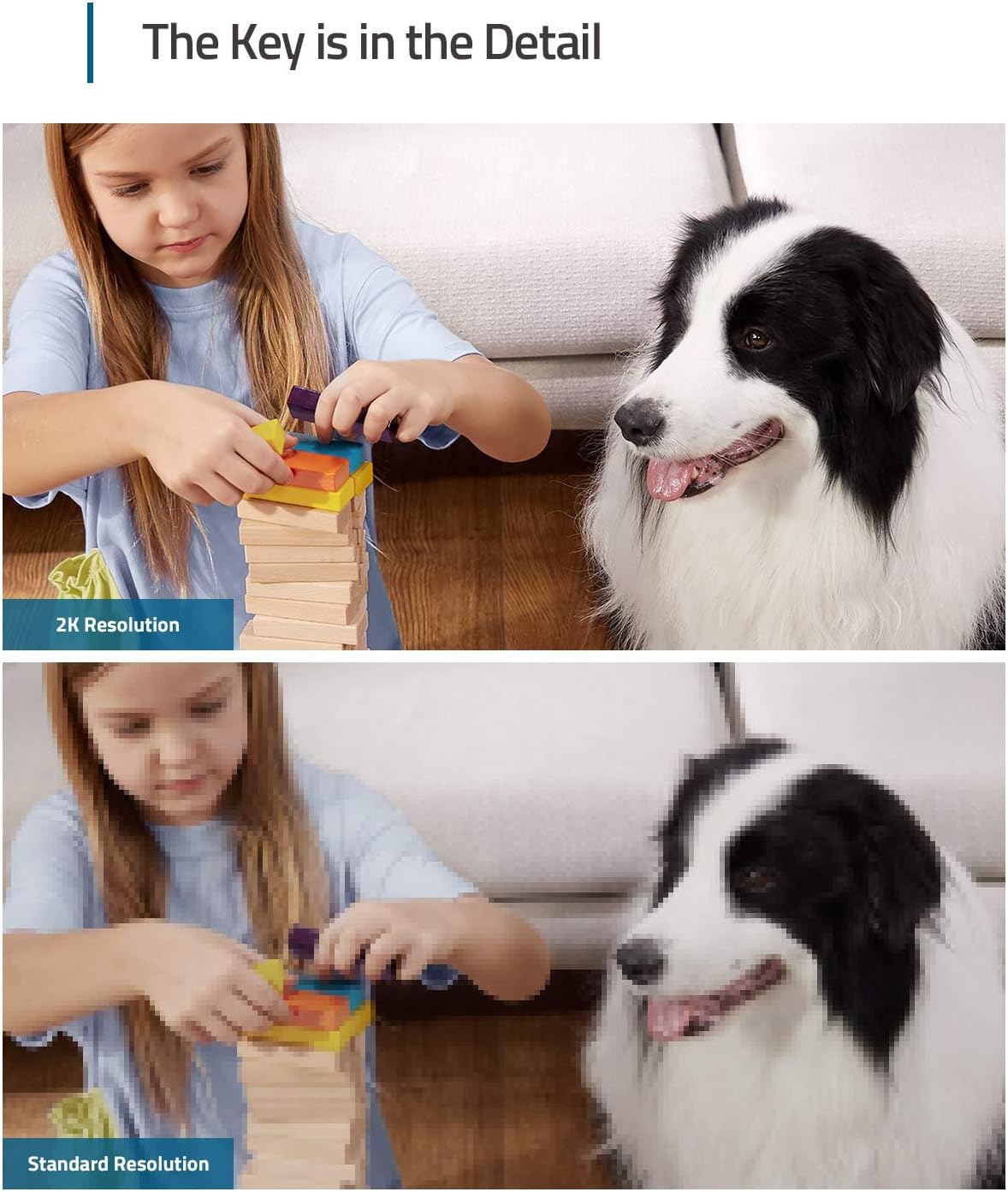
The Key is in the Detail: View every event in up to 2K clarity (1080P while using HomeKit) so you see exactly what is happening inside your home.
Communicate From Your Camera: Speak in real-time to anyone who passes via the camera’s built-in two-way audio.
Smart Integration: Connect your Indoor Cam to Apple HomeKit(Please download our HomeKit User Guide in the product information section below), the Google Assistant, or Amazon Alexa for complete control over your surveillance.(HomeKit available via update. When opening HomeKit, users must add the device in the eufy Security app and then complete the activation process.)
Sight at Night: Advanced night vision allows you to keep an eye on any room, even in low light settings.
8 reviews for eufy Security Indoor Cam C120 | Plug-in Security Camera 3 MP | 2K with Wi-Fi | IP Camera | Voice Assistant Compatibility | Night Vision | Two-Way Audio | HomeBase 3 Compatible | Audio and Motion Alert
Add a review

Original price was: $42.99.$34.99Current price is: $34.99.
robmer11 –
Exceptional Value and Performance
I recently purchased the eufy Security Indoor Cam C120, and it has exceeded my expectations. This compact camera offers impressive 2K video quality, ensuring clear and detailed footage both day and night. The night vision is particularly noteworthy, providing crisp black-and-white images even in low-light conditions.Setting up the camera was straightforward. The integration with the eufy Security app was seamless, allowing me to connect the camera to my Wi-Fi network without any issues an integrate into my Apple HomeKit.Overall, the eufy Security Indoor Cam C120 delivers exceptional performance at an affordable price point. It’s a reliable choice for anyone seeking a high-quality indoor security camera.
James R. –
Awesome HomeKit Camera!
NOTE: I have been using WyzeCams for almost 2 years now, so my review will be heavily revolving around that comparison.I was looking to upgrade due to the fact that Wyze – against numerous customer requests – has zero intentions of making their cameras compatible with Apple HomeKit. Also, I was over dealing with all the little quirks that came with using WyzeCams (random disconnections, tiny bugs with every firmware update etc.), I don’t need special face detection or pet detection features – for my usage all really I need is streaming video and motion notifications. After looking into what my options were I decided to try the Eufy 2k Indoor Camera since it is HomeKit compatible.The 2K camera is made of plastic, but it has a better finish to it compared to other cameras, with a simple, understated but nice looking modern design. Installing the 2k camera is like most others; inside the package you get the camera, a micro USB cables and a standard USB AC power supply. Installation hardware is included, and I like how the camera features a detachable base plate that makes positioning the camera much easier if it’s being wall-mounted. After installing the camera, I downloaded the Eufy security app from the App Store and fired it up.First of all, pairing the 2k camera within the Eufy app literally took seconds to do, and I was up and running in no time. Second (and more importantly) I could see that the Eufy’s 2k video quality was much, much clearer than WyzeCams lower-quality HD video. The “live view” video streaming on the 2k was crisp, smooth and never choppy (something that anyone who has used Wyzecams will tell you does happen regularly). Response was quick as well, whenever I went into the camera view it connected with no problem. I have the 2k camera in the exact same location as a WyzeCam that would on occasion take 5-10 seconds to connect to. Speaking of the Eufy app, it has a similar layout when compared to the Wyze app so learning my way around didn’t take much time to get used to. I did notice though that when compared to the Wyze app interface, the Eufy app felt much more polished and complete.The best features though for me so far are related to Apple’s HomeKit and the Home app. Before, I had to open the Home app to check the status or control any of my smart home products (lights, fans, etc.) and then open the Wyze app separately to check all the Wyze cameras. Because the Eufy 2k Indoor camera is HomeKit compatible, I could now see the camera’s live feed directly from the Home app! Also, because the Eufy 2k works with Apple’s HomeKit Secure Video, I know all of my video footage is more secure and stored privately. Honestly, I didn’t realize how much of an issue having to open multiple apps was until I had the means to view and control everything within one central app on my phone, and HomeKit compatibility makes this possible.So if you’re looking for a HomeKit compatible camera that has excellent features, excellent video quality, and effortless setup, the Eufy 2k indoor camera is an awesome choice. Granted, I am still not through trying out all the other features this camera has (person or pet detection, etc.) but as of this writing, I am already a happy customer. I actually went and ordered a second Eufy 2k Indoor camera to replace my other WyzeCam V2, and I’m already planning on buying their 2K Indoor Cam Pan & Tilt cameras to possibly replace my WyzeCam Pans. As much as I liked the low cost and decent features that Wyze cameras gave me, upgrading to the Eufy 2k cameras was an eye-opening experience and a great choice after all. They are only marginally more expensive than Wyzecams but well worth the price!
Brian Shops Online –
INCREDIBLE (For the price) – No Subscription!!!
INCREDIBLE – For the price because – NO MONTHLY SUBSCRIPTION FOR STORAGE!INCREDIBLE – if you have never bought a remote camera. Learn on this one before you buy a more expensive one. There is so much to learn in the app as far as setting sensitivity, storage, playback, view field… there are a ton of options to customize the experience. The default is fine too – but if you’re getting a million alerts every time a car drives past, or a tree branch moves in the wind – you will want to use settings to ignore those detections and set your detection to just the door or porch.Simple camera – doesn’t remotely rotate – has night vision and plugs into USB (included)Sure, you need to sign into the app, it’s a little clunky, there’s a learning curve, playback doesn’t always seem to work, events don’t always record, I’ve had one just stop working over time.HOWEVER – I’ve tried other more expensive brands and they are about the same. I’ve bought a different brand in-store from Best Buy to watch the dogs – DISASTER.WORSE – Almost every other brand tricks you into needing a Monthly Subscription or Google Storage – someplace to store the footage for playback.This Eufy Camera stores/retrieves the information directly onto/from the SD card (sold seperately – another pain) – But again – the cost savings of not paying $ monthly subscription is obvious and makes this camera my Go-To camera for keeping an eye on my basement and attic for any intruders or critters. Bought them for my mom for her house.I even used it once to direct a friend to find a folder in a box in my attic by directing him through the live camera/microphone “Go left… it may be under that blue bag… try that yellow container – there it is!”The camera in my basement at my mountain cabin for 3 years suffers extreme temperatures… keeps on ticking! It’s awesome. Live view anytime and trigger alerts when it detects something moving.
Ibrahim A –
ممتازة للاطفال، متوافقه مع انظمة ابل، لاتحتاج اشتراك
Ralph C. Martin –
This camera is easy to install and has an amazin quality!
Senjosan –
I first purchased two cameras. After using for a year, I purchased two more as they performed very well. They work very well. Be sure to purchase a micro sd card as well.
Paul –
Was not what I was looking for
Wilberth R. –
En homekit no aparece boton para hablar.