

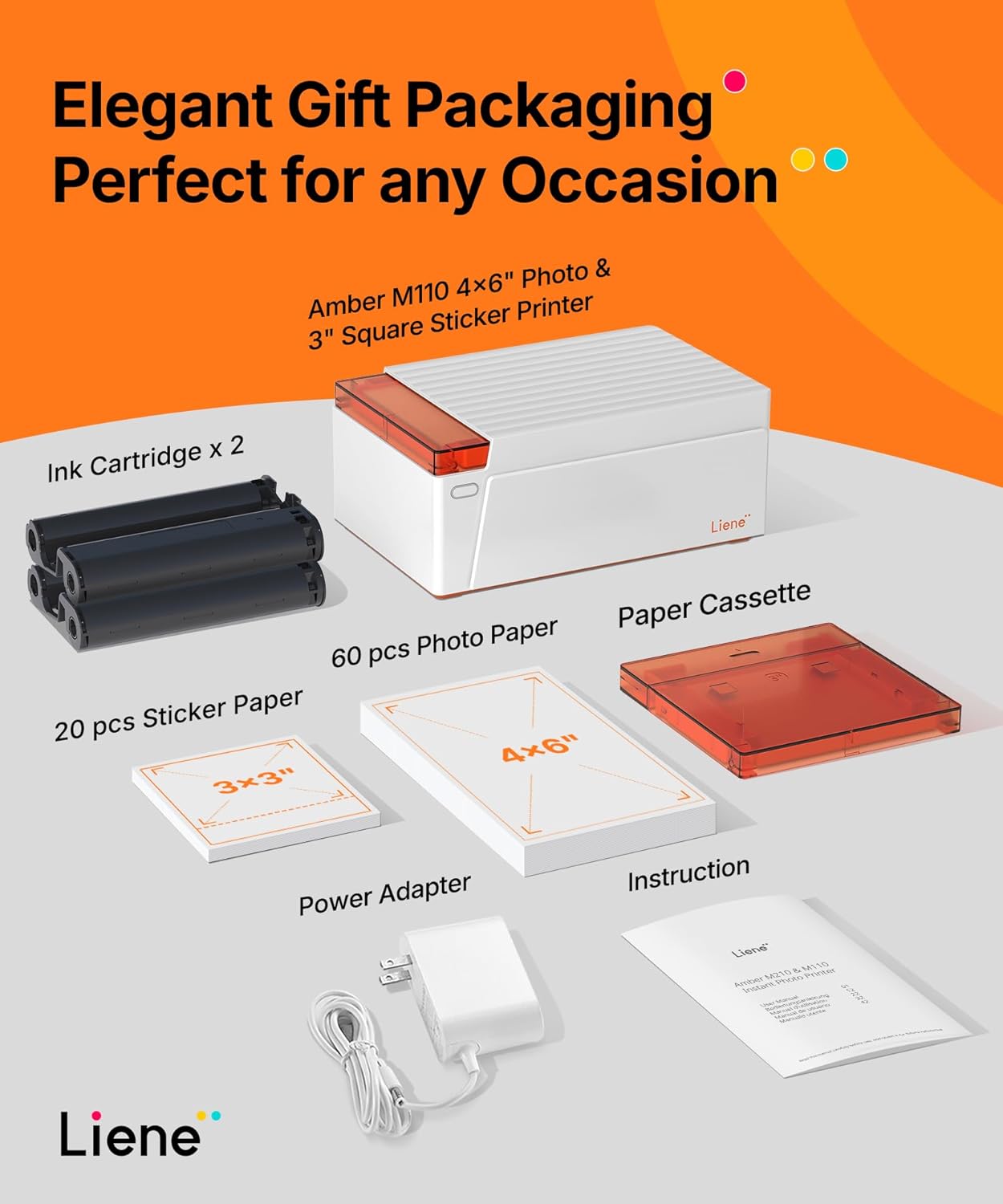
Liene Amber M110 Bluetooth Photo Printer 80 Sheets, Portable Photo Printer for iPhone, Thermal Dye Sublimation, Picture Printer 60 Sheets 4×6 Paper & 20 Sheets 3″ Square Sticker Paper & 2 Cartridges
Original price was: $199.99.$179.99Current price is: $179.99.
Related Products







From the brand

Swipe to See More → Previous page
Liene Amber M110 Photo Paper


2×3” Mini Photo Printer
2×3 Mini Photo Printer Bundle
4×6” Photo Printer


Every moment that we explore the insights of the future, is always dedicated to inspiration and aspiration.
Hannto Technology is eager to collaborate with the open environment of this era, and contribute more happiness and love to everyone on a global scale, this is the story that LIENE was born.
We expect everybody could join this brand family, grow and search a wonderful future.
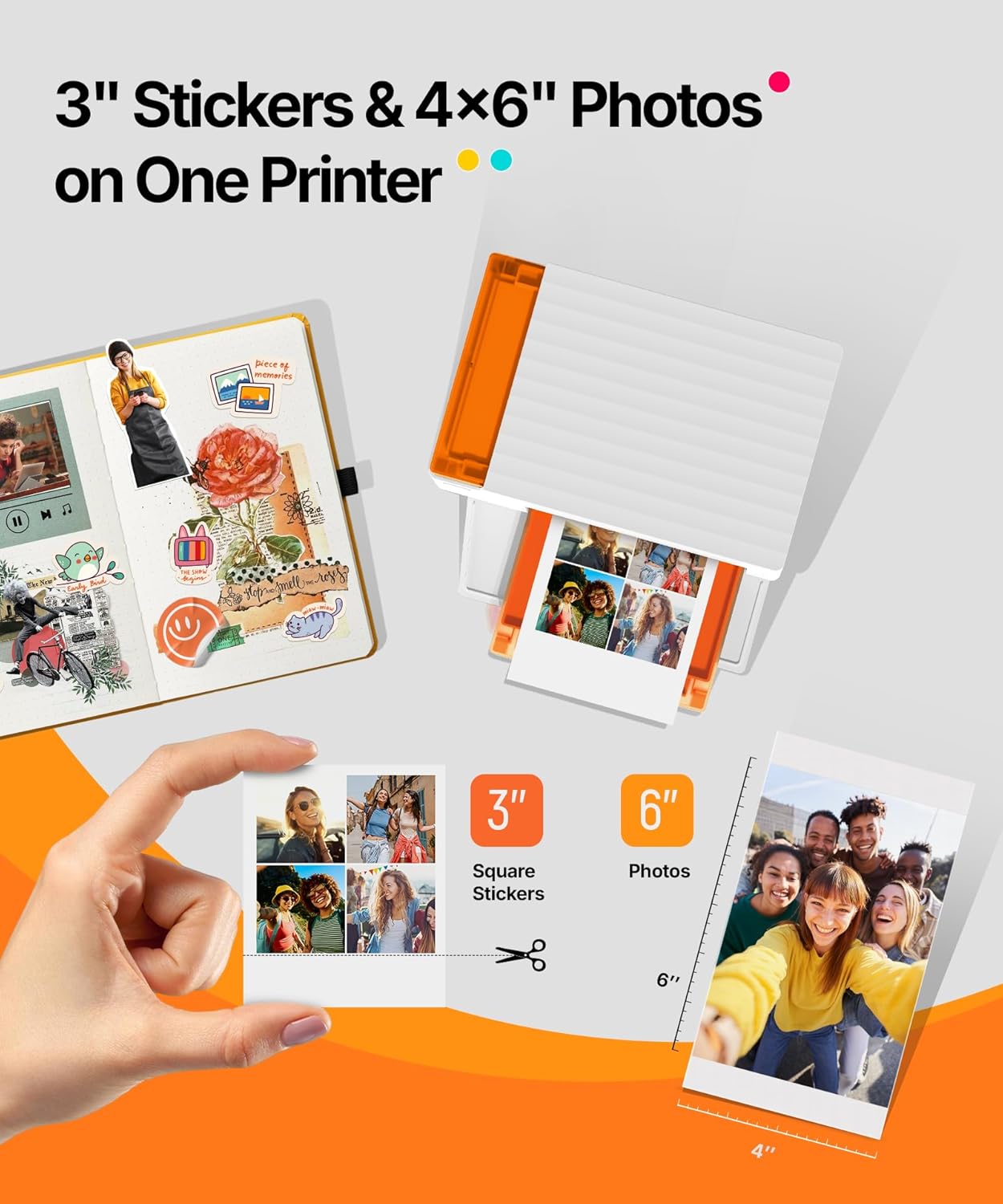
Dual 4×6″ & 3×3″ Photo Printer Paper Tray Convenience: Seamlessly print both 6-inch standard photo paper and 3-inch sticky-backed paper with our innovative dual tray design. This compact phone photo printer for smartphone offers easy storage and quick access, making it perfect for diverse printing needs without taking up much space. Enjoy vibrant, high-quality prints every time.
Fast Bluetooth Connectivity: Experience lightning-fast printing with our liene photo printer’s Bluetooth connection, which pairs in just 13 seconds. Enjoy a seamless and efficient printing experience, perfect for capturing and sharing memories on the go without the hassle of cables or complex setups.
Superior Quality Photo Printer 4×6 – Print photos like no other thanks to the thermal-dye sublimation tech adopted by the picture printer for iphone. The dyes deeply penetrate the paper for vibrant photo printing, and the laminated surface is resistant to water, scratches, fingerprints and fading. Get Liene photo printers now as amazing gifts for yourself and your loved ones, print your happy moments together and keep your love forever!
Multiple Device Compatibility – Liene picture printer for iphone provides instant photo printing for up to mutiple simultaneous connections. Share with family and friends or print from your different devices. No additional cables required when printing photos with this phone printer.
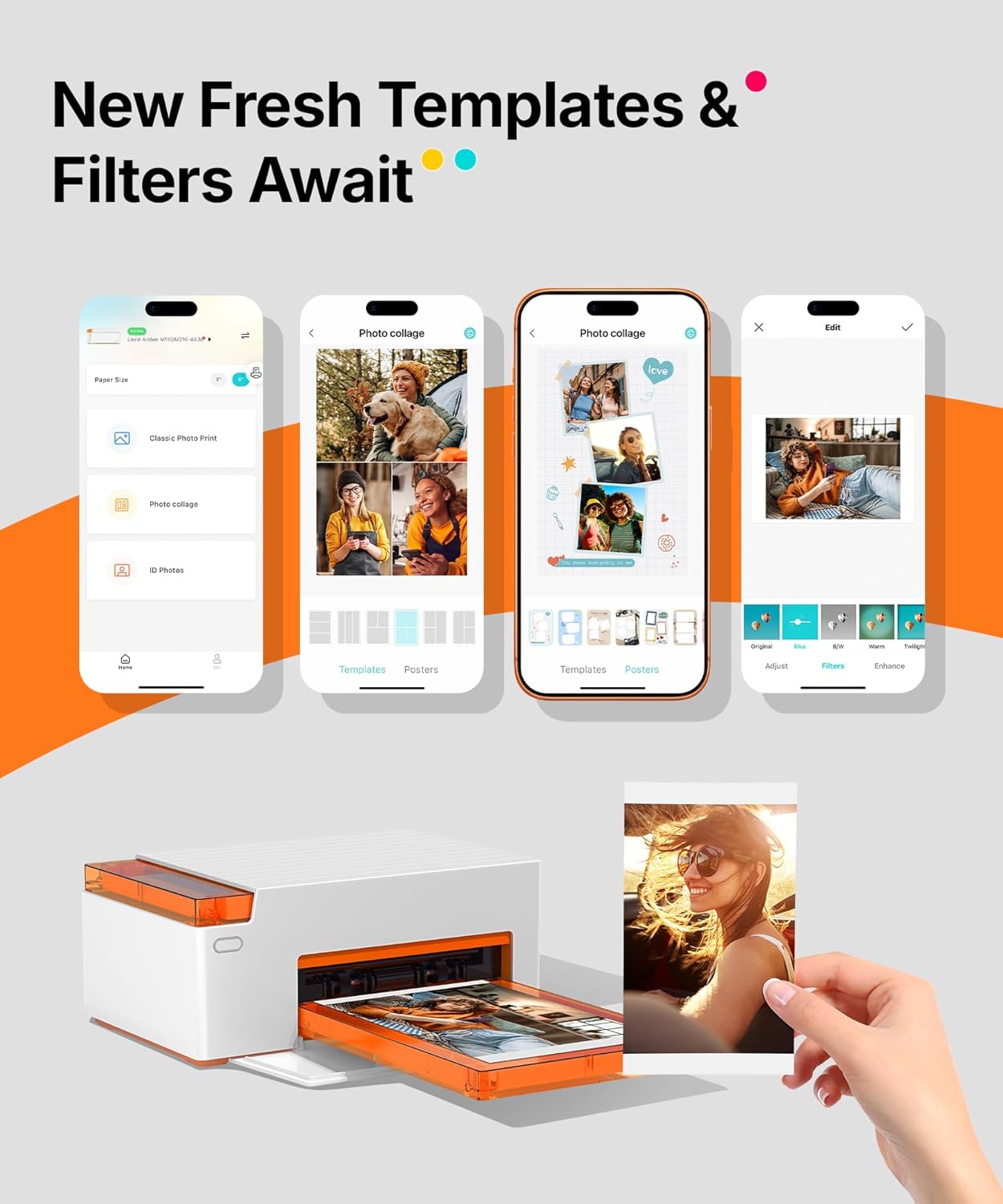
Customize your Printing with the Liene App – Customize your photos with our specialized App! You can add a Polaroid border, insert filters, enhance the contrast and brightness, check printing status, and more. You can even print your ID and Visa photos from home with this iphone photo printer for 4×6 & 3×3 prints.
13 reviews for Liene Amber M110 Bluetooth Photo Printer 80 Sheets, Portable Photo Printer for iPhone, Thermal Dye Sublimation, Picture Printer 60 Sheets 4×6 Paper & 20 Sheets 3″ Square Sticker Paper & 2 Cartridges
Add a review

Original price was: $199.99.$179.99Current price is: $179.99.
Amazon Customer –
Photo printer shop on the go!
Got this photo printer to print out some digital photos to frame and gift to family. Physical set up as well as app installation and configuration was very east. I was up and running in about 10 minutes after unboxing.Ran several test prints before running the actual prints to be printed. Photos came out as if it was developed at a photo print shop. The app let’s you do adjustments to the photos before printing, including resizing, color adjustments, apply filters, and adding text.The durability and longevity is yet to be determine, and will be tested on afew up and coming trips.If you dont want to have your photos sent to the cloud or to some company to print, not knowing if they may or may not store your personal photos, this is a great option to print photos at home or on the go.
Nicholas SB –
Maybe best purchase of this year.
Don’t think twice, go ahead and buy this one! I read a lot of reviews here saying the quality for this printer was great and that is TRUE! Even being pricy, is worth to have a good printer if you want to develop pictures once in a while, as a hobby.So far a total of zero problems with this product 🙂
Namaslay –
LOVE EVERYTHING BUT CAN BE PRICEY
**Update: If you are paying for the convenience, you’ll be happy with this. If you are paying for QUALITY, you will be happy with this. HOWEVER, if you are buying this to eventually save money, you’ll be disappointed. The printer is pricey to begin with and I was ok with it because I thought I’d save money down the line. But after researching… I wont. As a matter of fact, Ill be spending more money because I cant just use any photo paper- I’d have to use one that is specifically made for this printer (or any thermal ink sublimation printer) which are not cheap. Not only do I have to buy the photo paper but also a new cartridge for every 40 prints. You do the math.Aside from the costs….**I really love this little printer! I have so many photos on my storage devices that I want to print. With this printer, I can conveniently print it at home whenever I want it.While storage devices are fine to save photos, i think it’s a good idea to print it so you can share your memories with your family and friends when they come and visit.-So convenient to print from home. No more waiting 2 weeks to receive your photos or have to drive to dept store to pick them up.-Printer comes with 2 size photo papers to print on so you can start printing as soon as you receive it.-PRINTS SOOO GOOD. The colors are vibrant!-GREAT QUALITY- printer & photo paper are really good quality. The printer is well-constructed and seems durable. Definitely not cheaply made.-Prints right before your eyes. It’s pretty cool to watch the process. It goes through a 3-4 swipe process then it’s done (watch my video) Takes approx 1 min per photo. My toddler was fascinated! lol-PERFECT for scrapbookers or those just wanting to stick to traditional photo albums.-NO MORE MESSY INK. The ink cartridges are so simple- just unpack and slip it in. I didnt stain my hands or anything as the cartridges are.-Pictures dont smudge when you touch them right away. According to my research, Thermal Dye Sublimation does not create raised ink on the surface. It’s a process that produces vibrant, prints that are durable and resistant to fading and water damage once sealed.Product is definitely as advertised!-Comes with everything mentioned on the listing . (Photo paper of 2 sizes, 2 ink cartridges, printer, power cords)-Very simple to set up and use. Just scan the QR code on the printers door and there are videos that walk you through the process.-Connects to the bluetooth on your phone-DONT need the app – I can print directly from my phone or laptop-App is available for free download. You can edit your photos and add filters from the app (“Liene” App)Again, I LOVE THIS PRINTER! Would recommend if finances is not a concern!WOULD MAKE A WONDERFUL GIFT!
Sandra –
Quality prints for events
I ordered this photo printer for my granddaughter’s birthday party and I can say that everyone love it. The pictures came out so vibrant just like it showed on my phone. I love the small size made it easy for me to just pick it up and go. This printer will definitely be my go to printer for events I will be attending.
Nancy –
Liene
This is such a great picture printer. I’m not that teach savvy, but just took my time. Before I new it I was printing pictures off my phone.
C Kistler –
Works great even though instructions are not the easiest to follow
Good quality picture.Remember to use the program to print from – this does not show up in the printer area.Takes about 1 minute per picture to download and then print.
Jen G –
Not great for the price
Purchased this product w fairly high expectations but unfortunately it turned out to be quite disappointing. Bot the device an the app felt rather poorly executed.App in particular was frustrating to use. Lack of intuitiveness. The print quality didn’t meet the standard I was hoping for. Compared to this a traditional polaroid actually delivers a much better experience. Price of this product is fairly high.Shipping was very fast, which I did appreciate.
Hardman –
Print anywhere, anytime
I’m really impressed with this photo printer. The print quality is excellent, and colors come out vibrant, sharp, and true to life, making every photo look professional. The thermal dye sublimation process gives a smooth finish that feels durable and long-lasting, perfect for keepsakes or creative projects.The portable design is another big win. It’s compact and lightweight, so it’s easy to carry around or store without taking up much space. Pairing with my iPhone over Bluetooth is quick and simple, and having both 4×6 photo paper and 3″ square sticker paper included adds versatility right out of the box. The strong build and thoughtful design make it feel like a premium device.Overall, this printer combines high-quality output with a convenient, portable shape which ideal for anyone who wants to print beautiful photos at home or on the go.
R. & J. –
A sticker printer has been on my ‘love to have’ list for quite some time and after some less than thrilling experiences with another brand – i’m happy to report this Liene M110 is a winner.It has everything needed to get started printing amazing quality photos fast.It also prints 3×3 stickers which is the real selling feature, imo. I have an heirloom seed business and this is really going to up-level my packaging.For photos – it’s amazing – As someone who grew up in the 90s remember taking your film to the drugstore & waiting with anticipation for your photos to be developed… my teenage self is in heaven with this.Though I love the modern convenience of digital photography ~ I do feel like there’s something *missing* & with a physical print that you can touch, pass around or add to a flip through album – there’s a whole other level of appreciation.Because of this I was thrilled to try the Liene Amber M110 bundle.> Fascinating tidbit: Psychologists (echoed by parents) say that displayed prints reinforce belonging, especially for kids.Looking at prints together sparks deeper reminiscing, reduces loneliness, and evokes stronger emotions than swiping on a screen. ~ In short, prints make memories feel alive and permanent, turning fleeting moments into heirlooms that bring joy, connection, and comfort.This little baby quickly became my go-to for at-home photo printing. It’s super easy to use, produces vibrant results, and adds fun features that set it apart from the competition.If you’re like me & not a fan of uploading your personal pictures to a lab somewhere like walmart where there’s no guarantee of privacy etc. This is a great option to bring the photo lab to your home.Here’s my breakdown based on hands-on use…- Appreciate Its compact size (about the footprint of a book) fits perfectly on my desk without dominating the space.- The white finish gives it a clean, premium vibe, and it’s lightweight enough to take on the go for events etc..- Setup was a breeze via Bluetooth, and the app integration feels intuitive right out of the box..(you just scan a QR code- it’s not overly complicated.)* Print Quality and Comparisons:At 300 DPI, the print quality is on par with the Canon Selphy series – sharp, glossy, and lab-like with a protective overcoat for water and fade resistance.Having used the Selphy before, I noticed the Liene’s images come out slightly different: ~ darker blacks and what feels like more accurate colours overall. ( It’s subtle, but it gives photos a richer, more professional look, imo.)I put the Liene to the test by printing a photo of one of my prized tomatoes on both the Liene and my old Kodak Mini Retro (using up some leftover paper). I’m no expert but I’d describe it as..The Kodak has much higher contrast, is more saturated, and “punchier” I would describe it as harsh, over-processed, artificial or less natural.Where as the Liene M110 results more natural/refined reproduction – closer to the original image, with smoother gradients, accurate skin tones, and a cohesive, realistic feel. with better overall colour accuracy, less over-saturation, and a “true-to-life”quality.- Prints take about 50-60 seconds and it’s fun to watch it go colour by colour through the process.*Standout Features:*Sticker printing:Allows me to incorporate some high quality images into the packaging for my heirloom seed company without having to order stickers online only to realize later there’s a printing error & creating delays, increased costs etc.)- The bundle includes 3″ sticker paper, turning ordinary photos into custom decals for your DIY projects, product packaging or just your usual laptops, water bottles etc.This pushes the Liene past being just another photo printer – & into a creative tool.The app allows for some edits like borders, text, and effects ~ but it could offer more in the way of creative options…that said -for now I just edit in an outside app like Canva & import the results into the Liene app.*Price Per Print and Comparisons:The kit comes with 2 cartridges & 60 4×6 pages & 20 3” sticker prints. Each cartridge is good for 40 printsThe bundle option provides the exact amount of ink required & subsequent refill kits are also matched this way so you’re never guessing if you’ll have enough ink.- Running costs are similar to that of competitors with Liene being slightly higher by a few cents at the momentdue to the availability of 3rd party off-brand refills for brands like Canon etc. being highly accessible & more affordable(…but since they’re off-brand products the quality of the printed images is likely questionable IMO.)Overall I would say that Liene’s sticker perk justifies the slight premium – plus, this bundle includes starter supplies to offset initial costs.Liene seems to be a relatively new player in the photo printing space, In a field dominated by older giants like Canon and Kodak, carving out a foothold by emphasizing great value & convenience with bundles like this one.Their sticker-printing is a smart innovation ( i think they also recently released the PixCut S1 – which is a sticker printer / die-cut combo which which i would *love* to try!Overall, the Liene Amber M110 bundle sticks out from the crowd, a solid 5 stars from me.It’s not just a printer; it’s a fun, creative companion that delivers quality prints with a twist. Highly recommended!
Rick Rev –
This portable 4×6 inch photo printer from brand LIENE is a bit of a mixed bag of pros and cons for me, particularly when up against offerings from some of the larger brands, namely Canon, and their “Selphy” line of portable printers. If direct comparisons are made to this series, then in some respects, the Liene printer does fall flat. I will try to showcase both its useful values, but not discount its failings.The LIENE M110, which is the printer I am directly comparing to the Canon Selphy today (and which LIENE does appear to attempt to emulate to some degree), does does offer a few unique differences that could be more useful to some, and seems to set it apart somewhat, but only marginally. For example. the tray on the top can be interchanged between the 6 inch standard photo print, and a smaller 3 inch sticker paper. Although the Selphy does offer “sticker” options for print, they are not included in the initial package, whereas LIENE features this, and includes two individual trays for each type, both of which fit symmetrically with the printers rectangular form factor. I really like that, and find they have chosen to market to this strength.The brand seems to offer all the printer ink, paper and sticker options one would need after running out, though I had to fish a bit to understand which 4×6 paper and ink combos in particular the M110 required, since it appears to be the newest model. I wish the brand had made this more clear from the onset.One thing that separates the Selphy printer line from Canon apart from this LIENE printer, is its ability to make itself truly portable with the inclusion of an attachable battery in the back. The M110 omits this feature, yet still promotes the product as portable. In reality, although smaller than an average printer, it is still bound by its corded requirements, only becoming truly portable if you were to plug it into an external battery via USB-C port, which does seem to be included, but is not readily advertised. Still, it’s there, so with a smaller cord and battery of your choice, you technically could use this when not near a wall outlet.I found the software for Selphy to be simple enough, albeit somewhat limited. LIENE offers similar app interface for stylizing and printing via Bluetooth; the connection is likewise fairly easy, and the app is actually, in some respects, a step forward, offering more customization of your stickers and photos than the other brand, including allowing multiple photos to be framed like a carousel, placed together on a single print. The entire device is significantly more colourful as well; the bright orange design is perhaps an acquired taste for some by comparison to the Selphy’s standard dark grey or white options, but its definitely striking, and I have no complaints about that.In fact, the more I have used this printer, the more I can laud its positives. The similarities to the competitor are there, but they seem to be differentiated enough that it shows an attempt at least at being original and fun. I would suggest this as a great alternative, given that there is an ample supply of printer ink, paper and stickers included. There is however, the budgetary caveat to consider. At the time of this review, the LIENE M110 is significantly more than the aforementioned Selphy, by a significant margin, making the latter perhaps a better cost-effective solution, but there might actually be more value from the M110 package as a whole, at the onset.I cannot fault the brand for offering a solid product though; its performance is in many respects as fast and as quality a print option as the only other real alternative on the market. 4 stars.
The great spender –
I was a bit sceptical at first on a small home printer for photographs however I am absolutely blown away by this. Out of the box it doesn’t seem like much just a plastic white box with some orange cartridges, instruction guides, paper and power wire. This came with two different sizes of photo paper. 4 x 6 and 3 1/2 x 4. Which I thought was a bit of an odd size but makes four nice sized refrigerator photographs. The instructions are easy to follow and the printer took less than five minutes to set up and get printing. There is an app that you will require and can be found using the QR code on the front cartridge insert door. Instructions are also provided via QR code. An app is very easy to use quick to install and you can limit access to your smart device if you want. That said there is a USB-C port on the back that will allow you to print directly from your computer or other wired smart device. This is very quiet when printing and it is interesting to watch the progress of the photo being printed in three separate colours then laminated with a glossy clear the photo is phenomenal on how clean it looks. If you are looking to print one or two photographs occasionally this is definitely a nice to have. It is a bit slow just under a minute for each print, but the quality is definitely there. Once your 4 x 6 photograph has been printed you can break off the end tabs that are pre-cut and crisp. I believe these tabs are for centring on the photograph when printing If you’re looking for a way to send family photographs to your loved ones over the holidays. This is an easy way of printing beautiful copies for your Christmas card.
Canada –
This worked well. The printer is tiny but works well: the prints come out well and we found the quality to be good enough to share and keep as little keepsakes: to my eye, every bit as good as the sticker photo booths.The printing process was really fun to watch: it’s incremental and looks really cool as it come together.
Mimoki –
The thermal dye sublimation technology produces colours that look vibrant and natural, blacks are deep rather than washed out grey, and the automatic lamination process means photos come out protected against water damage and fingerprints without needing a separate laminating machine which saves both money and hassle.The dual tray design handles both 4×6 inch standard photo paper and 3×3 inch sticker paper seamlessly, you just load whichever size you need and the printer recognizes it automatically. Setup was straightforward, scan the QR code on the printer door and follow the video instructions that walk you through connecting via Bluetooth and loading the cartridge and paper. The cartridges slide in cleanly without any mess, no ink stains on fingers like traditional inkjet printers which is a relief. Print speed is reasonable at roughly one minute per photo, you can watch the process as it goes through three or four passes building up the image layers.The dual tray design handles both 4×6 inch standard photo paper and 3×3 inch sticker paper seamlessly, you just load whichever size you need and the printer recognizes it automatically. Setup was straightforward, scan the QR code on the printer door and follow the video instructions that walk you through connecting via Bluetooth and loading the cartridge and paper. The cartridges slide in cleanly without any mess, no ink stains on fingers like traditional inkjet printers which is a relief. Print speed is reasonable at roughly one minute per photo, you can watch the process as it goes through three or four passes building up the image layers.The cost per print is higher than bulk online ordering at around 50 cents per photo when buying refills, but the convenience and immediate gratification make it worthwhile for me. Build quality feels solid, the printer housing is well constructed and doesn’t feel cheap or flimsy. Perfect for creating physical photo albums, scrapbooking projects, or just having prints to share with family when they visit.