

UGREEN NAS DXP2800 2-Bay Desktop All-Round NASync Ideal for Small Team, Enthusiasts, Intel N100 Quad-core CPU, 8GB DDR5 RAM, 2.5GbE, 2X M.2 NVMe Slots, 4K HDMI, Network Attached Storage (Diskless)
$177.99
Related Products


Product description
All-Round NAS: UGREEN Nas DXP2800: Free Up Space, Free Your Digital Life.
The video showcases the product in use.The video guides you through product setup.The video compares multiple products.The video shows the product being unpacked. what is ugreen nas Merchant Video
All-round 2-bay NAS that’s perfect for home users and creators who want smart media management and effortless backups. Supports both Docker and virtual machines.


1 Why NAS ?
2 Cost-effective
3 Aluminum Alloy Shell
4 Access Anywhere
5 Widely Compatible


1 Your AI Assistant
2 Baby’s Growth Album
3 Family’s AI Album
4 Award & Media Recognition
 The Highest-Funded NAS Product on Kickstarter
On Kickstarter, the UGREEN NASync series has garnered support from over 13,000 backers, raising $6.6 million and becoming the highest-funded NAS product on Kickstarter, earning the “Best of Kickstarter” award.
See What the Pros Say
“I think UGREEN has done quite well across the board with this series.” — TweakTown
“Performance advantage in similarly priced models from the competition.” –TechPowerUp
“The DXP4800 Plus is a 4-bay NAS that has the best hardware in its category. ” –Android Central
“The presentation of the DXP4800 Plus is genuinely top-tier. ” –NASCompares

The video showcases the product in use.The video guides you through product setup.The video compares multiple products.The video shows the product being unpacked. Unboxing the UGREEN NASync DXP4800 Plus Merchant Video
Unboxing the UGREEN NASync DXP4800 Plus Unbox Therapy
Unbox Therapy
The Greatest Storage That’s Ever Lived? Salem Techsperts
“This impressive piece of tech has earned my approval! I actually replaced my old NAS with this, and that’s not something I take lightly…”
The video showcases the product in use.The video guides you through product setup.The video compares multiple products.The video shows the product being unpacked. The Greatest Storage That’s Ever Lived? Merchant Video
 NASync DXP4800 Plus Hands On Zach’s Tech Turf
“This is the UGREEN NASync DXP4800 Plus, it’s basically like building your own private cloud server, but it’s super easy…”


1 High-Performance CPU
2 8GB DDR5 RAM
3 Fast Transfers
4 Dual M.2 NVMe Slots
5 Heat Dissipation


1 UGOS Pro
2 Security
3 Video Center
4 Virtual Machine & Docker
5 2 Years After-sales



1 Professional Services
2 Versatile Interfaces
3 Packages Included
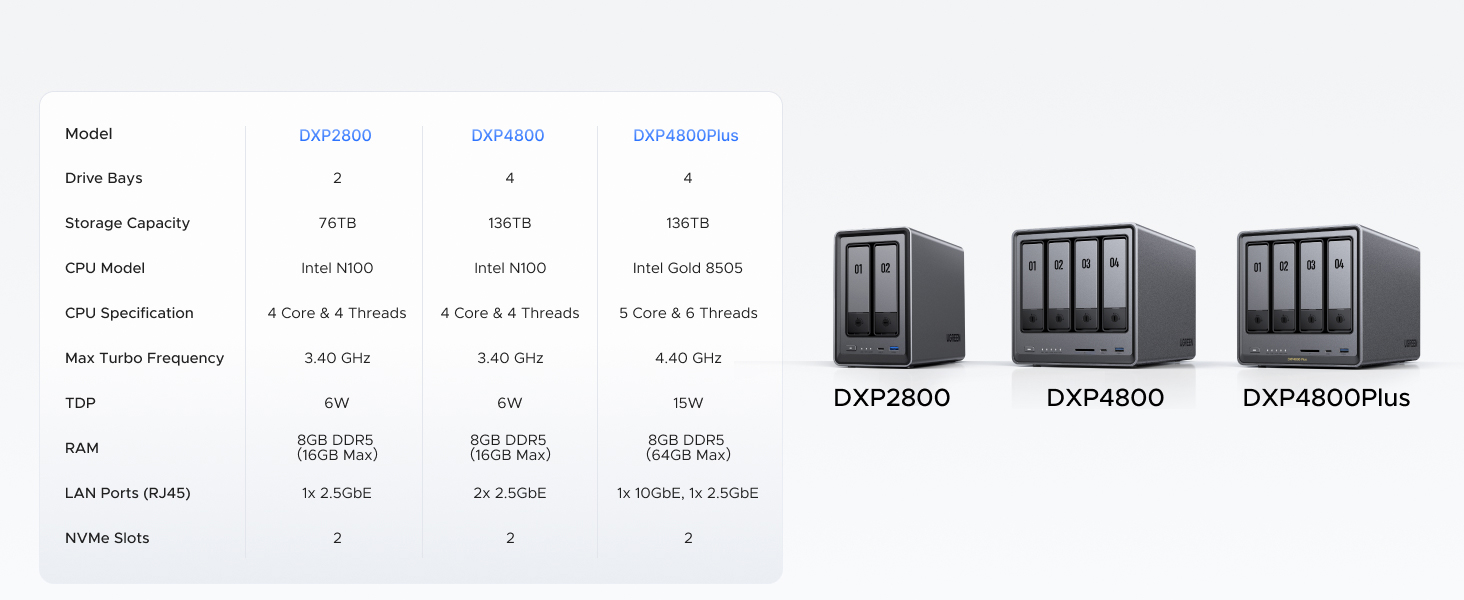
4 Model Compared
5 FAQ
All-Round NAS: DXP2800 is ideal for enthusiasts, small Teams, & More. You will get pro specs and advanced features from accessible and user-friendly storage. It is intuitive for users moving from cloud storage or external drives and helps you to create an intuitive and secure platform to centralize, organize, and securely share your data. Just move away from data scattered across devices.
Spend Less, Store More: Unlike costly cloud storage subscriptions, NAS only requires a one-time purchase with no ongoing fees, offering much better long-term value. Storing your data locally also provides far greater data security and gives you complete control. All-Round NAS is ideal for small team, & more.
Massive Storage Capacity: Store up to 76TB, giving you more than enough space to back up all your files, photos, and videos. Automatically create photo albums and enjoy your personal home cinema.
User-Friendly App: Simple setup and easy file-sharing on Windows, macOS, Android, iOS, web browsers, and smart TVs, giving you secure access from any device.
AI-Powered Photo Album: Automatically organizes your photos by recognizing faces, scenes, objects, and locations. It can also instantly remove duplicates, freeing up storage space and saving you time.
Secure Private Cloud: Keep full control over your data with advanced encryption, ensuring your files and personal information are always protected.
Best Performance in Class: Equipped with a 12th Gen Intel N100 processor and a 2.5GbE network port, this NAS can comfortably run multiple apps at the same time and transfer a 1GB file in as little as 3 seconds.
Widely Compatible: UGREEN NASync is compatible with Western Digital, Seagate, Toshiba, and more third-party hard drives. Please check our compatibility list for full details. Note: Storage hard drives are not included and need to be purchased separately.
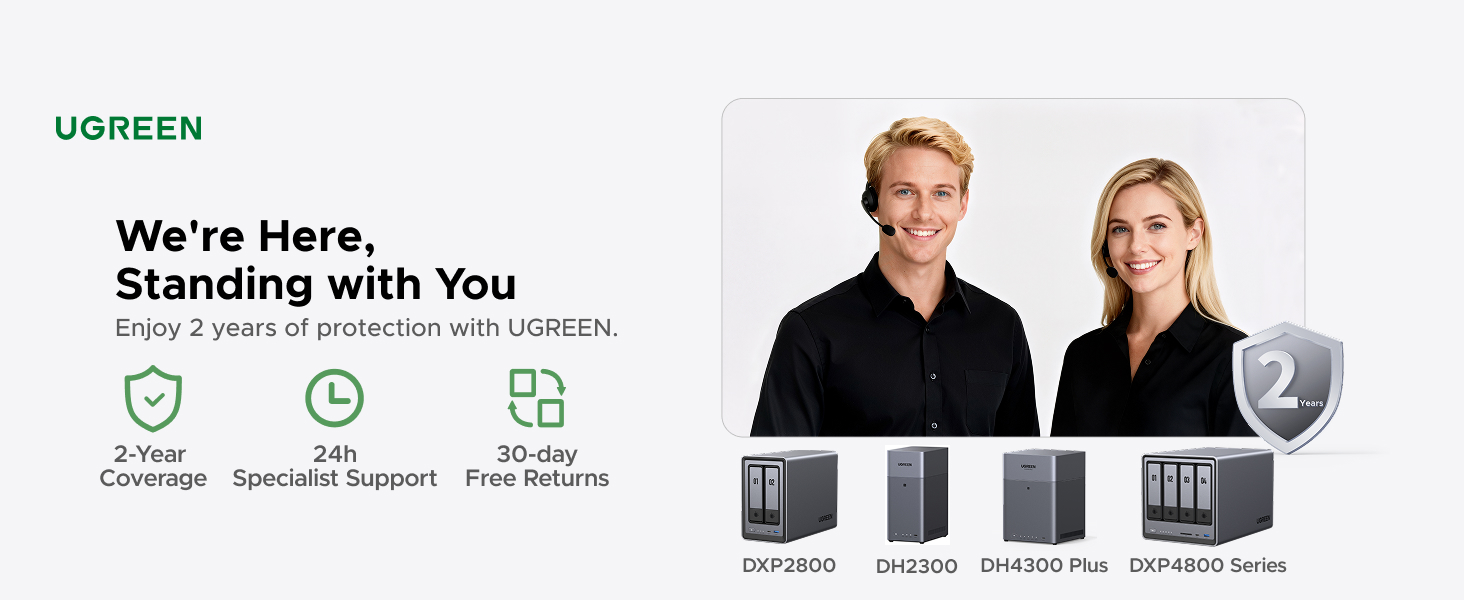
2-Year Warranty & Support: You will enjoy 24/7 specialist support and 30-day free returns. We are here, standing with you. We stand by our products. Facing an issue? Whether it’s damaged packaging, a quality defect, or receiving a used item, contact us via Amazon. We’re here to make it right.
8 reviews for UGREEN NAS DXP2800 2-Bay Desktop All-Round NASync Ideal for Small Team, Enthusiasts, Intel N100 Quad-core CPU, 8GB DDR5 RAM, 2.5GbE, 2X M.2 NVMe Slots, 4K HDMI, Network Attached Storage (Diskless)
Add a review

$177.99
D. LEBLANC –
Simple, Fast, Performant, Great Software. Buy now, don’t look back.
This is the easiest, best 4 bay NAS money can buy. You will be up and running in _no_ time. Snapping in four drives of whatever size you choose takes moments. I unwrapped four Toshiba N300 Pro 18TB drives and snapped them into the chassis in about 4 minutes. Connected the NAS to my 2.5GB ports on my lan and had everything up and running and updated with the latest software in under 30 mins. Time to get going is important, but what’s more important is how does it run over time?I am 9 weeks into owning the thing and I can tell you this: The software is easy. The system is complete… it’s robust… it has features I’ll never use–and that’s cool if you’re looking for a gimungous media server or whatever… I needed it for digital camera RAW storage in a RAID5 scenario. I couldn’t say more good things about the product.Managing permissions for users on your LAN is easy, managing storage and basic drive management, etc. is easy. Updating the software routinely as patches and security updates are released is easy. Once upon a time Apple owned “easy” and now iOS has 1138 settings in the general tab and nobody can make it do anything–but this NAS is _easy_. And good. High performance reads and writes near theoretical limits… I literally can not say enough good things about it.Buy it and don’t look back. Great value, great performance.
Burn0u7 –
Great NAS, UGREEN is awesome
I’m an IT nerd by trade. Normally, i build my own NAS units out of old machines. This time i decided to bite it and just buy a NAS because i’m lazy in my older age.This NAS is easy to set up and get running. has a ton of options for anyone, completely user friendly, easy to upgrade. Flexible thatit supports most x86/x64 based operating systems. you’d just need to upgrade the primary boot drive internally which is a 128gb SSD i believe. Yes you can run windows server on this thing but the default UOS has everything you’d need with less overhead. You can run TrueNAS or UnRaid if you want. tons of videos online showing you what to expect. Note that if you do change / swap the OS, you should either image the default boot drive or pull the drive and replace it then store the original drive in a safe place because ugreen has said you cannot download the stock base OS and restore it.The image i included or attached is the desktop. this is the web interface. the unit has a physical HDMI port and does supply video but i have not used it.Do yourself a favor though. upgrade the ram. the 4 bay unit has 1 ram slot. uses DDR5 i have DDR5 5900 in it, a single 32GB module. The Ram module runs at 1.1v i believe too. it will speed up the transfers and help the unit do what it needs to. Also drop in a pair of 512gb NVME drives and assign them as cache drives. this will boost the overall throughput too. i dropped in a pair of 2tb nvme drives just because i have a couple of them laying around.My unit i stuffed in 4 24TB sata NAS drives. you can use desktop drives but just know this thing will hammer on those drives so desktop drives might suffer in longevity and might prematurely fail. NAS / Enterprise grade drives will last longer and they are built to suffer.I have NAS grade drives in my unit. All are 7200 RPM. i get anywhere from 240MB/s to about 290MB/s transfer speeds this is before i added the cache drives. now i usually get around 730MB/s the unit manages the cache automatically. it will fill the cache drives then shove the data from cache to long term storage as it goes.I have mine configured for RAID 0, BFS file system. it asks you how you want it configured when you plug drives in and do the initial setup.
KT ELA –
⭐️⭐️⭐️⭐️⭐️ Beginner-Friendly, Blazing Fast, and Beautifully Built – UGREEN NASync DXP2800 Nails It
I’m a beginner when it comes to setting up my own NAS for business use, but the UGREEN NASync DXP2800 made the process incredibly simple. From unboxing to full setup, it took me just 20 minutes to figure out what needed to be done, install my WD 20TB hard drives, and configure the system. The only caveat: formatting the drives took a couple of hours—but that’s expected with high-capacity storage.💾 Performance Upgrade: I paired the NAS with UGREEN’s Cat8 Ethernet cables (3ft and 10ft) to connect my router to my internet switch and then to the NAS. My system used to feel clunky with competitor cables and older hardware, but now it’s blazing fast and incredibly responsive.🧠 Easy Setup for Beginners: The tool-free chassis and intuitive interface made setup a breeze. Even with zero prior NAS experience, I was up and running in no time.🎯 Smart Features: Supports RAID, dual M.2 SSD slots for caching, and AI-driven photo management. It’s perfect for organizing client files and securely archiving business data.📺 Connectivity & Design: The HDMI output and multiple USB ports offer great flexibility. The unit looks sharp, and paired with UGREEN’s blue and black braided Ethernet cables, my setup is both professional and stylish. Bonus: the braiding is resistant to love bites from my wife’s fur babies, which is a real win in our pet-friendly office.🙌 Reliable Support: UGREEN’s customer service was excellent. I had a few setup questions, and their team was responsive and helpful.
Moises –
Es un NAS increíble y las capacidades que tiene da mucho margen para sus usosSolo me gustaría que en la galería de fotos se pudieran etiquetar las fotos para poder organizar mas facialmente las fotos
Tenzin –
Great NAS! Got it on sale, and its been awesome and running straight for a month.Slotted in 3-12tb NAS drives and run them in RAID 5. Took 3 days to build the array, but its been running well.It only has a few Apps available at the store so far, including Docker and Jellyfin which work pretty well if you configure them right. Took me a few hours to learn how to do it and configure everything, but thats from 0 knowledge and it was pretty easy to pick up.I wouldn’t really run VMs on it, just because the CPU is rather limited.Mostly set up as a photo back up(with the sync and backup App) and a media server(Jellyfin). I run the Jellyfin server on my Linux server though, since I find its easier to configure. You just have to permanently mount your network drives so you can access the NAS storage. It even has a built in remote access without configuring ports, so you can access and backup when your away from you local networkWould definitely recommend to get this if you have no experience with NAS, since its very easy to pick up
Armando S. –
Un gran dispositivo, superfacil de usar y muy intuitivo. Si no tienes conocimientos de previos el sistema operativo de Ugreen es muy amigable. Lo recomiendo ampliamente.
Steph G. –
so far so good, very easy to install and setup.I have 3 drive 12To.
Amazon Customer –
Great NAS, great software. Should give UGREEN a shot they do regular updates and listen to the community.