

USB C Video Output Hub, 3 USB-C & 2 USB-A 3.2 10Gbps Ports, 4K@60Hz HDMI, 100W PD, SD/TF, USBC Splitter Dual Monitor Adapter for MacBook Pro/Air, iMac, iPad Pro, XPS, Surface, Galaxy S22,Samsung DEX
Original price was: $59.99.$7.99Current price is: $7.99.
Related Products





Product description


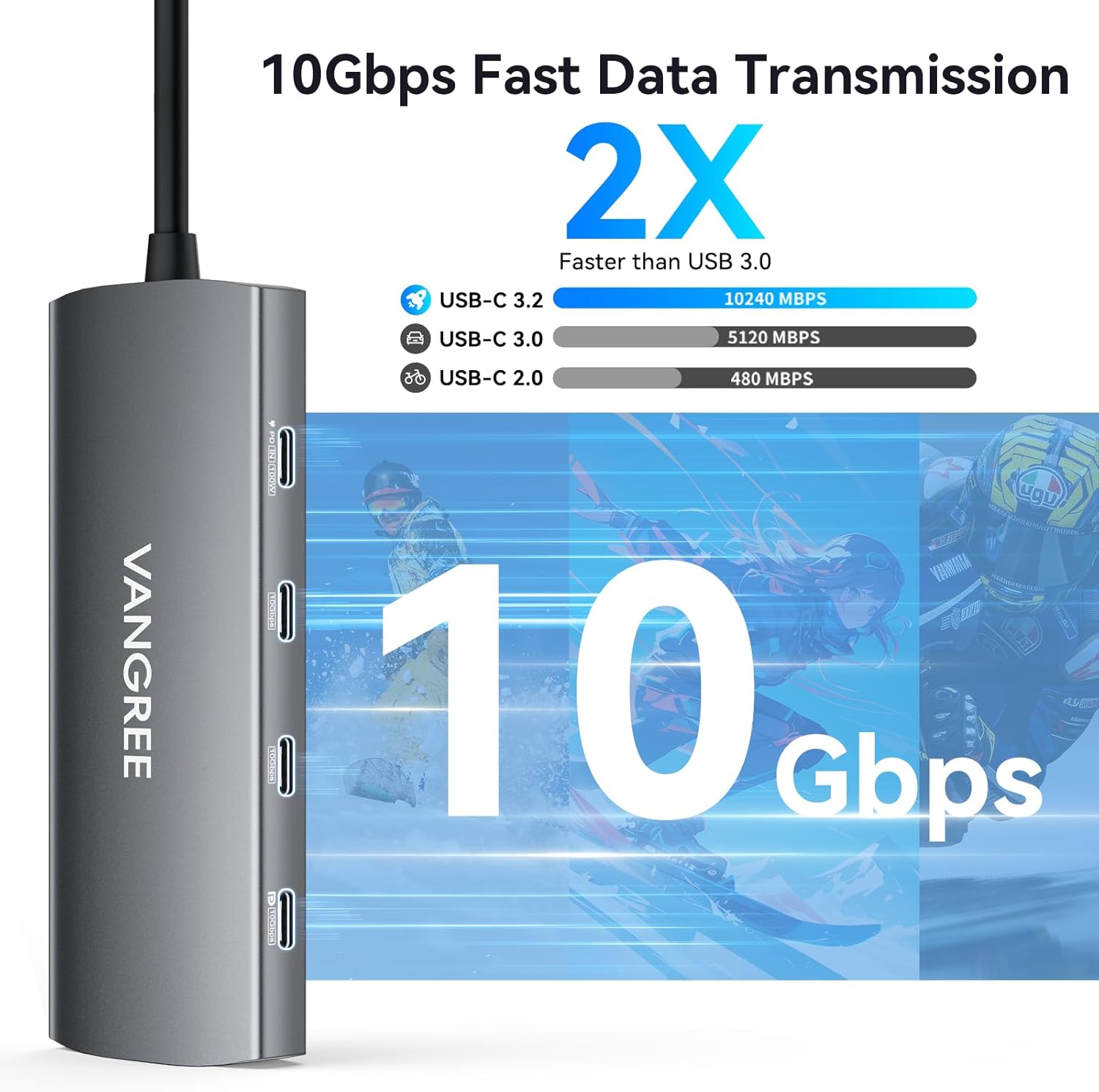
Get 2×USB-C 3.2 data ports(10Gbps), 2×USB-A 3.2 data ports(10Gbps), 1×USB-C Displayport(4K@60Hz &10Gbps Data Transfer) port, 1×4K@60Hz UHD HDMI port, 1×100W Power Delivery, 1× SD/TF slots. Warm Tip: Only one USB C port supports display & video output.


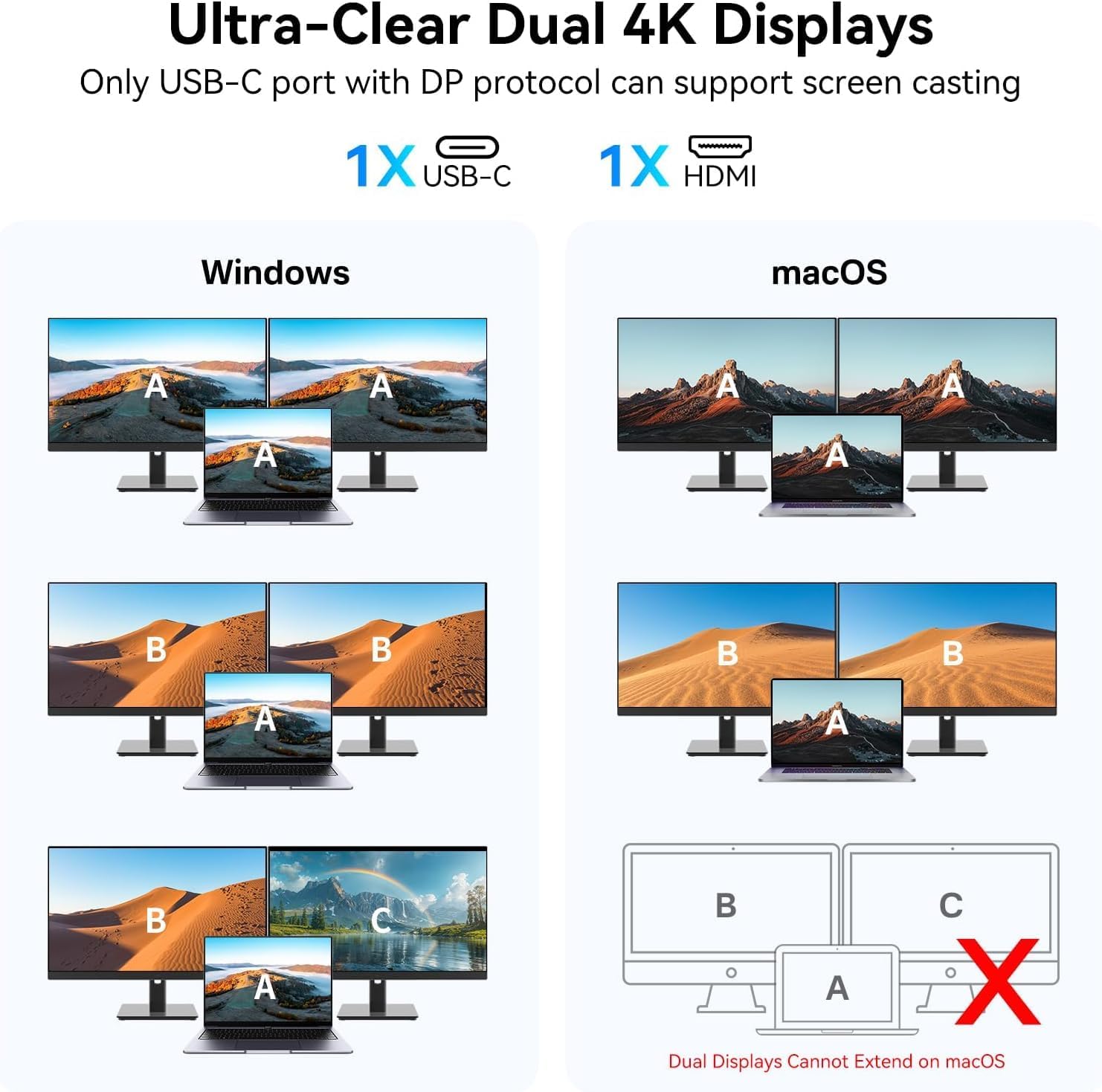
1 Extend USB-C+HDMI Display
2 USB-C Video+Data Output
3 10Gbps Data Transfer
4 Max 100W PD Charging
5 SD/TF Card Slot


1 Dual Display Modes
2 Interface Standards
3 Rapid Heat Dissipation
4 Safe and Reliable
5 Product Specifications


1 USB-C Video Output Device
2 Kind Suggestions
3 Wide Compatibility
4 Compatible Device


1 Work From Home 2 For Portable Monitor 3 Learning Available 4 Plug and Play
Comparison
Add to Cart
Customer Reviews
4.6 out of 5 stars 160
4.4 out of 5 stars 514
4.6 out of 5 stars 160
4.2 out of 5 stars 104
Price
$49.99$49.99
$39.99$39.99
$79.99$79.99
$39.99$39.99
Number of Ports
9
8
10
9
Connection Technology
10Gbps
10Gbps
10Gbps
10Gbps
USB C Displayport
1 x 4K@60Hz
–
2 x 4K@60Hz
–
Charging for Laptop
80W Max PD Pass-Through
80W Max PD Pass-Through
80W Max PD Pass-Through
90W Max PD Pass-Through
USB-C Port
2 x 10Gbps, 1 x 4K@60Hz/10Gbps
3 x 10Gbps
2 x 10Gbps, 2 x 4K@60Hz/10Gbps
3 x 10Gbps
USB-A Port
2 x 10Gbps
3 x 5Gbps
2 x 10Gbps
2 x 5Gbps
HDMI Port
1 x HDMI 2.0, Up to 4K@60Hz
1 x HDMI 2.0, Up to 4K@60Hz
–
1 x HDMI 2.0, Up to 4K@60Hz
Ethernet
–
–
1000Mbps
–
SD Card Slot
1
–
1
1
Micro SD Card Slot
1
–
1
1
9-IN-1 USB C VIDEO OUTPUT HUB: This USB C Hub expands one type-c port to 2*USB-C 3.2 10Gbps ports, 2*USB-A 3.2 10Gbps ports, USB-C DisplayPort (4K@60Hz & 10Gbps), 100W power delivery port, 4K@60Hz HDMI port, SD/TF card reader.
10Gbps USB-C & USB-A 3.2 DATA TRANSFER: This USB C Hub can synchronize data through 3 USB-C & 2 USB-A 3.2 ports with 10Gbps data bandwidth, which can transfer and backup data for your external devices more efficiently.
USB-C DISPLAYPORT: Only one USB-C DisplayPort supports 4K@60Hz display and 10Gbps data transfer, offering seamless extended monitor functionality and high-speed video transmission without needing HDMI interfaces. Downward compatible with 1080p@120Hz, 1080p@240Hz.
4K@60Hz HDMI with HDR: Stream videos, animations, and presentations smoothly with zero lag. HDR(High Dynamic Range) delivers richer colors and deeper contrast for lifelike visuals, while the 60Hz refresh rate ensures fluid motion from Netflix to PowerPoint.
DUAL MONITOR ADAPTER: This USB C Hub is equipped with a 4K@60Hz USB-C DisplayPort and a 4K@60Hz HDMI port to meet your need for extended dual monitors. Windows systems support MST. MacOS systems support SST. Note: Due to MacOS limitations, it can’t extend to two different screens.
Note: Most computers’ USB-C ports support max 15W output. Total power of connected USB peripherals (e.g., SSDs) exceeding 15W may cause disconnections. Each USB-C port of this product outputs 5V 3A.
12 reviews for USB C Video Output Hub, 3 USB-C & 2 USB-A 3.2 10Gbps Ports, 4K@60Hz HDMI, 100W PD, SD/TF, USBC Splitter Dual Monitor Adapter for MacBook Pro/Air, iMac, iPad Pro, XPS, Surface, Galaxy S22,Samsung DEX
Add a review

Original price was: $59.99.$7.99Current price is: $7.99.
Han –
Incredible Hub that does it all!
I wanted to give this hub a thorough review since no one else has. Here’s what I found:For just $54, you get a hub that does it all! It checked every box I needed for my setup.Here are the pros:- HDMI 4K 100Hz locked with an UGREEN 8K HMDI: This is a great feature for those who want to enjoy high-quality video.- USB-C Display Port through Thunderbolt: I have an AMOLED 3K 120Hz Portable Monitor that projects those numbers at different refresh rates. It works great!- Pass-Thru Charging: As long as you have PD Power installed, this hub can charge your 2025 Apple MacBook Air M4 and iPhone 16 Pro Max while all screen mirror from the phone or used as an Extended Display from the MacBook.- Connectivity: I plugged in two SSD’s, one standard HDD, and a 1TB Micro SD card all at once to see how much load it can take. It all worked great! You can check out my attached photos for read/write speeds, which matched my expected speeds. It does get pretty hot, though. If you want to permanently install it somewhere, you’ll need a cooler environment. The ambient temperature was 28 degrees Celsius or 82 degrees Fahrenheit during all the testing. I wanted to see how well it would function in warmer conditions. The surface of the hub, at max port allocations, is super hot. Not to a point where it would burn you, but it is definitely uncomfortable if you held it in your hand for a short duration.Every port except one USB-A was occupied during the entire run. It even printed some labels from my 4×6 Laser printer for shipping while everything was running. I had another USB Hub that couldn’t even print through USB-A and I had to use a dongle. I returned that and tried this Hub instead.Here’s how I’ve been using the Hub: I’ve charged my MacBook Air M4 and powered all my connected devices. I’ve attached photos showing the power consumption statistics at full load. Right now, I’m using the Hub to project to my 16-inch portable monitor through HDMI with the PD power connected. The monitor is powered remotely through my power station. For some reason, the Hub is having trouble connecting to the portable monitor. In the past five minutes, the monitor turns off for a quick second and then keeps playing the movie. Everything is connected smoothly. My internet speed at home is 2,000 MBPs on WiFi 6, so streaming is no problem. My phone is at 90% capacity, so it’s in the trickle charge stage, so it’s not using a lot of power. I switched the cables from HDMI to USB-C from the Hub to the iPhone. It’s still charging the iPhone and powering the monitor. It takes less than two seconds to connect on either the MacBook or the iPhone. I put on another movie from the Hub using USB-C to USB-C, and the video from the Apple TV app is much better. The video hasn’t flickered or lagged, and the quality is still amazing while playing a movie from the HDR library, Avengers Infinity War. I switched the display to an IPS LG 27-inch 2K 240Hz video game monitor, and as of now, there are no issues. The video looks great with the same movie running. This suggests that there’s a small compatibility issue with the Hub interfacing with monitors that can use Thunderbolt and HDMI. To make my 3K portable monitor work with HDMI, I need it to be powered through USB-C. I think it’s having conflicting issues with each other. So, I checked the portable monitor’s user manual to see if there were dedicated ports for it. It doesn’t describe it in words or pictures. I tried switching the power input ports on the monitor from Port 2 and Port 1 and so on, but nothing changed. The intermittent flickering still persisted. So, it seems like the portable display is conflicting with the hub and the iPhone.I switched to a 2025 iPad A16 to see if the issue would repeat itself. As of now, I haven’t seen any problems. It seems the issue is only specific to the iPhone, which is strange. One last thing I tried was removing the PD Power supplying the hub and charging the iPhone. Well, that actually worked! The flickering is gone completely. I knew the issue was somewhere very specific. So, the portable monitor and the hub have problems communicating if the HDMI, PD Power, and the hub is connected to the iPhone, but no issues with the iPad. It’s the phone. I’d like to try the same setup with an Android device, but I don’t have one.Pros:- Gets really hot at max load capacity with all ports allocated.- Negotiating issues between iPhone-Hub-HDMI with the video flickering, intermittently with certain displays that have the ability to do Thunderbolt Display and HDMI. The issue is resolved if PD Power is removed from the hub. Only an issue with the iPhone, but not with the iPad.- The USB-C input/output cable built into the hub is short and not braided. Over time, those cheap cables degrade, especially with the heat and are outdated to today’s standard.Overall, I give this device a 4.5 out of 5-Star Rating.The cons I had for the device could be potential points of failure or even severe points of rapid degradation due to the lack of heatsink/heat dissipation, and the overall perpetual use of the built-in cable, and the negotiating factor, BUT it’s not a deal breaker. During normal use, the hub is warmish and not hot at all. The flicking could be an extremely annoying issue, but it’s a very very specific issue that is easily fixable.I am extremely happy with this Hub!The best part about the Micro SD card input options was the Ethernet capability. If I needed that, I could just buy an RJ-45 to USB-C dongle. But that would be super rare.As a background, I work in IT, specifically in Telecommunications Structural Cabling Installation and Fiber Optics.
Kindle Customer –
Works Well, gets hot.
This works perfectly to allow me to run three monitors and my laptop when working from home. Powerful little hub. It does get hot, but I put a small desk fan blowing on it and it stayed cool then. Allowed me to work from home with all the monitors I needed while recovering from foot surgery.
Dustin Udy –
Works with two USB-C monitors
I got this dock becuse I have two portable USB-C monitors, a keyboard, and a mouse, and I swap out two laptops. The dock works great so far. For the personal laptop both monitors plug-in to the dock and both screens and the laptop screen work great. For the work MacBook I have to plug one monitor into the laptop so each screen is different. That is a limitation of the Mac book.No extra power is needed to power both monitors, which is great.This was the only USB-C dock that I could find to support both monitors on USB-C and it was a pretty fair price.
Jeremy Jolly –
Great except audio noise
This works extremely well to simplify a Steam Deck with external monitor set-up. For that application, it’s ideal. However, I did also test it with my desktop and while everything works OK, there was an unacceptable & unpleasant amount of electrical noise over the USB-C connections. If you are doing any kind of hi fidelity audio, do not use this hub. Otherwise its great.
Cowboy Rick –
⭐⭐⭐⭐⭐ A Must-Have USB-C Video Hub for Samsung DEX & More!
I recently purchased the VANGREE USB-C Video Output Hub, and I couldn’t be happier with its performance! This isn’t your typical USB hub—it’s a game-changer for anyone using Samsung DEX, portable monitors, and other USB-C devices.Why I Love It:✅ USB-C Video Output for Samsung DEX: Unlike HDMI, which doesn’t support stylus input, this hub allows me to seamlessly use my Innocn 13.3″ OLED Portable Monitor (Model 13Q1F) with the included stylus. The 4K@60Hz USB-C DisplayPort delivers crisp visuals and smooth performance.✅ Pass-Through Charging: The 100W power delivery ensures that my Samsung phone stays charged while in DEX mode—no interruptions!✅ Fast & Versatile USB Ports: With USB-C and USB-A 3.2 (10Gbps) slots, I can easily connect my ProtoArc Foldable Keyboard and Mouse (XKM01) without lag.✅ SD/TF Card Readers for Photography: As a photographer, I love the built-in SD and microSD slots for quick photo transfers from my camera and drone—no extra adapters needed!Final Verdict:This 9-in-1 USB-C hub is compact, powerful, and extremely versatile—perfect for mobile professionals, photographers, and anyone who needs seamless multi-device connectivity. If you’re looking for a high-quality USB-C hub that supports video output, fast data transfer, and pass-through charging, this is the one!🔹 Highly Recommended! 🔹
ER –
Great quality
High-quality works exactly as advertised
Amazon Customer –
Works great
Works as it should.
Rodrigo Martinez –
Excelente atención
No, cumplió para lo que compre. Pero tuve la devolución de mi dinero. Excelente atención al cliente. Gracias
gouwefilms –
It doesn’t work with a Philips USB-C monitor; there’s no video input. I actually even wanted to test whether my mouse (which is plugged into the monitor) would work, but since I don’t even get any video output, it doesn’t work at all.
Me –
Bought April 2025, and it worked great. Stopped working in October 2025.Not worth the price tag.Contacted the comapny, and I was surprised that they were so very helpful.Sent me a new one, and this one works great!Great service, will buy from them again.
P.M –
👍 👍
Robert –
Apart from one feature the product works just fine. The problem starts when I connect the Bluetooth adapter of my wireless mouse to the HUB.Problem description: The mouse pointer sometimes moves slowly, interupts it’s movement or totally freezes. When I plug the adapter directly into the computer everything workt well. Tried it with 2 other USB-mice – same problem.I asked an AI (ChatGPT) whether it has any idea what the issue could be and one of it’s suggestions was to put the bluetooth adapter for the mouse further away from the hub in order to minimize interferences in the 2,4MHz band. I did so by using an extension cable, which is 150cm long (a shorter one was not enough). Now the mouse works without problems.A USB-Hub in this price range should not have this problem that’s why I can give only 2 stars