

Asustor AS5404T, 4 Bay NAS, Intel Quad-Core 2.0GHz CPU, 4X M.2 NVMe SSD Slots, 2 x 2.5 GbE Ports, 4 GB DDR4 RAM, Cloud Storage for Gaming and Live Stream, Network Attached Storage (Diskless)
Original price was: $973.99.$84.99Current price is: $84.99.
Related Products


Product description

Quad-Core Intel Celeron CPU

Four M.2 Slots

Two 2.5 GbE

Efficient and Fast
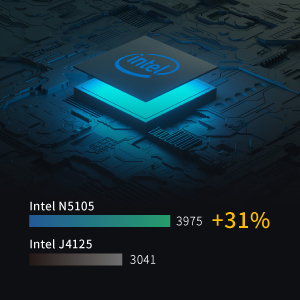
The 10 nm Quad-Core Intel Celeron N5105 processor brings speeds of up to 2.9 GHz. Performance is up to 31% higher than the previous generation, ensuring maximum speed for your workflow in an efficient package.
Four M.2 Slots
The AS54 series is equipped with four M.2 slots for NVMe SSDs to accelerate tasks that require high random IO performance to save unbelievable amounts of time in applications that can take advantage of SSDs, such as content creation. Each M.2 slot for NVMe SSDs is tool-free for easier installation while the cooling vents ensure SSDs run at optimum performance.
2.5 + 2.5 = Extreme Speeds
With 2.5GbE ubiquitous on enthusiast motherboards and available as an affordable USB adapter, the ubiquity of 2.5GbE makes all transfers fast. Break barriers even further by combining the dual 2.5-Gigabit Ethernet ports in SMB Multichannel to enjoy speeds exceeding 2.5 Gbps.
ASUSTOR Live
Your own streaming center. Stream your from a phone or tablet as well as a computer to multiple streaming platforms, Including, but not limited to Twitch, YouTube, Facebook, Instagram, Restream or RTMP compatible platforms. Recordings can be safely saved to your NAS for future use.
Quad-Core 10 nm Intel Celeron N5105 CPU Four M.2 slots for NVMe SSDs 4 GB of DDR4-2933 RAM Dual 2.5-Gigabit Ethernet ports 3x USB 3.2 Gen 2 at 10 Gbps Aesthetically pleasing M.2 SSD heat dissipation thermal vents Supports Wake on LAN and Wake on WAN HDMI 2.0b with 10bit 4K hardware


Effortless Connections to Your NAS
ADM 4.2 provides easy connections by supporting a new Internet Passthrough function that helps users to simplify previously complex router configurations.

Snapshot Center
Snapshot Center is a new feature for ASUSTOR NAS devices to utilize Btrfs and iSCSI volumes to take snapshots of the information inside a NAS. Snapshot Center supports up to 256 snapshots of a volume and can be done every five minutes, creating a backup that can be restored easily if data is damaged or lost.

PC-less Software Installation
Mobile installation with AiMaster takes only 3 steps! Finding your NAS, system initialization and installation, power management, ADM firmware updates, system information and more are all available from the convenience of your mobile device at any time.

All New Gaming-Inspired Theme for ADM
All new gaming-inspired elements brought to ADM.

Adobe and ASUSTOR – A Winning Combination
Local Adobe Creative Cloud folders can be synchronized and backed up to and from your NAS. Take advantage of snapshots to increase protection of your data.

Cross-Platform Multi-User Access
The ASUSTOR NAS provides seamless cross-platform and multi-user access, allowing you to easily connect to your NAS from Windows, macOS or Unix-like operating systems no matter if you are using a PC, notebook, tablet or smartphone.

Wake Up From Anywhere
The AS54 Series feature Wake on WAN technology. No specialized equipment or settings are needed to wake the NAS. Simply use ASUSTOR’s wide variety of mobile apps, including but not limited to AiMaster, AiMusic, AiVideos and AiData to turn the NAS on or off remotely. Wake on WAN helps protect data by keeping the NAS powered off when not in use; thereby helping to prevent attacks, protects data integrity by remaining powered off during power failures and Wake on WAN also saves electricity, making for an even more efficient NAS.

Overwhelming 4K HDR Experience
The AS5402T features HDMI 2.0b with 10bit 4K hardware decoding, HEVC decoding and VP9 10bit Profile2 decoding for a smoother experience and lower CPU usage. Use Plex Pass or a third-party player to play 4K HDR videos.
Add to Cart
Add to Cart
Customer Reviews
4.2 out of 5 stars 94
4.2 out of 5 stars 437
4.3 out of 5 stars 288
4.2 out of 5 stars 348
4.0 out of 5 stars 138
Price
$529.99$529.99 $569.99$569.99
— no data
— no data
— no data
CPU
Intel Celeron N5105 Quad-Core 2.0GHz (burst up 2.90 GHz) Intel Celeron N5105 Quad-Core 2.0GHz (burst up 2.90 GHz) Intel Celeron J4105 Quad-Core 1.5 GHz (burst up 2.5GHz) Processor Realtek RTD1296 ARM64 64-bit Quad Core 1.4GHz Realtek RTD1296 ARM64 64-bit Quad Core 1.4GHz
Memory
4GB SO-DIMM DDR4 (Memory Expandable up to 16GB (2x 8GB)) 4GB SO-DIMM DDR4 (4GB x1, Expandable. Max 16GB) 4GB SO-DIMM DDR4 (4GB x1, Expandable. Max 8GB) 2GB DDR4 (not expandable) 1GB DDR4 (not expandable)
HDD
4 x SATA3 6Gb/s; 3.5″/2.5″ HDD/SSD 4 x SATA3 6Gb/s; 3.5″/2.5″ HDD/SSD 4 x SATA3 6Gb/s; 3.5″/2.5″ HDD/SSD 4 x SATA3 6Gb/s; 3.5″/ 2.5″ HDD/SSD 4 x SATA3 6Gb/s; 3.5″ HDD
Expansion
3x USB 3.2 Gen 2 2x USB 3.2 Gen 2 3 x USB 3.2 Gen 1 3 x USB 3.2 Gen 1 2x USB 3.2 Gen 1
Network
2 x 2.5 Gigabit Ethernet (2.5G/1G/100M) 2 x 2.5 Gigabit Ethernet 2.5 Gigabit Ethernet x 2 1 x 2.5 Gigabit Ethernet (2.5G/1G/100M) 1x 2.5 Gigabit Ethernet (2.5G/1G/100M)
Output
1x HDMI 2.0b 1x HDMI 2.0b 1 x HDMI 2.0a no data
no data
M.2 Drive Slots
4 4 no data
no data
no data
Quad-Core 10 nm Intel Celeron N5105 CPU
4x M.2 slots for NVMe SSDs
4 GB of DDR4-2933 RAM
Dual 2.5-Gigabit Ethernet ports
3x USB 3.2 Gen 2 at 10 Gbps
Aesthetically pleasing M.2 SSD heat dissipation thermal vents
Supports Wake on LAN and Wake on WAN
13 reviews for Asustor AS5404T, 4 Bay NAS, Intel Quad-Core 2.0GHz CPU, 4X M.2 NVMe SSD Slots, 2 x 2.5 GbE Ports, 4 GB DDR4 RAM, Cloud Storage for Gaming and Live Stream, Network Attached Storage (Diskless)
Add a review

Original price was: $973.99.$84.99Current price is: $84.99.
Tana B. –
Oh the power and the simplicity! Home Server Heaven
I was looking for a replacement home server for storing data and streaming media, with the ability to access that data remotely. My most recent solution was a big bulky and power-hungry HP Z840 which taught be a lot about Windows Server 2022 but everything was a challenge to implement – especially remote access since Microsoft dumped the Essentials server line (why??). I own a QNAP NAS for backing up said server, and found a lot of what it did unintuitive and hard to integrate with Windows.I had always respected ASUS products, so turned to this beauty to see if it could continue the tradition. Boy could it ever, with a tenth the power draw and minimal setup! Streaming is in fact BETTER compared to my dual-Xeon 64GB RAM beast. Plus it can be set up as a hub for a home security camera solution (but I haven’t gotten there yet so cannot advise).If you’re in the market for such a solution, I cannot recommend this product enough. Just one warning: Don’t set up NIC pairing … that appears to be buggy and caused a lot of hard-to-troubleshoot network communication errors.
Jess –
Working great
This is my first Nas very simple to set up mainly using it for jellyfin there are tons of YouTube videos on different options and walkthroughs so far it’s been working great I’ve had it set up for a few days if anything arises I will update here
Brian Thomas –
My first personal NAS
So, this is my first personal NAS device although i do have set-ups at work so I am not a novice. The hidden nature of wherre you plug in the SSD stick to accelerate access means you first have to remove all drives before the cover will unlock to reveal the spot.One problem i did have is that port 3 on my device is a tad sensitive to plugging in the drive so if it gets jiggled a bit or I have to turn off the machine like with the storage upgrade mentioned above drive 3 is just as likely to not read, then read as a new device and storage will get rebuilt on the drive rather than resumed.
Kurse –
Great NAS
I really like this NAS. It was easy to set up. I was able to set up all the shares via Samba or NFS as I needed. Docker was easy to install as well. I have had it a cople weeks so far and really am pleased with the purchase
birdup –
Cheap garbage trash hardware.
Garbage…. how can you charge this much for a device and use garbage screws that are insanely tight and strip with high quality screw bits? How? Why? This is the nail in the coffin for me with asus. I am tired of having such crap happen with their “high-end” devices. I am so frustrated with the tech world these days. All the possibilities we have and you offer this crap. I wish I knew how the actual device worked but unfortunately I won’t Do yourself a favor and drop asus. There aren’t any good options to choose from I suppose but this company has finally gotten me, a very long time purchaser of asus specific brand to quit the game. I am more aggravated that I didn’t even get the device booted up once than anything…. because of a garbage trash quality screw. Unreal… unreal. If this didn’t cost so much I’d drill the crap out but I am not doing that. Not anymore with I be content with their products across the board made with flimsy garbage hardware only having to band-aid the crap because I hate wasting time with returns. This is it…. you finally chased me away. No more asus. Which is rough because everything I buy is asus and now I am going to have to slowly replace all of it because I can’t even stand to see the name. Again, all the possibilities in the year 2025 and over the past 5 years, at the least, you deliver cheap garbage hardware. Shame…. for shame. *And I will never capitalize the word asus again, you lose proper noun status. *oh that’s right, I just came back to add that I now have to remove the RAM and maybe return that because I went out of my way to purchase the 4 NVME SSDs, the 4 HDD, and upgraded the RAM so now I am either pigeon-holed into finding a NAS that takes this RAM or I have to return, or even better they won’t take the return and I eat the cost. I am so done eating the cost with asus.
KP –
Decent NAS even with a couple little issues.
Purchased this along with hard drives. This device has provided a pretty decent NAS experience. I have had a couple issues with the operating system losing some settings when the device isnt rebooted frequently. In other words the antivirus docker application will complain of configuration issues if the device is not rebooted about every 2 to 3 weeks. I also purchased the extension with drives for this. I only have 2 complaints with that. 1. Sometimes when rebooting the NAS the extension will not be seen, which requires an actual power cycle. 2. Would like to have had at least 1 more usb port for another external usb attached drive. Other than that I am pretty happy with the device.
R. Frey Jr. –
Watch out for audio limitations.
One of my decisions to purchase this NAS was advertised 4K output on HDMI. Unfortunately there is no support for DTS or Dolby audio Codecs so forget about surround sound playback. Looks to be an excellent NAS otherwise.
MIT Guy –
Total waste of money
Could not get it to connect to my PC. It would connect some times and other times drop. Very frustrating and costly experience. Repeated calls with customer service only lent to more frustration as I found them completely useless. I’m going to try a different vendor. Everything was returned thanks to Amazon‘s great return policy
François –
Rapide à installer. Logiciel à télécharger facile et intuitif. Vous trouverez des titis et guides bien faits. Matériel fiable et performant.
Galarza –
Es una maravilla, le puse 4x512MB RAID 5 para el Sistema Operativo y archivos que necesito constantemente y 4x8TB HDD RAID 5 para todo lo de más.El sistema operativo que trae es ADM el cual tiene una interfaz sencilla y dentro de lo que cabe intuitiva. Si tienes experiencia puedes instalar este NAS otros sistemas operativos como TrueNAS, Ubuntu Server o HexOS.Venía originalmente solo con una SODIMM de 4GB de RAM lo que esta bien para uso básico pero como lo uso como servido de archivos, Jellyfin Server, Dockers y VirtualBox, esa cantidad de RAM era poca así es que la reemplaze con 2x8GB y me da más libertad de hacer múltiples cosas a la vez.Recomiendo mucho por cuestión de seguridad deshabilitar la cuenta de admin y activar el firewall para bloquear conexiones de países extranjeros.
Ratnesh –
This is the best one. The learning curve is high but the best NAS one can have at this price.
Arvin S. Salazar –
its a powerful NAS that can go up to 64gb of ram and plenty of storage.i just hope that it supports vmware on its next upgrades of adm.
Daniel –
Buen servidor, Asustor da muy buenos resultados, tiene un S.O. muy intuitivo, compatible con las aplicaciones mas populares, de momento ofrece muy buena ventilación a los HDD y no es más ruidoso de lo normal.