

Eyedro Home Energy Monitor – Real-Time Electricity Usage Monitor with Solar Net Metering – Whole House Power Consumption Monitor – WiFi/Ethernet Smart Energy Meter with Reports & History, 2 Sensors
Original price was: $149.00.$139.00Current price is: $139.00.
Related Products





Product description
Track Your Energy Usage, React by Changing Your Habits, Save Money With an Eyedro Home Energy Monitor

Track, React, Save
Looking to use energy more efficiently and save money in the process? We have the solution. With Eyedro’s home electricity monitors, you can see your electricity usage and costs—in real-time—empowering you to take control of how energy is used in your home. Our small electricity monitors are designed for homeowners, as they are easy to install and simple to use. Eyedro’s home electricity monitors will be a benefit to both your pocketbook and the environment. Eyedro has all your energy monitoring needs covered, with options for both solar energy and electricity.
One of the main benefits of monitoring the electricity usage in your home is being able to determine where you might be inefficient. Identifying energy hogs and energy use habits are the first steps towards addressing your home energy inefficiencies. With MyEyedro cloud data, you can view your real-time energy use data from wherever you are.
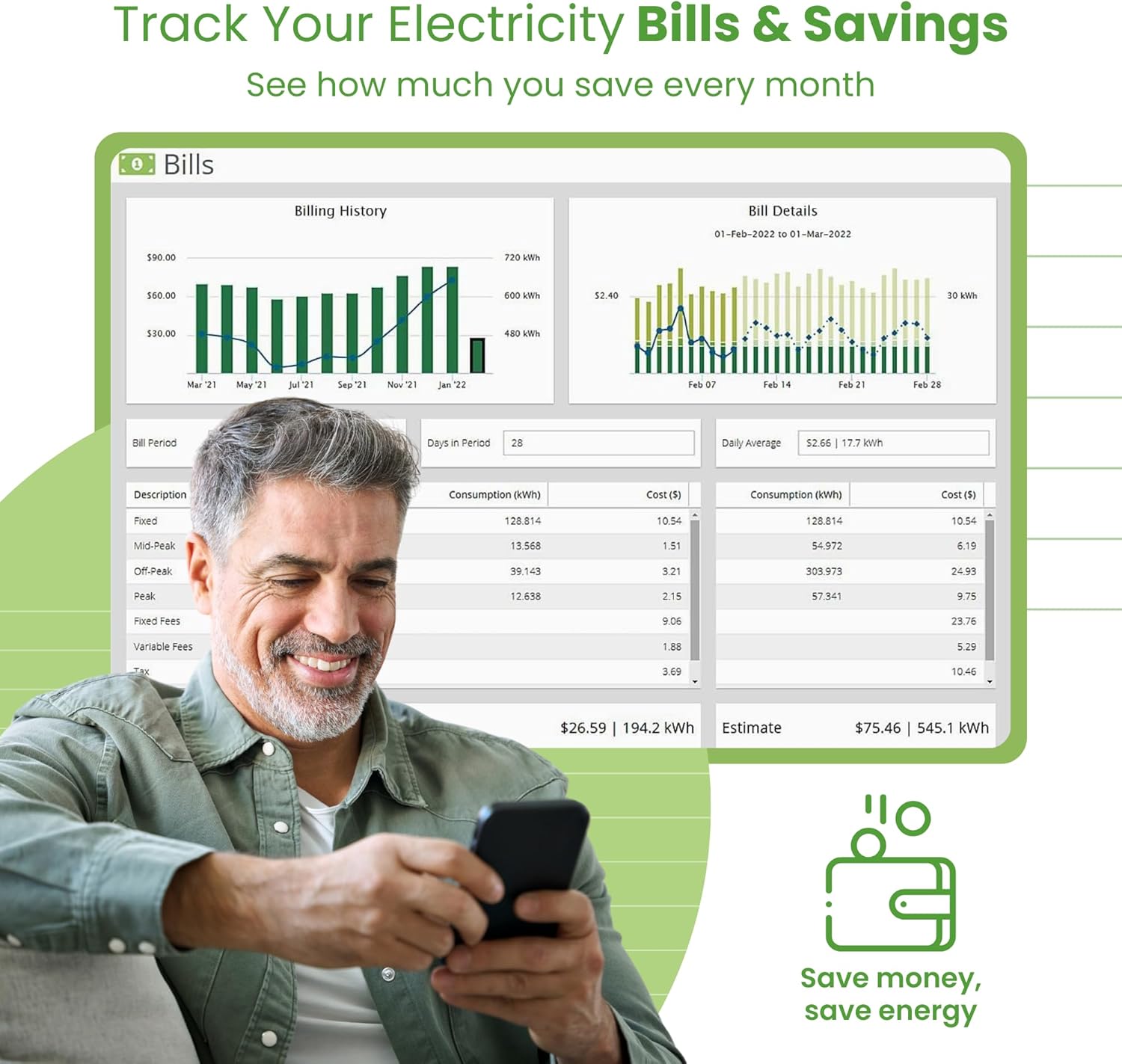
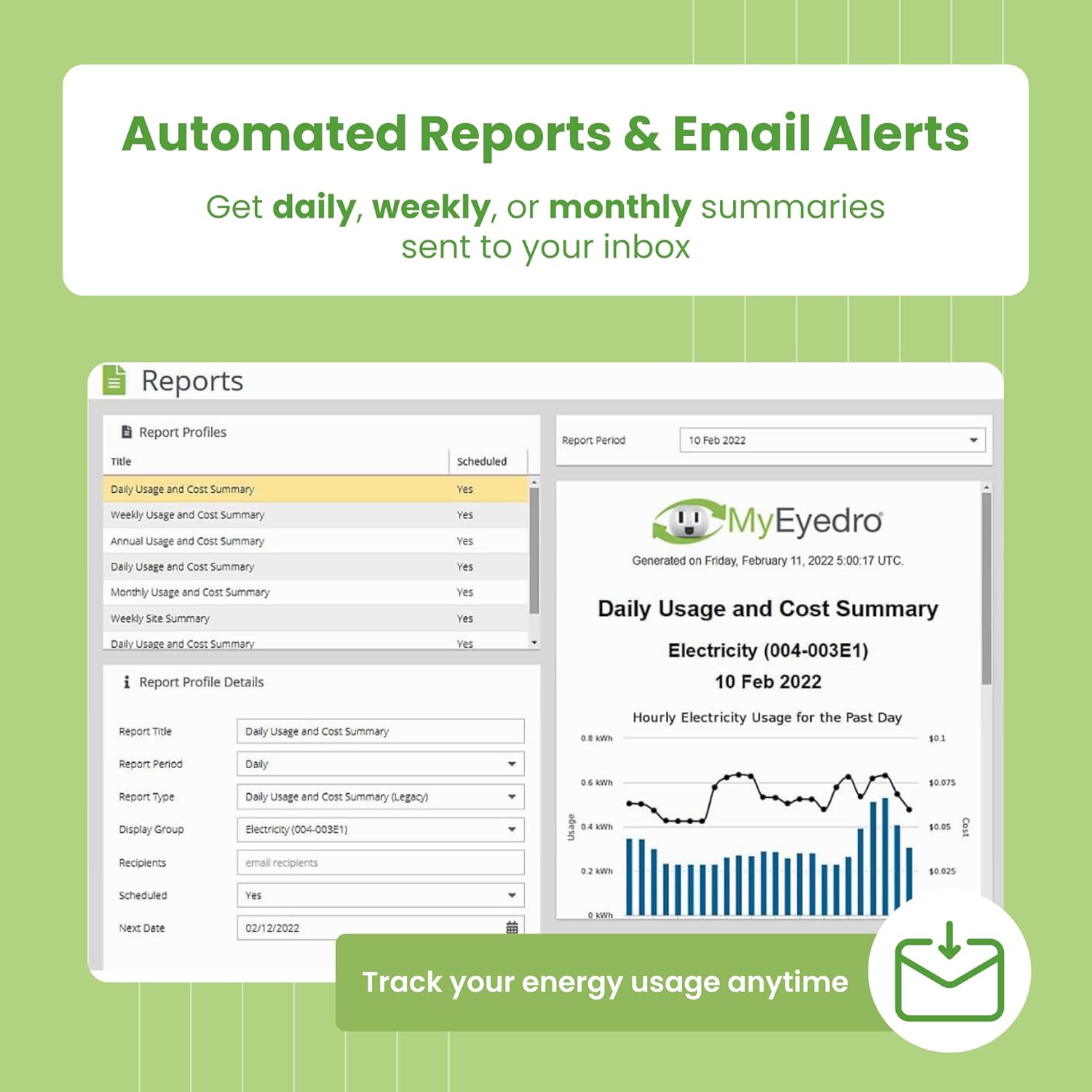
When it comes to your electricity bill, it can be difficult to ascertain where your money is going. When you use an Eyedro system to monitor your electricity usage, you will be able to see exactly where your hard-earned dollars are being spent. This will also allow you to address specific problem areas and save you money in the process. With MyEyedro Bills data and automated Reports, you will be able to see how your energy-saving efforts are paying off over time.
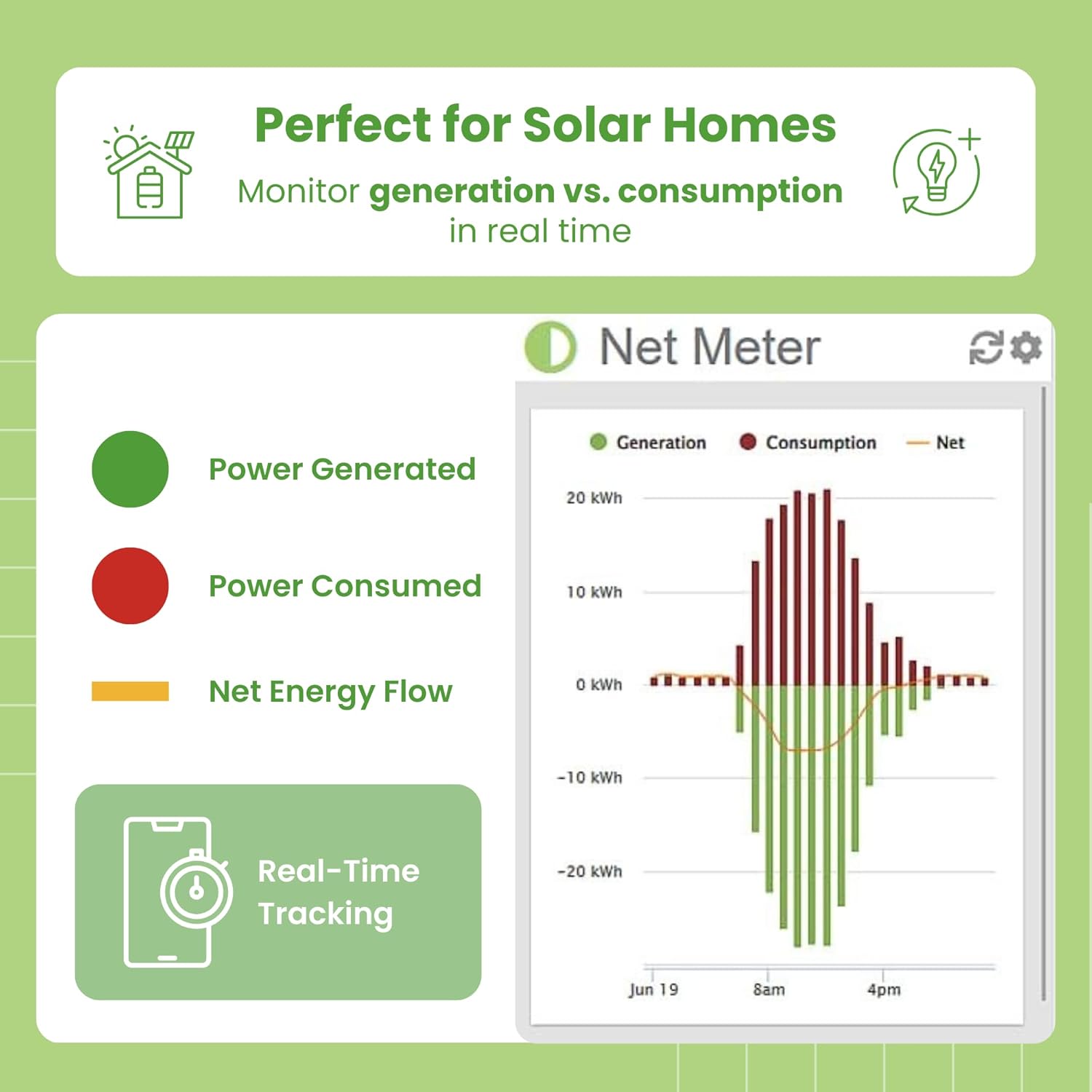
The EYEDRO-HOME energy monitor can monitor either your grid usage or your solar consumption. If you want to do both simply add a second EYEDRO-HOME system. The EYEDRO-HOME can also be used for net metering applications.
The EYEDRO-HOME model is connected by WiFi or Ethernet (your choice).
Log into your MyEyedro account from anywhere you are on your mobile phone, tablet or computer. Thanks to the MyEyedro cloud, your data is always safe. You don’t have to worry about losing work or missing your electricity usage history if something were to happen to one of your devices.
The cloud means that you can access all of your energy data from any device – even tablets and phones with limited storage space.
MyEyedro Cloud Software

Features of the EYEDRO-HOME Residential Energy Monitor:
WiFi or Wired Ethernet connection (you choose)Real-time energy usage & cost dataGrid power, net metering, or solar energy monitoringMyEyedro cloud – access anytime, anywhereMyEyedro cloud – no subscription feesComprehensive daily, weekly, monthly, and yearly reportsBill comparisons and estimatesDaily insights – view data in watts, amps, and dollarsSingle-phase electricity monitoring – mains or branch circuitsTwo (2) 200A sensors included (supports 5A – 200A)Easy non-invasive installationMeets North American safety standards
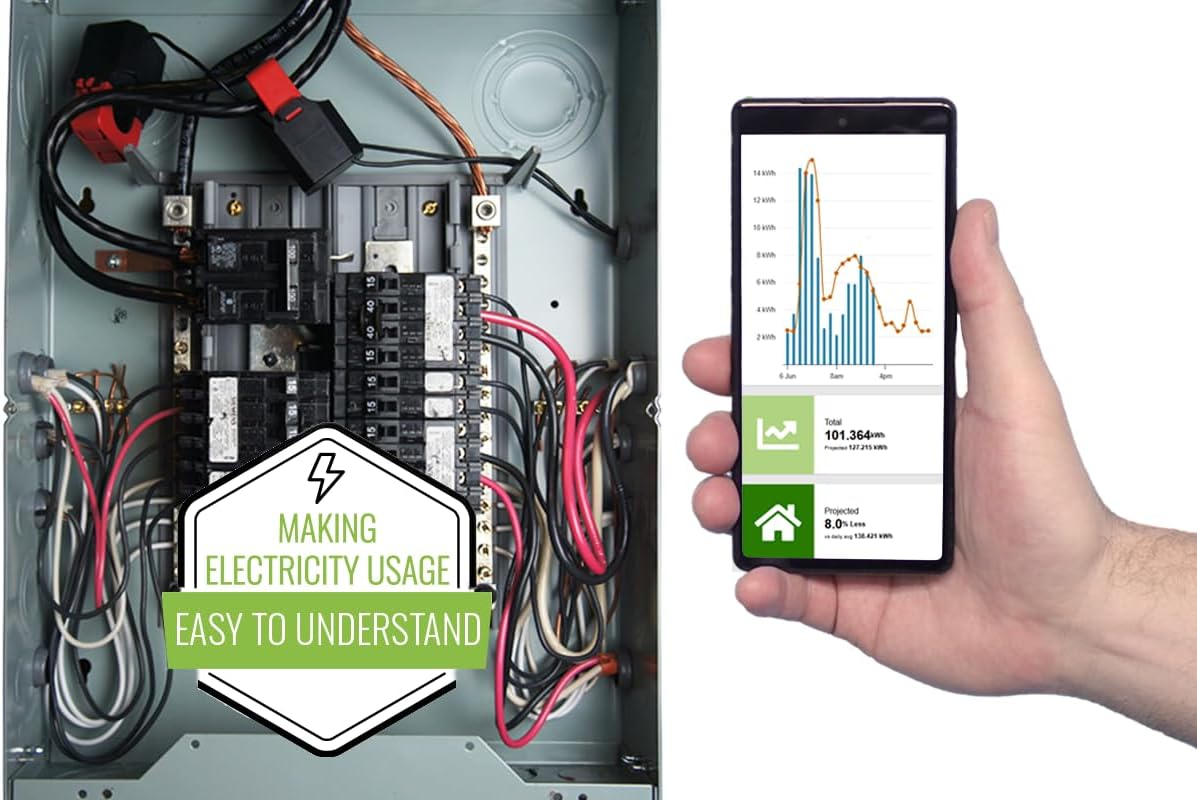
This easy-to-install, real-time home electricity monitor will make your electricity usage easy to understand. Join thousands of customers already using Eyedro to keep an eye on their electricity use.

Frequently Asked Questions
Is there a fee to use MyEyedro?
Using MyEyedro is free.
Is MyEyedro available on my phone?
– Yes, the MyEyedro cloud service can be accessed from any device.
Can I export my data?
– Yes, you can export your MyEyedro data to Excel.
Can I install the monitor myself?
– We recommend that you hire a licensed electrician to install your Eyedro system. Installation is simple and can be completed in as little as 15 minutes.

Track Your Energy Usage in Real-Time
Track your energy consumption with Eyedro to stay on top of your household electricity spend. Why wait for your utility bill to arrive to find out how much you’ve consumed – with Eyedro’s electricity monitors you can see, in real-time, your home’s electricity usage. When you utilize an Eyedro system to monitor your electricity usage, you will be able to see exactly where your hard-earned dollars are being spent. This will also allow you to address specific problem areas and save you money in the process. With MyEyedro Bills data and automated Reports you will be able to see how your energy-saving efforts are paying off over time.

React by Adjusting Your Electricity Usage Habits
With the data provided by your Eyedro Home Electricity Monitor, you can adjust your energy usage to be more efficient and cut costs. Hourly, daily, weekly, and monthly consumption can be analyzed in MyEyedro with a variety of high-resolution graphs and charts. Tracking your usage will help you spot wasteful practices and adjust accordingly. Identifying energy hogs and energy use habits are your first steps towards addressing your home’s energy inefficiencies. With MyEyedro cloud data, you can view your real-time energy use data from wherever you are.

Save Money on Your Energy Bills
Combined with the MyEyedro cloud service, Eyedro electricity monitors provide timely and actionable information that will help you monitor usage, identify problems, reduce waste, and ultimately spend less on your electricity while making a positive environmental impact. You would be surprised at how easily old appliances can make up most of your energy bill. Those old incandescent bulbs in your kitchen or that rickety air conditioning unit can contribute greatly to increasing your utility payments. Identifying problematic appliances allows you the opportunity to address everyday devices that might be draining your wallet. With MyEyedro on-the-go cloud data you can monitor your electricity usage in real-time, and then make changes to save money – Track, React, Save!

What is included?
Two (2) 200A current sensors with 19 mm opening (0.75 inch)One (1) 3m (10ft) Ethernet cableOne (1) 6V AC power adapterOne (1) energy moduleOne (1) Quick Start guideAccess to MyEyedro Cloud Standard is included for free
Take Control of Your Power Use in Real Time: The Eyedro Home Energy Monitor gives you instant insight into how much electricity your home consumes and produces — empowering you to save money and optimize energy efficiency. Works as a whole home energy monitor or solar meter, giving clear, accurate data on your power usage 24/7.
Track, React, Save – Identify energy waste, lower utility bills, and make smarter choices with real-time tracking through the MyEyedro cloud. Whether you’re living off-grid, managing a smart home, or just want to monitor costs, this smart energy monitoring system helps you visualize your consumption in dollars, watts, amps, and volts.
Smart, Precise, and Easy to Use: Includes two 200A sensors, Ethernet cable, power adapter, and access to the MyEyedro cloud (no subscription). Compatible with WiFi or wired Ethernet, and supports solar, grid, or net metering. Track usage across devices, appliances, or circuits. Built to meet North American safety standards. Compatible with 2.4 GHz WiFi.
Ideal for Homeowners, Smart Homes & Solar Users: Perfect for energy-conscious households, DIY enthusiasts, and off-grid living. The perfect electricity monitor to identify “energy hogs” and optimize your entire power system.
Eyedro – Real Data, Real Savings: Trusted by homeowners and professionals for over a decade, Eyedro is dedicated to making energy monitoring simple and effective. Our mission: help you reduce waste, save money, and take control of your electricity with reliable, easy-to-use technology built to last.
***Note: a single EYEDRO-HOME can be used to monitor either grid energy or solar, or for net metering (not all at the same time). To break out the grid energy usage from the solar generation there are needed 2 x EYEDRO-HOME (there is a Net Meter plugin in the MyEyedro software that requires 2 meters to activate). NEED HELP? Reach out to Eyedro’s Technical Support Team for assistance with the setup of your Eyedro device.
7 reviews for Eyedro Home Energy Monitor – Real-Time Electricity Usage Monitor with Solar Net Metering – Whole House Power Consumption Monitor – WiFi/Ethernet Smart Energy Meter with Reports & History, 2 Sensors
Add a review

Original price was: $149.00.$139.00Current price is: $139.00.
James F –
Great little device, great website, only one tiny complaint
I purchased this a week ago, and installed it literally in a few minutes. I did not even look at the directions, it’s just too simple.The install is really easy if you’re at all handy and not afraid of your load panel. Simply put, you remove the cover from your load panel, open the sensor by pushing in the little clip, slide the sensor around one of the power mains, and clip it shut. Repeat for the other sensor. Drop the wires out of the panel and replace the cover. Then connect the sensors to the EyeDro box, run an ethernet cable to it, and plug in the power. Voila!Next, go to their website and register an account, and either enter the serial number from the box or click the “Scan network” option which will find it.That’s it, you’re up and running!The box itself is very small, about the size of a deck of cards. There are no indicator lights on it, but it does include screws and a mounting template if you want to wall mount it.If you have not decided yet, you can go to their website and play with a demo version of the system, which is nice.It has the following reports:* Highlights. This shows a bar chart with recent power usage per hour, a meter that shows current usage (and is very responsive), today’s total usage, today’s projected total usage, a comparison to last month, the minimum and maximum amount of power used, the current rate (if you entered it into the setup, such as a tiered rate like I have), your estimated bill to date, and an estimate for your total bill.The best part about the Highlights is that the meter is VERY RESPONSIVE. I can watch the needle move up and down in near real-time. I can see when the stove is turned on, then watch as it cycles the burner on/off to maintain heat. It also shows a +/- designation that shows how much more/less power is being used presently compared to the last time the needle moved. For example, right now it shows -25w after a fan was turned off. If something else turns on, it would show +[number] to indicate the difference.* Insights. This shows your usage compared to other forms of power, such as gas, coal, natural gas, etc. I don’t find this very useful.* Live. This shows a very detailed chart of minute-by-minute power usage.* Summary. This shows a bar chart with hourly totals of power usage.* Comparison. This shows a comparison of power used to the previous month on a daily basis.* Bills. This shows a 12 month billing history, daily cost, daily average cost, consumption per tier, and so forth.* Reports. This shows a weekly report of usage compared to previous weeks.* Phantom energy. This shows your minimum usage demand, and helps you track down low-use devices that cost you money while they are supposedly turned off.* What’s it cost. This is a usage calculator that allows you to pick from a wide range of devices to determine how much they cost you to operate.* Net meter. If you have solar, or some other supplemental power supply system, this will tell you how much power you have generated versus how much you have used.The mobile website has all of these features as well, and has a really well done “swipe” design that allows you to swipe left/right across multiple screens per area.The site also has a variety of setup options, including a “rates” feature. This allows you to enter your rates from the power company, in one of three ways:* Fixed Price* Tiered* Time of UseYou can also specify if you are billed:* Monthly* Bi-monthly* QuarterlyFinally, you can also tell it that you have the following fees/charges:* Fixed fees* Variable (per kWh) fees* Adjustment factor* Taxes* RebatesMy only complaints: You have to login to the website almost every time you visit, even if it’s only been an hour or two. On the mobile site this often results in a box saying “error” and it never goes away, so you cannot login. You have to close the tab/browser, or restart your phone to get back in. (I have reported this issue to them as of 5/10/2015 so hopefully they will fix this.) It’s just a little hassle to have to login each time. (SEE PHOTOS)In addition, the “Dial” meter is inconsistent. Some times it has the needle in the red zone for (example) 4 kWh, and then later it will have the 4 kWh in the yellow zone. It’s not labelled either, and it should be. (SEE PHOTOS)All in all I really like it. This is exactly what I have been looking for, it’s cheap, easy to use, and has really helped me understand what the energy hogs in my house are (hint: it’s my HVAC).Finally, I got mine as an Amazon Warehouse Deal, for only $75! The box was very beat up, but the device was perfect and works great. Save yourself a few bucks if you can!
fiveseven808 –
Unbelievable bargain and futureproofed!
I’ve had this unit installed, a little less than 48 hours so far and I can already tell that this is an amazingly well designed product that I will enjoy using for years to come!!!Device Installation:I only have 50A service to my house (it’s an old house). I bought 60A CTs. 200A CTs it comes with are pretty huge. The 60A CTs are itty bitty and EASILY fit into my house’s ancient cutoff switch! Installation was a breeze. CT wires are super super long too so it aids in the ease of installation!Device Setup:Super easy. Connect and web into the eyedro device, add your wifi details, and done!Web account:Make an account and then enter serial number printed on the device on the website, and done!You can even reverse the CT direction on the site in case you installed one backwards (like I did!) BRILLIANT! Why that reversal feature isn’t in all of these devices boggles my mind…API:RESTful API. Simple, easy, effective. Wanna know the best part? YOU CAN QUERY THE DEVICE ITSELF! If for some reason Eyedro goes out of business, you aren’t left with a useless piece of electronic that tries to phone home and stops working when it can’t see the Eyedro servers. You can either use a third party application or write your own (like I did) to query the device and display the relevant info where you need it! (like on my MagicMirror screen)Web interface:This interface is gorgeous. I come from efergy which is absolute trash. Eyedro gives you all the data you need, and even splits up your CTs on a beautiful, fast updating graph. It is difficult for me to overstate how much I love the interface on this website. It’s relatively clean, TONS of information, and they’re all in relatively intuitive areas. Let’s face it.. if you’re interested in installing whole house power monitoring, you’re probably a nerd. This web interface gives you the numbers and stats you want to mega nerd out.Conclusion:Want an easy to use API for your own devices (my main use case)? BUY ITWant to customize the CTs you stick inside your electrical boxes for more accuracy and space limitations? BUY ITWant a clean and beautiful web interface with TONS of numbers? BUY ITWant to use this device well after the company Eyedro has died? BUY ITdOn’t cARe AbOuT pOwEr mONItoRiNG? Why are you reading this review???
Jferrer –
Bastante bueno he logrado identificar los aparatos que gastan más luz, identificando los gastos excesivos he logrado bajar 40% el consumoEl precio se me hizo caro… pero ahora que se que es lo que gasta más luz he podido ahorrarla y ahí se pagará el costo de este equipoMe gustaría poder medir cada pastilla de luz pero solo hay esta versión que solo lee la principal
Robert N. –
I’ve been using this item for about 10 months now (actually I order 2 and use one for my home and the other for my parents house). I have never had an issue with the quality of the product. The website app can be used easily on a mobile device as well as a laptop. Easy to install and setup (they also have setup videos online you can watch). I use it multiple times a day to check my current demand (especially to check the demand of my hot tub and car charger). The daily consumption feature, month reports are convenient to use for knowing your energy consumption and what to expect from an invoice for your electrical utility (the myEyedro reports have always been withing a few dollars of the utilities invoice). I have contacted their technical support team and they are quick to respond and help you out. I would highly recommend this product for the all the features you get for the price; it can’t be beat!
Alex –
TLDR: It’s a decent home/small-business solution. Gives a much better overview of energy consumption vs what KW Hydro has on their website.Good:- The version I have (2 measurement coils, wired internet connection) is affordable (<150$ on Amazon).- Easy to set up.Power consumption samples up to every 10 seconds.- Almost real-time (~5-10 seconds delay).- Handles correctly power and/or internet loss.- The web interface is reasonably easy to use and share with other people.Has enough advanced settings to be able to automatically estimate electricity bills and time-of-usage/tiered consumption.- The platform can be extended with add-on metering devices.Bad:- Requires an internet connection and the my.eyedro.com cloud to see any stats or download data.- Does not accurately account for voltage drop (since it does not have volt-meter) and power factor (mine is ~90%). So it will show a slightly higher load/consumption than what really occurred. You'll need to adjust this manually, so it's not a "set and forget" kind of setup.- Might not immediately sense subtle changes in load (10w or less), especially when in "change of state" polling mode.- To measure individual circuits (eg. solar net-metering, baseboard heating) one would need a much more expensive version of the device (that has extra measurement coils and ports) or to buy another meter just like this one (for each pair of circuits).
Mike S. –
Let me just start with how poor the instructions are on this product (see attached image). It basically says “connect it” and that’s it. No information about how it would be configured in a solar system, no information on the best place to connect it in your panel other than “put it on what you want to monitor”. I was trying to use it in an off-grid system, all of our power comes from our solar generation (which is stored in batteries). This seemed like a perfect product, given how much solar monitoring is mentioned, for example:- “The EYFEFI-2 is capable of monitoring solar and electricity”- “MONITOR YOUR SOLAR USAGE with the EYEFI-2 and its Two 200A Sensors.”- “Check your solar usage to minimize electricity usage and maximize solar use.”- “The EYEFI-2 supports Solar and Net Metering.”This really sounds like it will monitor solar generation eh? Well, after connecting it at various places along our system and a fair amount of back and forth with customer service, it turns out that this is ONLY able to measure AC AFTER the inverter. It does not monitor how much your solar generates. The only situation in which it “monitors solar” is if you’re feeding your panels directly into an inverter and then dumping that directly back into the grid. In this scenario you’re technically only using solar to offset your grid usage and your home really just runs off grid with solar as a way to offset costs. This is no difference than if you’re using ANY AC monitor and there is NOTHING about this that is specifically designed for solar. It cannot monitor what your panels are collecting. It cannot monitor what your charge controller is outputting. It cannot monitor flow into your battery bank.What it can do is monitor AC current (from grid or from an inverter) and you can LABEL that as “generation” on their website. So misleading and I’d argue is actively deceptive. Lastly, the website is janky as heck and barely works on a phone. The only thing it does to well is monitor usage from your main AC breaker panel. But so does a dozen other AC monitors on the market.If you’re looking to “monitor solar generation” this product probably isn’t for you. If you’re looking to monitor how much your solar is pumping back into the grid, then this would work in that and only that scenario. Ultimately I returned the product and will probably build a raspberry pi system to monitor the output from my AXS Port on my charge controller.
Amazon Customer –
It works very well. It’s nice to see the actual consumption with my solar setup. It is great for troubleshooting problems. I noticed immediately when my septic pump failed. You really notice power hog devices and try and conserve where you can. Great device. Would definitely recommend.